SmartScout Review (2026): Best Amazon Seller Intelligence Tool or Overpriced?
Affiliate disclosure: we may earn a commission if you buy through links on this page. How we make money How we check facts
SmartScout is worth paying for if your research starts with brands, sellers or categories rather than keywords, and for that job it is the strongest tool we know. It isn’t cheap: Basic costs $29 a month billed yearly ($49 monthly), Essentials $99 ($119) and Business $239 ($299), checked 10 October 2026, and the seller database that sets SmartScout apart starts on Business.
No free trial · 7-day money-back guarantee for new customers Affiliate link
Our SmartScout account is a complimentary Business plan, provided because we are an affiliate; how we test explains what that does and doesn’t let us claim. The in-app screenshots below come from that account on 2 August 2026. Every price and plan fact comes from SmartScout’s pricing page, which we re-read on 10 October 2026.
Correction (10 October 2026): SmartScout raised its prices after our 1 August 2026 check. Basic was previously $29 a month, Essentials $97 and Business $187 on monthly billing. We also previously put the Brands Database on Basic and the Search Terms Database on Essentials; SmartScout’s current comparison table puts the Brands Database on Essentials and the Search Terms Database on every plan, and the tool map below follows it.
Is SmartScout worth it? The short verdict
| Question | Our answer |
|---|---|
| Best for | Wholesale and arbitrage sourcing, brand and seller research, category sizing, agency prospecting |
| Not for | Sellers who want one subscription for keywords, listings and ad management |
| First plan with brand search | Essentials, $99 a month billed yearly ($119 monthly) |
| First plan with seller and subcategory data | Business, $239 a month billed yearly ($299 monthly) |
| Free options | The Chrome extension (100 full-feature uses a month) and a free brand report, neither needing a card |
| Best pairing | Helium 10 for keyword, listing and ad work |
Bought for brand, seller and category work, SmartScout earns its 4.5. Bought as a general Amazon suite, it disappoints: its keyword, listing and advertising tools are thinner than Helium 10’s, and it has no supplier database.
SmartScout plans and prices in October 2026
| Plan | Monthly | Billed yearly | What it adds |
|---|---|---|---|
| Basic | $49/mo | $29/mo | Product-level data, Search Terms Database, Chrome extension, price-list scanner |
| Essentials | $119/mo | $99/mo | Brands Database, keyword-level data, Rank Maker, keyword tracking |
| Business (most popular) | $299/mo | $239/mo | Sellers Database, subcategory research, Traffic Graph, Brand Reports, Excel exports |
| Enterprise | Custom | Custom | Historical data, Seller Exports, Ad Spy, Share of Voice |
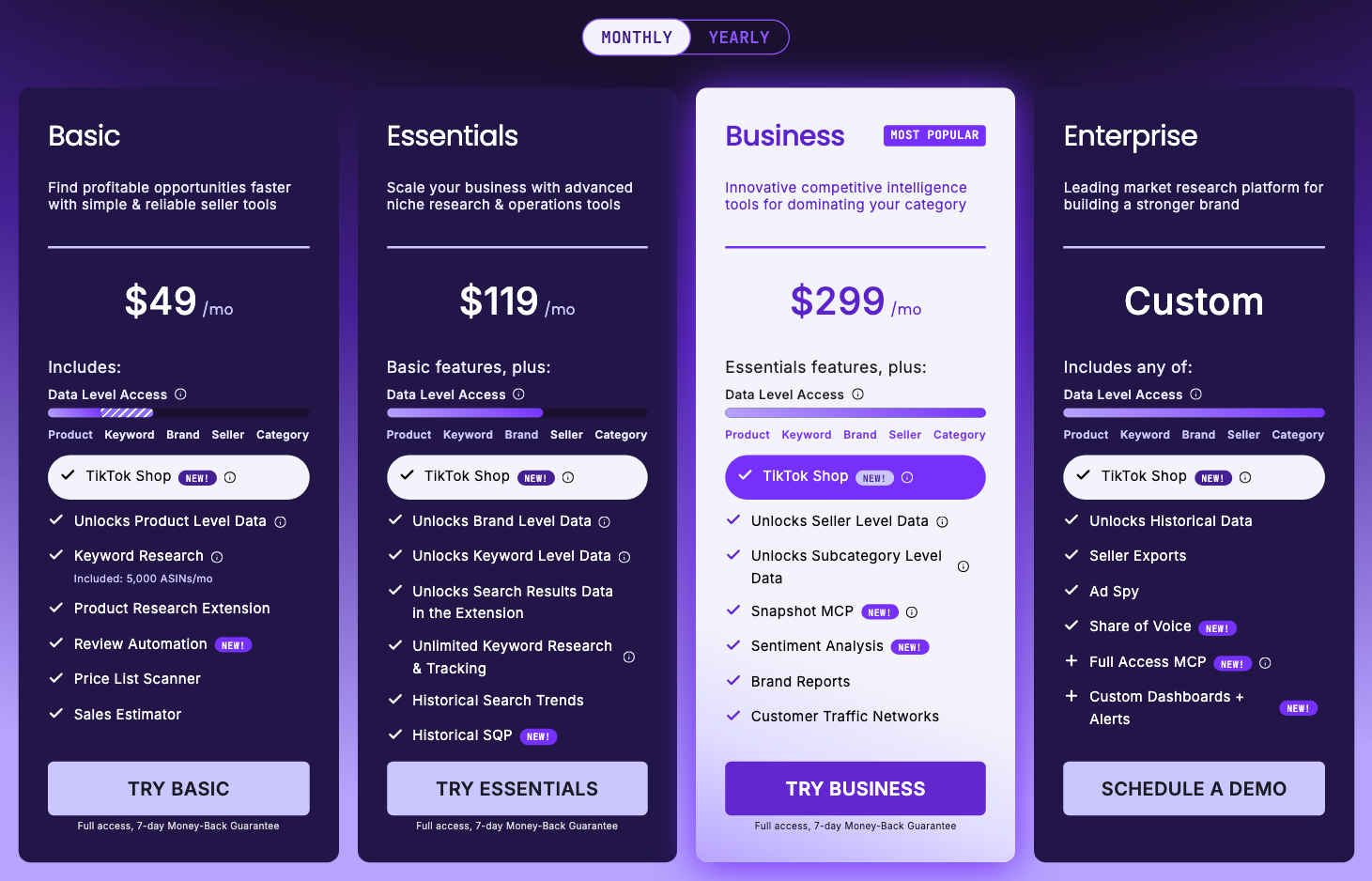
The pricing page opens on yearly billing and prints no yearly total, so every figure above is per month. At $29 a month billed yearly, Basic works out to $348 a year by our arithmetic. Each self-serve plan includes one user; extra users cost $49 each, with no billing period stated. Enterprise is sold through a demo, and SmartScout’s table marks the API and Data Lake as add-ons even there.
Our SmartScout pricing guide has the usage limits, the monthly-versus-yearly arithmetic and plan-by-plan advice. Two things to know before you check out. There is no SmartScout free trial, only the 7-day money-back guarantee, but you can look at the data for free through the Chrome extension or a free report from SmartScout’s Brand Reports page, which says no credit card is needed. And SmartScout’s own coupons page lists a 25% code, SMARTSCOUT25, for the first three months (checked 10 October 2026); our SmartScout coupon code page compares it with our partner code, which we last confirmed at checkout on 1 August 2026, before the price rise.
Which plan unlocks each SmartScout tool
SmartScout is a stack of tools, and the one you came for may sit a tier above the plan you were about to buy. This map follows SmartScout’s plan comparison table as we read it on 10 October 2026. Each link goes to our review of that tool.
| Tool | What it answers | Cheapest plan |
|---|---|---|
| Products Database and product history | How a single ASIN sells, and how its price, offers and rank have moved | Basic |
| Search Terms Database | Which search terms exist, filtered by volume, CPC and sponsored products | Basic (Search Terms Details: Essentials; Relevancy Quadrant: Business) |
| Brands Database | Which brands sell in a category, filtered by revenue, seller count and Amazon’s presence | Essentials |
| Rank Maker | Every term a listing ranks for, with visibility history | Essentials (ad creation: Business) |
| Keyword rank tracking | Where a listing ranks over time | Essentials |
| Listing visibility | A 0 to 100 Product Visibility Score, tracked over time | Essentials |
| Search Trends | Which searches are rising | Essentials |
| Competitor Keywords | The terms rival listings rank for | Not a named row in SmartScout’s current table |
| Sellers Database and Seller Map | Who sells what, how much, and where they are based | Business |
| Keyword Detective | Which search terms a set of products share | Business |
| Relevant Products | Which products compete most closely with one ASIN | Business |
| Traffic Graph | How shopper traffic moves between related listings | Business |
| Brand Reports | A seven-module report on any brand, including a head-to-head Competitor Analysis | Business |
| Ad Spy | A competitor’s paid search terms and sponsored win rates | Enterprise, or a sales add-on on Business |
| Share of Voice | Who wins the visibility on a search | Enterprise |

The practical reading: Basic is now a product-research plan. It has the Products Database, the Search Terms Database, the extension and the price-list scanner, but no brand search. Brand research starts at Essentials, and the seller and subcategory layers SmartScout is known for start at Business.
SmartScout’s other pages don’t always agree with that table. Its homepage FAQ says seller search is “available on the Essentials plan and up”, and its Rank Maker page says Rank Maker is “included in every SmartScout plan”. The pricing table puts the Sellers Database on Business and Rank Maker on Essentials. Check the table before you pay.
What SmartScout does better than keyword-first tools
SmartScout’s pitch is that most tools “only map one layer of Amazon” while it maps four: brands, sellers, subcategories and products. By its own count that covers 2M+ third-party sellers, 40,000+ subcategories and 500,000+ brands, linked together, so you can search a brand and see every seller carrying it, or search a seller and see every brand it carries. That connected view is the reason to buy it.
Seller intelligence
This is the clearest reason to pay for Business. The Sellers Database filters sellers by revenue, category, location and how many brands they carry, and SmartScout says it shows each seller’s share of the Buy Box on a product. Wholesale buyers use it to see who already distributes a brand, agencies use it to find prospects, and aggregators use it to build acquisition lists.
Brand research
The Brands Database, from Essentials, is where wholesale research starts. Its filters include average FBA sellers per listing, Amazon’s in-stock rate, and Dominant Seller Detection, which SmartScout says flags brands where one seller takes 50%+ of revenue, usually private label. Our guide to using SmartScout for wholesale walks through that workflow step by step, with the plan each step needs.
Category and subcategory mapping
Amazon’s public browse tree is coarse. SmartScout says it indexes 40,000+ subcategories below it, with revenue, competition, average price, growth and brand market share for each. That lets you size a niche before you open a single product page. The subcategory tools start at Business.
A product layer for the price of Basic
The product layer is the cheap part. The Products Database, product history, the Sales Estimator, the FBA calculator, the price-list (UPC) scanner and the Search Terms Database all come with Basic. That makes Basic a sensible plan for arbitrage and supplier price lists, and a poor one if you came for brand research.
What we saw inside SmartScout
We ran two of SmartScout’s tools against one listing, ASIN B0CJ1B6D6S from Scrub Daddy, on our Business account on 2 August 2026.
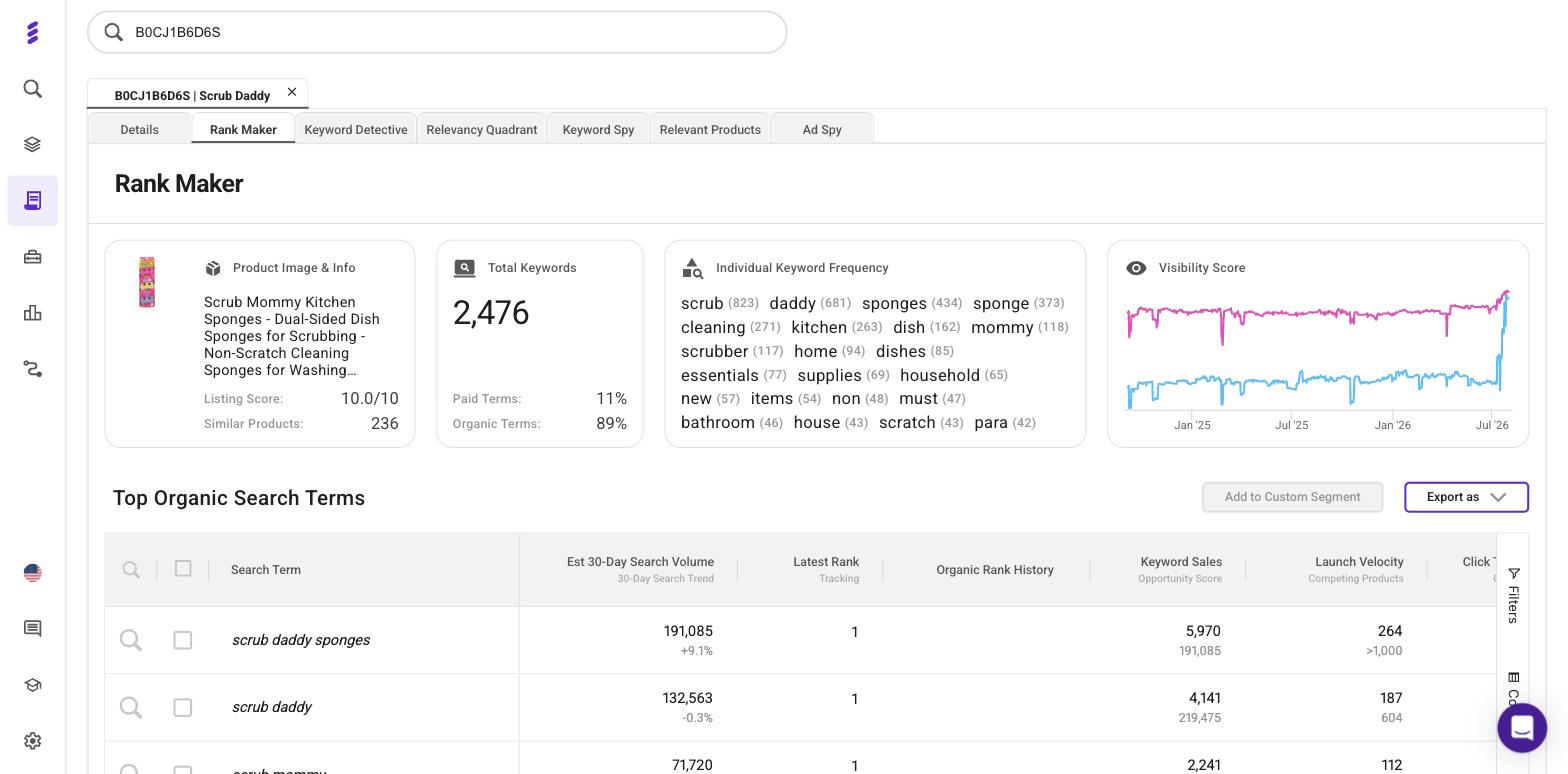
Rank Maker returned 2,476 ranking keywords for that one ASIN, split 89% organic and 11% paid, with a Visibility Score history running from around September 2024 to the start of August 2026. Each term carries its estimated 30-day search volume, latest rank, keyword sales and launch velocity, next to an Organic Rank History column that is empty for the rows in our capture. That depth is what you pay Essentials for, and our Rank Maker review, linked in the table above, reads the rest of the screen.
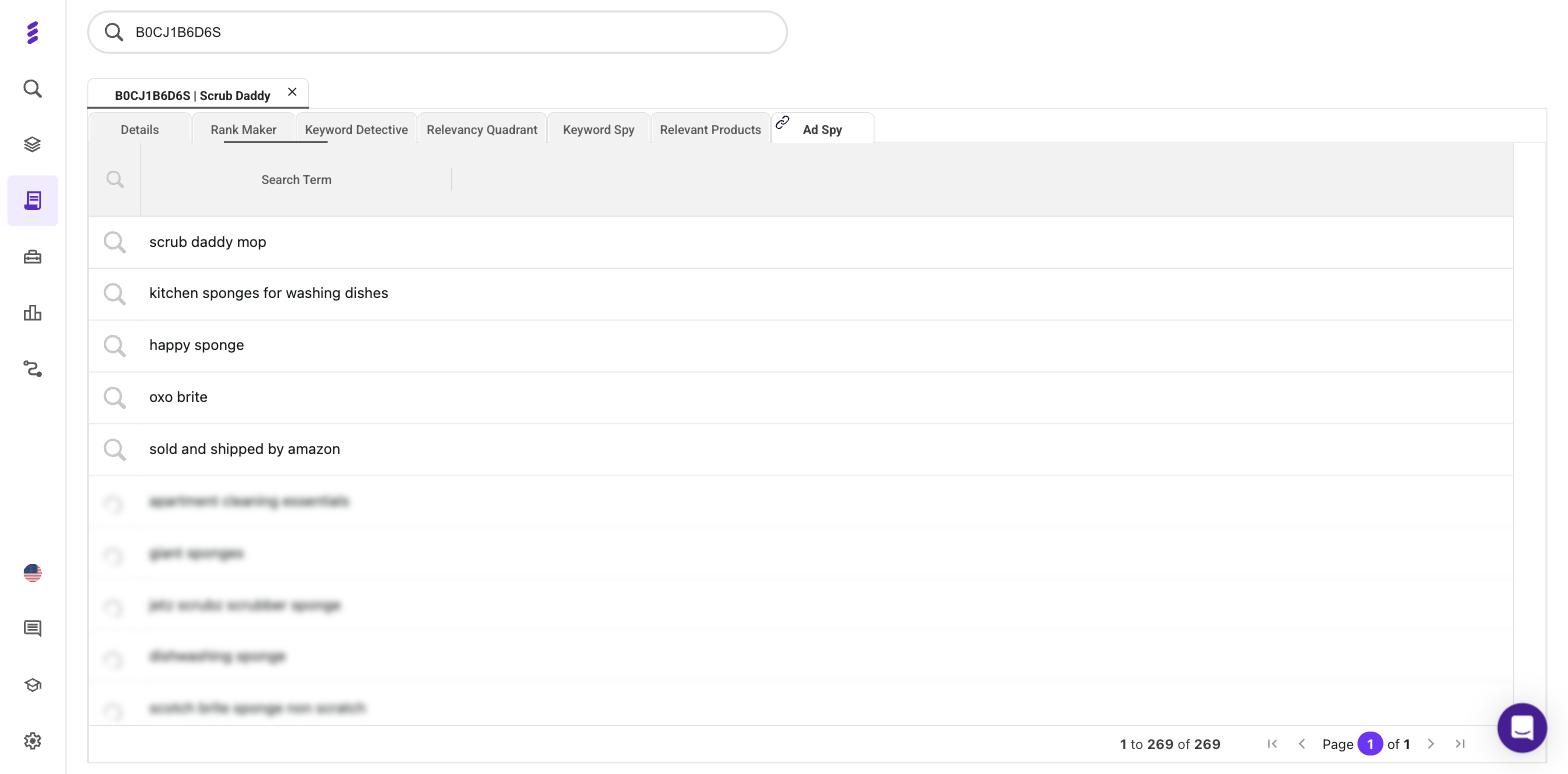
Ad Spy showed how much paid-keyword data exists for the listing, 269 paid search terms, but only the first five were readable. SmartScout’s pricing table now includes the full tool on Enterprise and offers it to Business customers as a sales add-on. Our Ad Spy review covers what the full table holds and how SmartScout estimates it.
How accurate SmartScout’s numbers are
SmartScout’s sales and revenue figures are estimates built from Amazon’s Best Sellers Rank, so the useful question is how far to trust them. SmartScout gives three different answers:
- Its founder, Scott Needham, writes that SmartScout is “within 80-90% accuracy on most brands and products”, and that it tracks “the 30 million that actually generate revenue” rather than all 500 million products (SmartScout’s accuracy page, checked 10 October 2026).
- Its comparison page puts SmartScout’s “Average Accuracy” at 95% in its summary table without saying how that figure was reached. The only test on the page is a single product checked against Seller Central: SmartScout estimated 16 units and $5,529 in 30 days against an actual 14 units and $5,385, which the page scores as 97.33% accurate. One product is an anecdote, not an accuracy rate.
- Its terms of use say the sales estimates and brand revenue figures in its marketing are “estimates only” and should be treated “as directional intelligence rather than definitive commercial data”.
We go with the founder and the terms over the comparison table. Use SmartScout to rank brands and read direction, and check the product-level detail it shows, such as sales rank history and reviews per child ASIN, before money depends on a figure. The accuracy page also notes that about 5% of Amazon products have no sales rank, and those get no revenue estimate at all.
Where SmartScout falls short
- Keyword depth. SmartScout’s own comparison table rates its keyword research 3 out of 5, against 5 for Helium 10, and its supplier and sourcing data 2 out of 5, against 5 for Jungle Scout. A vendor marking itself down is worth believing.
- Steep steps between plans. Business costs more than twice as much as Essentials ($239 against $99 a month billed yearly), and the seller and subcategory layers sit behind that step.
- One user per plan. Each self-serve plan includes a single user, and every extra user costs $49.
- No free trial, and a smaller free tier. To test a paid plan you pay first and rely on the 7-day money-back guarantee, and the Chrome extension’s free allowance is now 100 uses a month, down from 1,000 when we checked on 1 August 2026.
- Vendor pages that contradict the pricing table. Beyond the seller-search and Rank Maker examples above, SmartScout’s wholesale page invites you to “Try SmartScout Free for 7 Days”, and its FAQ still quotes the old yearly prices.
- Two headline features need a sales call. Ad Spy (Enterprise, or a Business add-on) and Share of Voice (Enterprise) have no published price.
Pros
- Brands, sellers and 40,000+ subcategories in one linked database
- Wholesale filters that screen out Amazon-held and single-seller brands
- Search Terms Database and product data included on Basic
- Free Chrome extension with 100 full-feature uses a month
- Pairs naturally with a keyword and listing suite such as Helium 10
Cons
- Seller and subcategory data starts at Business: $239 a month billed yearly
- No brand search on Basic; it starts at Essentials
- Keyword research thinner than Helium 10's, by SmartScout's own rating
- No free trial, and one user per plan
- Vendor pages contradict the pricing table on several tiers
SmartScout vs Helium 10
SmartScout’s comparison page sums up the split in three lines: “Jungle Scout starts with a product. Helium 10 works around your listing. SmartScout starts with the market.” That matches what the two products are built around.
Helium 10 is the better buy if you want keyword research, listing optimisation, ad management and operations tools in one subscription. Helium 10 Platinum costs $99 a month billed yearly ($129 monthly), and Helium 10 Ads (formerly Adtomic) needs Diamond, at $279 a month billed yearly.
SmartScout is the better buy if you want brand, seller and category research, wholesale sourcing filters, or market-level views for client work.
Many serious sellers run both: SmartScout to choose the market, Helium 10 to compete in it. Our Helium 10 vs SmartScout comparison goes feature by feature, and our Helium 10 review covers the other side.
SmartScout vs Jungle Scout
Jungle Scout is the easier first tool for private-label product research and supplier sourcing, and its Catalyst Starter plan costs $29 a month billed annually ($49 monthly), checked 10 October 2026. SmartScout is the better tool when the question is a market’s structure: who sells, which brands dominate, and how concentrated a category is. Jungle Scout sells market intelligence to larger brands through Cobalt, its demo-only line for $1M+ businesses. Our SmartScout vs Jungle Scout comparison has the detail.
SmartScout vs Sellerboard
Sellerboard isn’t a substitute. It tracks the real profit of products you already sell, from $19 a month, while SmartScout researches markets you might enter. Our SmartScout vs Sellerboard comparison explains why the two often sit side by side in one seller’s stack.
Who should buy SmartScout, and on which plan
| If you are… | Start on | Because |
|---|---|---|
| An arbitrage or wholesale seller screening supplier price lists | Basic | Products Database, the 5,000-ASIN price-list scanner and the extension |
| A wholesale seller building your own brand shortlist | Essentials | Brands Database and Brand Sellers, plus a 50,000-ASIN scanner |
| An agency, aggregator or brand mapping competitors | Business | Sellers Database, subcategory research, Traffic Graph, Brand Reports and exports |
| A team that needs historical data, Ad Spy or Share of Voice | Enterprise | Quoted after a demo |
Skip SmartScout if you are choosing your first private-label product (Jungle Scout is the gentler start, and our product research tools roundup compares it with five others), you mainly need keyword research and listing work (Helium 10 or Data Dive do that better), or the tool you want sits on a tier you can’t justify. Our SmartScout alternatives roundup matches each of those jobs to a better tool, and our guide to the best Amazon market intelligence tools covers the wider field.
Frequently Asked Questions
Is SmartScout worth it?
Yes, if your research starts with brands, sellers or categories rather than keywords. It is weaker value if you want one suite for keywords, listings and ads, and its seller-level data now costs $239 a month billed yearly or $299 month to month.
How much does SmartScout cost?
Checked on 10 October 2026: Basic is $29 a month billed yearly or $49 month to month, Essentials is $99 or $119, and Business is $239 or $299. Enterprise is priced after a demo. Each self-serve plan includes one user, and extra users cost $49 each.
Does SmartScout have a free trial?
No. Each self-serve plan has a 7-day money-back guarantee for new customers instead, usable once within seven days of creating your account. For a free look at the data, use the Chrome extension, with 100 full-feature uses a month, or the free brand report on SmartScout's Brand Reports page.
Which SmartScout plan should I buy?
Buy the cheapest plan that holds the tool you need. Basic covers product research, the Search Terms Database and the price-list scanner; Essentials adds the Brands Database and the keyword tools; Business adds the Sellers Database, subcategory research, Traffic Graph and exports.
Is SmartScout better than Helium 10?
Not overall. SmartScout is stronger for brand, seller and category research, and Helium 10 is stronger for keyword research, listings and ad management. SmartScout's own comparison table rates its keyword research 3 out of 5 against Helium 10's 5.
How accurate is SmartScout's data?
SmartScout's founder says its estimates are within 80 to 90 percent accuracy on most brands and products. Its terms call the sales and revenue figures in its marketing materials estimates only, to be treated as directional intelligence. Use the numbers to rank and compare brands, not to forecast exact sales.