sellerboard Review: Is It Worth It for Amazon Sellers in 2026?
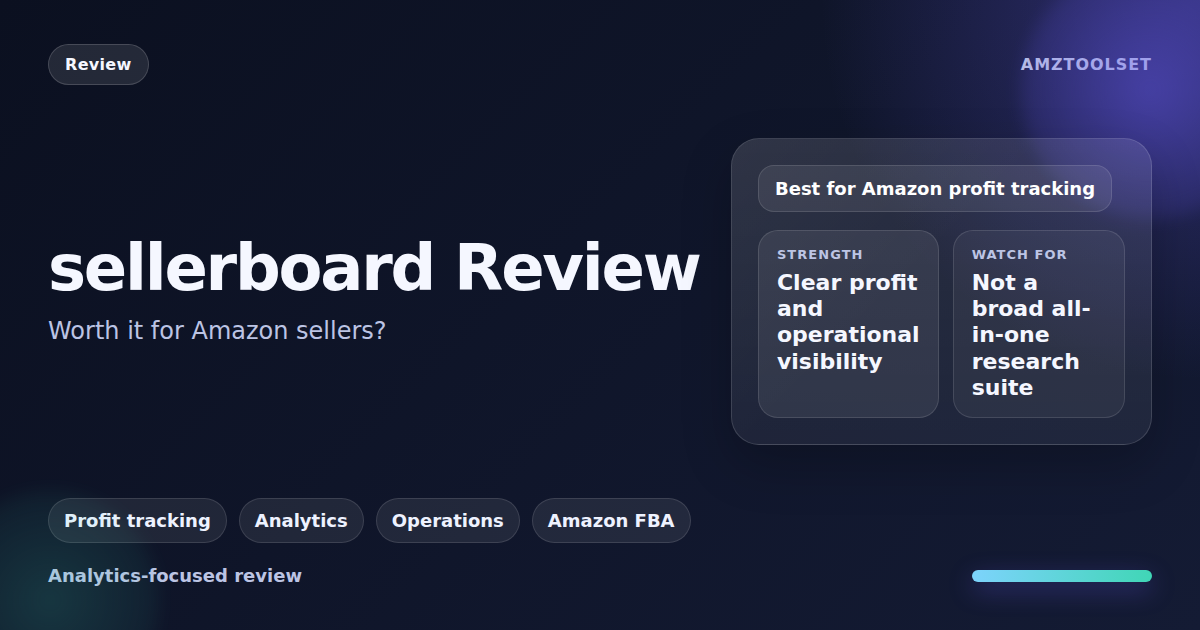
sellerboard is profit analytics software for Amazon sellers. It pulls your orders, Amazon fees, advertising costs and refunds into a net-profit dashboard, then adds PPC bid automation, inventory planning and checks for unpaid FBA reimbursements. Plans cost $19 to $79 a month, or $179 to $759 a year, and the first month is free with no credit card (checked 10 October 2026).
Our verdict: if you sell on Amazon and can’t say what each product earns after fees, ads and returns, sellerboard is a low-cost way to find out, and the free month lets you compare its numbers with your own records before you pay. It is not a research tool. It reports on your store, not on other sellers’ products, and its keyword tools need Brand Registry.
This review is based on sellerboard’s pricing table, feature pages, FAQ and terms, read on 10 October 2026. Where it describes what sellerboard does or delivers, it reports sellerboard’s own documentation. If you are weighing it against a market-research tool, our SmartScout vs sellerboard comparison covers that split.
sellerboard quick facts
| What | Detail (checked 10 October 2026) |
|---|---|
| What it is | Profit analytics and automation for Amazon sellers |
| Price | $19 to $79 a month, or $179 to $759 a year billed annually |
| Free trial | 1 month, no credit card; a demo account needs no sign-up |
| Marketplaces | 23 Amazon marketplaces; Walmart US, Canada and Mexico |
| Who makes it | nextechnology GmbH in Stuttgart, Germany; founded in 2017 |
| Best for | Sellers who need true profit per product after fees, ads and returns |
| Not for | Finding products or researching competitors |
| Our rating | 4.5 out of 5 |
sellerboard pricing (checked 10 October 2026)
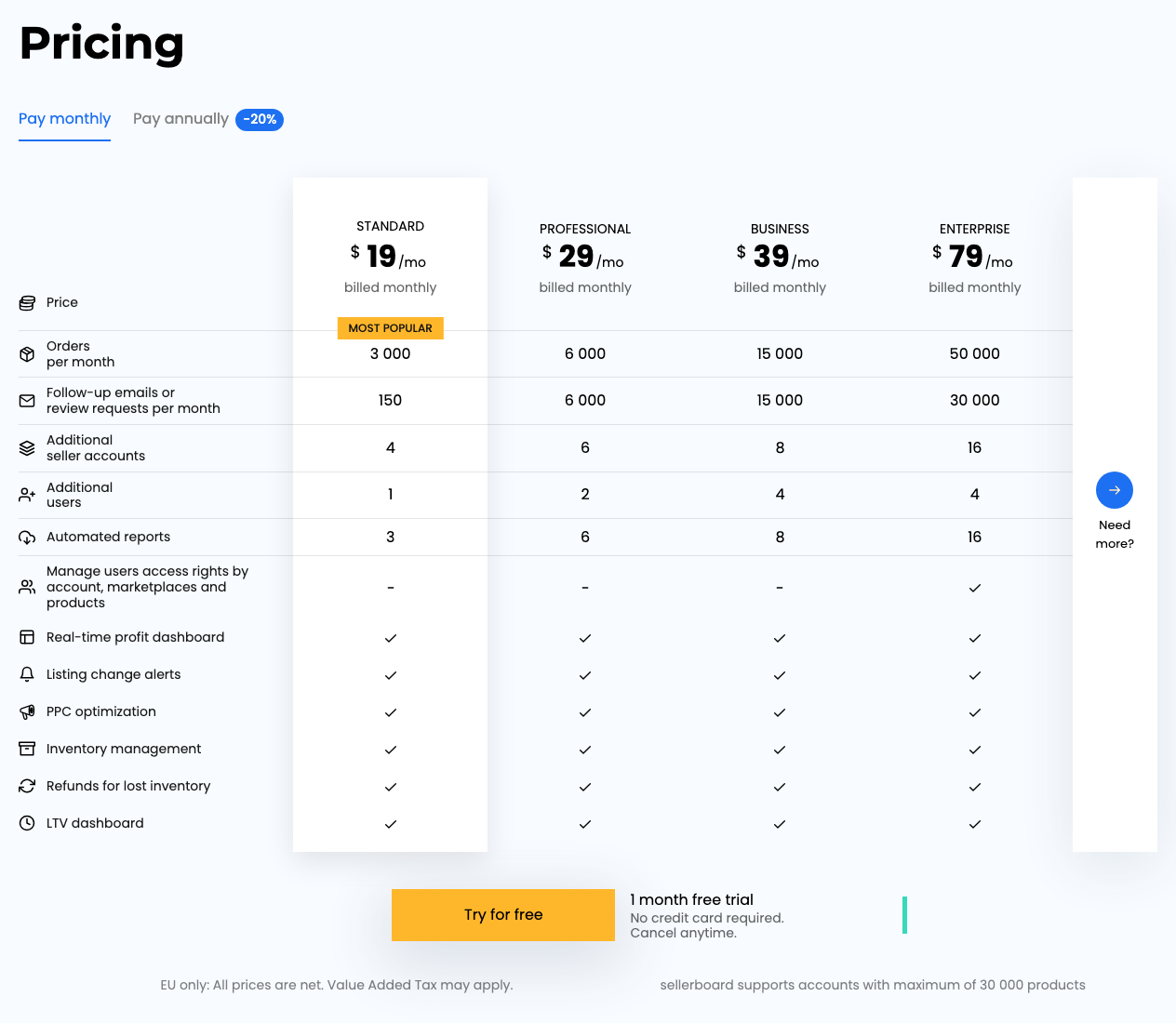
sellerboard’s pricing table lists four plans. Every plan includes the same core tools: the real-time profit dashboard, listing change alerts, PPC optimization, inventory management, refunds for lost inventory and the LTV dashboard. The plans differ in volume and seats.
| Plan | Monthly | Billed annually | Orders a month |
|---|---|---|---|
| Standard (“Most popular”) | $19 | $179 a year (shown as $15/mo) | 3,000 |
| Professional | $29 | $279 a year ($23/mo) | 6,000 |
| Business | $39 | $369 a year ($31/mo) | 15,000 |
| Enterprise | $79 | $759 a year ($63/mo) | 50,000 |
| Plan | Review requests or follow-up emails a month | Extra seller accounts | Extra users |
|---|---|---|---|
| Standard | 150 | 4 | 1 |
| Professional | 6,000 | 6 | 2 |
| Business | 15,000 | 8 | 4 |
| Enterprise | 30,000 | 16 | 4 |
Automated reports rise from 3 on Standard to 6, 8 and 16 on the higher plans, and only Enterprise can limit a user’s access by account, marketplace or product. Annual billing saves about 20%. EU prices are shown net of VAT, and sellerboard says it supports accounts with up to 30,000 products.
Which sellerboard plan you need
Choose by order volume first. Standard’s 3,000 orders a month is about 100 a day. At 150 orders a day (about 4,500 a month) you need Professional, and at 300 a day (about 9,000) Business.
Review requests are the easier limit to miss. Standard allows 150 a month, so a store that sends a request on every order outgrows it long before it reaches 3,000 orders. Professional jumps to 6,000.
Automatic upgrades, renewals and refunds
Two clauses in sellerboard’s terms of service matter before you pay:
- Automatic upgrades. If you exceed your plan’s limits, you “may be automatically upgraded to a higher plan”, charged at that plan’s price. sellerboard says it will email you when an upgrade is due.
- No refunds. Subscriptions renew automatically, monthly or on a yearly or half-yearly basis depending on the package, and “sellerboard subscription fees are non-refundable”. Cancelling takes effect at the end of the current term.
The free month needs no card, so that is the time to check its profit figures against your own records.
What sellerboard does
Profit dashboard and cost tracking
The profit dashboard is the core of the product: sales, orders, refunds, advertising costs, estimated payout and net profit, from account level down to a single product or order. sellerboard says it accounts for “more than 100” Amazon fee types, including storage, inbound shipping and labeling fees.
You supply what Amazon doesn’t know:
- Product costs (COGS) as a constant, by batch, by period, by marketplace or first in, first out (FIFO).
- Indirect expenses, such as rent, photography or a virtual assistant, one-off or recurring, which can be spread over time.
- FBM shipping costs, through shipping profiles set by weight, units or order price.
Per sellerboard’s FAQ, it separates VAT and GST from margin per marketplace, matches each refund to its order with the related costs and shows refund reasons. Other reports include trends by KPI and product, a lifetime value (LTV) dashboard, cashflow, scheduled reports and spreadsheet export. It integrates with QuickBooks for accounting and ShipStation for FBM shipping costs.
PPC optimization
sellerboard’s PPC tools report ACOS, margin and net profit by campaign, ad group and keyword. Bid automation works toward a target ACOS or profitability goal with a fast, moderate, slow or custom strategy, and sellerboard calculates a break-even ACOS for each keyword. You can approve each change by hand or let it run on autopilot. Keyword automation moves converting search terms into the campaigns you choose and adds a term as a negative once it passes your “clicks with no sales” threshold.
Inventory and purchase orders
The inventory planner recommends when and how much to reorder from sales velocity (adjusted for days out of stock), seasonality, manufacturing and shipping times, and your reorder preferences. It also syncs Amazon Warehousing and Distribution (AWD) stock. Purchase orders move from draft to ordered, shipped and closed, and closing one updates the product’s COGS. FBA shipments and a supplier list sit in the same module.
Refunds for lost inventory
The Money Back tool looks for FBA cases where Amazon may owe you: lost or damaged inventory, refunded items the customer never returned, incorrect fees, and reimbursements below your cost of goods. sellerboard’s homepage says you then request the money back “directly through Seller Support”, which suggests you file the claims yourself. Services that file claims on your behalf are compared in our best Amazon reimbursement software guide.
Alerts and review requests
Alerts cover listing changes (title, description, main image or category), parent and child ASIN changes, suppressed listings, new sellers and Buy Box losses, unusually large orders, FBA and referral fee changes, negative or neutral seller feedback, upcoming stockouts, and FBA inbound quantities that don’t match what Amazon received. Each alert type can go to a different email address.
The Autoresponder sends Amazon’s standard review request or your own emails. You can target by product, marketplace, country, FBA or FBM and repeat customers, exclude orders and attach PDFs.
Keyword research (Brand Registry only)
sellerboard now has Keyword Research and Search Term Performance tools. Both run on Amazon Brand Analytics data: search frequency rank, click share and conversion share, the top three ASINs for each keyword and 7-day trend changes, plus impressions, clicks, orders and profit per search term for your own products.
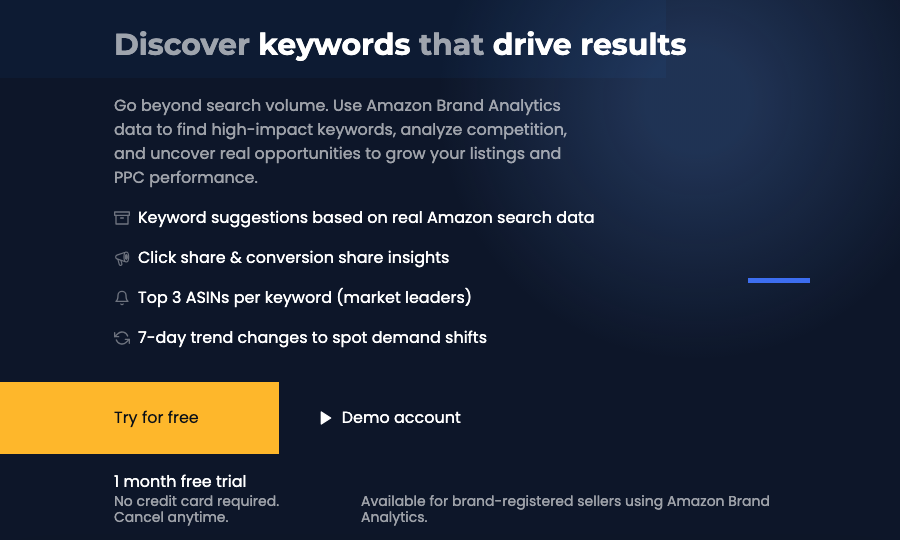
sellerboard says both tools are only for brand-registered sellers. Once you have access, Keyword Research works on any keyword or ASIN, “yours or competitors’”, while Search Term Performance covers your own products. sellerboard pitches this as going “beyond search volume”: the tools rank search terms rather than estimate how often they are searched, so they complement a keyword research tool rather than replace one. Our guide to Amazon Brand Analytics search analytics explains where that data comes from and who can see it.
Walmart, Shopify and reseller tools
sellerboard’s Walmart dashboard covers sales, fees, COGS and profit, plus inventory planning across Walmart Fulfillment Services (WFS) and seller-fulfilled stock, for Walmart US, Canada and Mexico. sellerboard says the dashboard is live “with more features coming soon”. Shopify sellers get a separate product at sellerboard.io with its own pricing.
For arbitrage and wholesale sellers, the Reseller Workflow covers barcode scanning in the mobile app, buy lists, creating or relisting offers, and FBA shipments with labels. Agencies get one profile for switching between client accounts and can add their own logo to the dashboard.
Who sellerboard is for
- Private-label sellers who know their revenue but not their margin per product after fees, ads and returns.
- Wholesale and arbitrage sellers who need batch-level costs and a sourcing-to-shipment workflow.
- Sellers on several Amazon marketplaces, or on Amazon and Walmart in North America, who want one profit view.
- Agencies reporting profit for client accounts: Business and Enterprise include 8 and 16 extra seller accounts.
Who should skip sellerboard
- Sellers who haven’t launched yet. With no sales there is nothing to analyse. Start with product research tools.
- Anyone who needs market or competitor research. sellerboard has no product, brand or seller database. A tool such as SmartScout does that job.
- Sellers without Brand Registry who were counting on its keyword tools.
- Helium 10 subscribers whose plan already includes Helium 10’s Profits dashboard. Check whether it covers you before paying twice (our Helium 10 Profits review).
sellerboard’s limitations
- The numbers are only as good as your costs. sellerboard can only subtract the product, shipping and overhead costs you enter, so a wrong COGS figure gives a wrong profit.
- Plan limits can raise your bill. The terms allow an automatic upgrade when you exceed your plan’s limits.
- No refunds once you pay. The free month is the only no-cost way to test it.
- Keyword tools need Brand Registry, and there is no product or market research.
- Reimbursement claims go through you. sellerboard finds the cases, and its homepage says you request the money back through Seller Support.
- Walmart coverage is narrow: three marketplaces, with sellerboard saying more features are coming.
sellerboard vs Helium 10 and SmartScout
Helium 10 is a research suite that also includes a Profits dashboard. Helium 10 Platinum costs $99 a month billed yearly, or $129 monthly (checked 10 October 2026). If you only need profit tracking, sellerboard costs a fraction of that; if you already pay for Helium 10 for research, compare its Profits tool first. Our Helium 10 review covers the whole suite.
SmartScout studies other sellers’ brands, products and categories, while sellerboard reports on your own account. They overlap so little that a seller who needs both jobs done can justify paying for both. For the wider field of profit and reporting tools, see our best Amazon seller analytics tools and best Amazon seller tools guides.
sellerboard pros and cons
Pros
- Net profit by account, product and order, with more than 100 Amazon fee types (sellerboard's count)
- Every plan includes PPC automation, inventory planning, alerts and reimbursement checks
- From $19 a month, with a 1-month free trial and no credit card
- Flexible COGS: FIFO, batch, period and marketplace-specific costs
- Covers 23 Amazon marketplaces, plus Walmart in North America
Cons
- No product, brand or market research
- Keyword tools need Brand Registry and Brand Analytics access
- Terms allow an automatic upgrade if you exceed plan limits
- Subscription fees are non-refundable after the trial
- Standard includes only 150 review requests a month
Is sellerboard worth it?
Sources
All checked on 10 October 2026:
- sellerboard pricing table, FAQ and terms of service
- Feature pages: PPC, inventory, alerts, review requests, keyword research, search terms, Walmart and reseller workflow
Frequently Asked Questions
How much does sellerboard cost?
sellerboard has four plans: Standard at $19 a month, Professional at $29, Business at $39 and Enterprise at $79. Billed annually they cost $179, $279, $369 and $759 a year. The plans differ in orders per month and seats, not in core features (checked 10 October 2026).
Does sellerboard have a free trial?
Yes. sellerboard offers a 1-month free trial with no credit card required, and a demo account you can open without registering. Once you pay, its terms say subscription fees are non-refundable.
What is sellerboard used for?
sellerboard is profit analytics software for Amazon sellers. It combines sales, Amazon fees, advertising costs, refunds and your product costs into net profit by account, product and order, and adds PPC automation, inventory planning, review requests and listing alerts.
Does sellerboard work with Walmart, eBay or Shopify?
Partly. sellerboard has a Walmart profit dashboard for the US, Canada and Mexico, and its FAQ says eBay sales can be tracked in the same dashboard. Shopify sellers use a separate sellerboard product with its own pricing.
Can sellerboard do keyword or product research?
Only in a limited way. Its Keyword Research and Search Term Performance tools use Amazon Brand Analytics data, so they need Brand Registry, and it has no product database for finding new products to sell.
What happens if I go over my sellerboard plan's limits?
sellerboard's terms say that if you exceed your plan's limits you may be upgraded automatically to a higher plan at that plan's price, and that it will email you when an upgrade is due. Check your monthly orders and review requests before you pick a plan.