SmartScout Search Terms Details Review: Worth It for Query Context?
**SEO title:** SmartScout Search Terms Details Review (2026): Worth It for Query Context? **H1:** SmartScout Search Terms Details Review: Worth It for Query Context? **Meta description:** This SmartScout Search Terms Details review explains who it fits, what query-level context it adds, where native Amazon reports are better, and what to compare before you buy. **Slug:** /smartscout-search-terms-details-review/
If you are reading a **SmartScout Search Terms Details review**, the useful question is not whether SmartScout includes another search-term feature.
It is whether your real job is:
- understanding the story behind a search term you already care about
- finding new opportunities from scratch
- validating demand with native Amazon reports
- checking owned-query or catalog-side behavior in Amazon’s own dashboards
- or prioritizing and clustering keywords after discovery
My practical take: **SmartScout Search Terms Details is most useful when you already have direction and want query-level context like trend history and top-ranking-product clues. It is weaker when you still need broad discovery, first-party validation, or deeper execution tooling.**
So the real choice is not just **“Is this SmartScout feature good?”** It is:
- **Search Terms Details** for query context
- **broader keyword suites** for discovery continuity
- **Amazon-native reports** for first-party validation
- **execution-depth tools** for clustering and prioritization after discovery
This refresh packet should also be treated as a **restore-first page**, not just a later polish pass, because the public URL currently returns **404**. That changes the job: the page needs to recover exact-query coverage while routing readers cleanly into the broader SmartScout, keyword-research, and Amazon-native support architecture.
Quick verdict box
| Snapshot | Verdict |
|---|---|
| Best for | SmartScout users who want more query-level context inside a broader research workflow |
| Strongest use | Adding context to specific search terms before the next decision |
| Skip if | You still need broad keyword discovery, native benchmark checks, or deeper optimization depth |
| Compare first if unsure | Helium 10 for broader workflow continuity, Amazon Brand Analytics for first-party benchmark validation, or Data Dive for post-discovery execution depth |
| Biggest strength | It adds narrower search-term detail without forcing you out of the SmartScout workflow |
| Biggest weakness | It is too narrow to act like a full keyword platform |
| Best next step | Compare it against broader keyword and native-report pages before buying on the feature name alone |
CTA: use it for the right job
Search Terms Details makes sense if you already work inside SmartScout and want more context on specific queries. If your real bottleneck is still discovery, validation, or execution, start with the broader lane first.
- **Primary next step:** `/smartscout-review/`
- **Pricing path:** `/smartscout-pricing/`
- **Secondary next step:** `/best-amazon-keyword-research-tools/`
- **Native benchmark path:** `/amazon-brand-analytics-search-analytics/`
- **Owned-query path:** `/search-query-performance-for-keyword-research/`
- **Catalog-behavior path:** `/search-catalog-performance-for-keyword-research/`
- **Broad-demand path:** `/top-search-terms-for-keyword-research/`
- **Execution-depth path:** `/data-dive-pricing/`
Locked implementation packet
Fixed title + H1
- **SEO title:** `SmartScout Search Terms Details Review (2026): Worth It for Query Context?`
- **H1:** `SmartScout Search Terms Details Review: Worth It for Query Context?`
Fixed intro to lift
If you are searching for a **SmartScout Search Terms Details review**, the real question is not whether SmartScout has one more keyword feature. It is whether you already know the query you care about and just need better context around it.
My practical take: **SmartScout Search Terms Details is worth it for query context, not for full keyword discovery.** It makes the most sense when you want historical trend clues and top-ranking-product context around a term you already care about. If you still need broader discovery, Amazon-native validation, or post-discovery execution depth, another tool or page should come first.
Fixed section order to preserve
1. `Quick answer` 2. `At a glance` 3. `Best for vs not ideal for` 4. `What kind of keyword job are you doing?` 5. `What Search Terms Details actually does well` 6. `What you are actually buying` 7. `Why Search Terms Details is not Keyword Detective, Search Trends Explorer, or Ad Spy` 8. `Search Terms Details vs broader suites, Amazon-native reports, and execution-depth tools` 9. `Which sellers should choose this feature?` 10. `Read this next` 11. `FAQ`
Locked first-screen implementation copy
Use this as the implementation-safe opening package if the page is restored live:
**Intro paragraph 1:** If you are searching for a **SmartScout Search Terms Details review**, the real question is not whether SmartScout has one more keyword feature. It is whether you already know the query you care about and just need better context around it.
**Intro paragraph 2:** My practical take: **SmartScout Search Terms Details is worth it for query context, not for full keyword discovery.** It makes the most sense when you want historical trend clues and top-ranking-product context around a term you already care about. If you still need broad discovery, Amazon-native validation, or post-discovery execution depth, another tool or page should come first.
**Quick-answer sentence to keep above the fold:** Use Search Terms Details for **query story**, not for **full workflow coverage**.
Locked internal-link anchor recommendations
Keep the first-screen links purposeful rather than generic:
- Link `/smartscout-review/` with anchor text like **full SmartScout review** or **see the full SmartScout platform review**
- Link `/smartscout-pricing/` with anchor text like **check SmartScout pricing**
- Link `/best-amazon-keyword-research-tools/` with anchor text like **broader Amazon keyword research tools**
- Link `/amazon-brand-analytics-search-analytics/` with anchor text like **Amazon Brand Analytics and Search Analytics**
- Link `/search-query-performance-for-keyword-research/` with anchor text like **Search Query Performance for owned-query analysis**
- Link `/search-catalog-performance-for-keyword-research/` with anchor text like **Search Catalog Performance for catalog-side behavior**
- Link `/top-search-terms-for-keyword-research/` with anchor text like **Top Search Terms for broad demand validation**
- Link `/data-dive-pricing/` with anchor text like **Data Dive for execution-depth keyword work**
Best for vs not ideal for
| Use case | Fit | Why |
|---|---|---|
| Query-level support inside a SmartScout workflow | Best fit | This is the cleanest reason to use it |
| Getting more context on a search term you already care about | Best fit | The feature is easier to justify when direction already exists |
| Broad keyword discovery from scratch | Not ideal | You probably need a broader keyword workflow first |
| Amazon-native benchmark validation | Not ideal | Native reports are still the better fit for first-party validation |
| Heavy optimization or clustering work | Not ideal | This is a support feature, not a post-discovery execution system |
First-screen chooser: when this page is the right answer
| If your real job is… | Best starting point | Why |
|---|---|---|
| Understanding the story behind a search term you already care about | SmartScout Search Terms Details | This is the cleanest fit for query-level context, trends, and top-ranking-product support |
| Building a broader keyword workflow from scratch | Helium 10 or a broader keyword suite | You need more continuity than a narrow support layer can provide |
| Checking first-party Amazon benchmark context | Amazon Brand Analytics / Search Analytics | Native reports are the better validation layer when benchmark trust matters most |
| Understanding owned-query behavior or catalog-side movement | Search Query Performance or Search Catalog Performance | Those pages are better when the bottleneck is first-party diagnosis rather than third-party query context |
| Turning discoveries into deeper prioritization and optimization work | Data Dive or execution-depth tooling | You have already moved beyond support-layer analysis |
Feature snapshot
| Area | Take |
|---|---|
| Primary job | Query-level support inside SmartScout keyword workflows |
| Best buyer | Seller who already has direction and wants more context on specific search terms |
| Main advantage | Keeps narrower search-term analysis inside a broader SmartScout stack |
| Main limitation | Does not replace broader keyword discovery or native benchmark checks |
| Best alternative when the job changes | `/best-amazon-keyword-research-tools/` for broader discovery, `/amazon-brand-analytics-search-analytics/` for native benchmark context |
Quick verdict: is SmartScout Search Terms Details worth using?
**Yes, for the right job.**
Search Terms Details is worth using when you are already inside the SmartScout ecosystem and want a narrower query-level layer that helps you make sense of specific search terms.
That is a real use case. Plenty of sellers do not need another giant feature set. They need a little more context around the query they are already evaluating.
**No, it is not worth treating like a complete keyword platform.**
If you still need discovery, first-party validation, or heavier downstream execution, this feature is too narrow to carry the workflow by itself.
What SmartScout Search Terms Details actually does well
1) It helps when the keyword direction already exists
This is where the feature makes the most sense.
If you already know the search term or the neighborhood you care about, Search Terms Details is easier to justify. It sharpens the picture instead of pretending to create the entire research process.
2) It keeps query-level work inside the SmartScout stack
That matters if you already like SmartScout for broader seller and search-term context.
A narrower support layer is more useful when it connects to the rest of the workflow instead of feeling like a disconnected side tool.
3) It can reduce unnecessary tool sprawl
Not every seller needs another separate app just to get more context around a query.
If this feature answers the exact follow-up question you have, it may be the cleaner move than adding another specialist platform too early.
What you are actually buying with Search Terms Details
The easiest way to overbuy this feature is to imagine it does the whole keyword job.
It does not.
What you are really buying is a tighter **query-context layer** inside a broader workflow:
| If you want… | Is Search Terms Details the right buy? | Why |
|---|---|---|
| More context on a keyword you already care about | Yes | This is the clearest reason the feature exists |
| A broad list of new keyword opportunities | No | You still need a broader discovery workflow first |
| Amazon’s own benchmark and demand validation | No | Native Amazon reports are stronger for first-party validation |
| Clustering, prioritization, and downstream execution depth | No | This is support-layer analysis, not a full execution system |
That framing should stay visible because it keeps the page honest and prevents the review from drifting into generic feature praise.
Why Search Terms Details is not Keyword Detective, Search Trends Explorer, or Ad Spy
One easy way to ruin this page is to blur SmartScout’s feature boundaries.
That is exactly what this review should not do.
| Feature | Main job | Why it is different |
|---|---|---|
| Search Terms Details | Query-story context on a term you already care about | This page should stay anchored on trend history, top-ranking-product clues, and decision support around a known term |
| Keyword Detective | Shared-overlap and competitor-gap discovery | That is a different buyer job from understanding one query more deeply |
| Search Trends Explorer | Monitoring-adjacent trend watching | It belongs later in the queue because trend watching is not the same as query-context support |
| Search Terms Ad Spy / Rank Maker | Keyword-to-PPC bridge work | Those features belong to a later advertising-adjacent workflow, not this restore-first keyword-support page |
The practical takeaway: if the reader needs overlap discovery, trend monitoring, or ad-bridge support, route them out instead of pretending Search Terms Details covers all of it.
Search Terms Details vs broader suites, Amazon-native reports, and execution-depth tools
Keep the comparison ladder explicit all the way through this page: 1. **Search Terms Details** = query-story and trend-context on a term you already care about 2. **Broader keyword suites** = wider discovery continuity and adjacent keyword expansion 3. **Amazon-native validation** = first-party benchmark checks across owned query behavior, catalog-side behavior, and broad demand 4. **Execution-depth tools** = clustering, prioritization, and downstream optimization after discovery
| If the bottleneck is… | Best path | Why |
|---|---|---|
| Query-level context on a term you already care about | SmartScout Search Terms Details | This is the cleanest fit for query story, trend history, and top-ranking-product context |
| Broader discovery and keyword continuity | broader keyword suites | A support feature should not pretend to replace a fuller keyword workflow |
| First-party validation inside Amazon’s own dashboards | Amazon Brand Analytics / Search Analytics | Native reports are stronger when benchmark trust matters more than third-party interpretation |
| Owned-query diagnosis or catalog-side behavior | Search Query Performance or Search Catalog Performance | Those pages map the native split more cleanly than a generic Brand Analytics mention |
| Broader demand checks | Top Search Terms | That route is better when you want marketplace-level demand context rather than one query story |
| Post-discovery clustering and prioritization | execution-depth tools like Data Dive | That layer makes more sense after discovery and validation are already handled |
Where Search Terms Details is not enough on its own
1) It is not your best starting point for keyword discovery
If you are still asking, “What should I research at all?” this is usually too narrow.
That is when broader routes like `/best-amazon-keyword-research-tools/` make more sense.
2) It is not the first-party validation layer
When you need Amazon-native proof or benchmark context, start with the native reports.
That is exactly why pages like `/best-amazon-search-analytics-tools/` and `/amazon-brand-analytics-search-analytics/` should sit beside this feature, not behind it.
3) It is not an execution-depth tool
Some sellers confuse “more detail” with “full workflow depth.” Those are not the same thing.
If the next stage is heavy prioritization, clustering, or listing work, Search Terms Details is not the full answer.
Strengths vs limits
| Area | Strength | Limit |
|---|---|---|
| Workflow fit | Useful inside an existing SmartScout workflow | Weak as a standalone starting point |
| Decision value | Helps clarify specific queries | Does not solve broader tool-selection or discovery problems |
| Context | Fits the SmartScout intelligence-first stack well | Still not a native benchmark or specialist optimizer |
| Commercial value | Can be worth it if you already use SmartScout | Can be overbuy if you only need a broad keyword tool |
Use this feature vs choose broader tools
| If your real job is… | Better choice | Why |
|---|---|---|
| Understanding a specific search term better | SmartScout Search Terms Details | This is its cleanest use case |
| Finding keyword opportunities from scratch | Broader keyword tools | The workflow is still too early for a narrow support feature |
| Checking native Amazon demand and funnel context | Amazon-native reports | First-party reporting is the better benchmark layer |
| Turning keyword findings into deeper optimization work | Broader execution tools | You need more than query-level support |
Which sellers should use it?
| Seller type | Should use it? | Why |
|---|---|---|
| SmartScout user who wants more detail on specific search terms | Yes | That is the cleanest fit |
| Seller already comfortable with SmartScout’s intelligence-first workflow | Yes | The feature works better inside that broader context |
| Seller choosing a first keyword tool from zero | No | A broader category page is a better place to start |
| Seller who mainly wants first-party benchmark proof | No | Native reports are the better first move |
| Seller who needs deeper optimization depth after discovery | No | This feature is too narrow for that job |
Is it worth paying for inside the SmartScout stack?
Usually **yes, if you already believe in the SmartScout workflow and the missing piece is narrower query-level context**.
Usually **no, if you are using the feature name as an excuse to avoid choosing the right broader category first**.
That distinction matters. Search Terms Details can be valuable without being a main reason to buy SmartScout by itself.
CTA: buy the workflow, not the feature label
Search Terms Details is useful when your workflow already points toward SmartScout. It is a poor reason to skip broader keyword, native, or optimization tools when those are the real bottleneck.
- **Primary next step:** `/smartscout-review/`
- **Secondary next step:** `/best-amazon-search-analytics-tools/`
Evidence ladder behind this recommendation
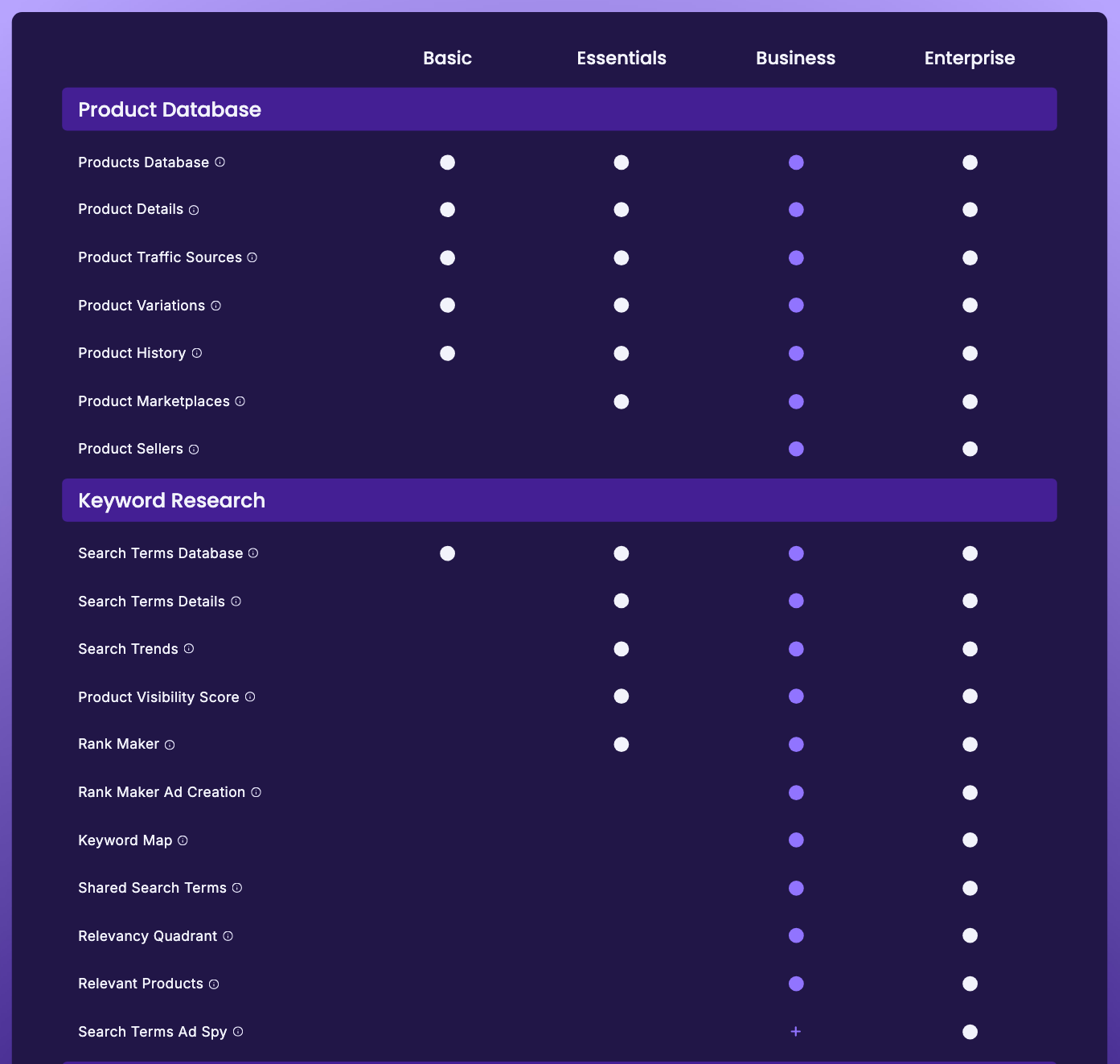
- **Public-doc-backed:** SmartScout public plan-comparison copy still frames Search Terms Details as the place to see the `story of any search term at a glance`, including historical trends and top-ranking products.
- **Public-doc-backed:** The same plan hierarchy still makes Search Terms Database and Competitor Keywords the more buyer-facing entry points, which supports treating Search Terms Details as a deeper query-context layer rather than a broad discovery default.
- **Live-site-tested:** The current target URL still returns **404**, so this page should be treated as a restore-first coverage recovery asset.
- **Heuristic only:** The recommendation to route readers toward broader suites, Amazon-native reports, or execution-depth tools depends on workflow fit rather than one-vendor feature bragging.
Read this next
If you want broader SmartScout context
- `/smartscout-review/`
- `/smartscout-pricing/`
- `/best-amazon-seller-intelligence-tools/`
If you want broader keyword discovery
- `/best-amazon-keyword-research-tools/`
- `/helium10-pricing/`
If you want native Amazon validation
- `/best-amazon-search-analytics-tools/`
- `/amazon-brand-analytics-search-analytics/`
- `/search-catalog-performance-for-keyword-research/`
- `/search-query-performance-for-keyword-research/`
- `/top-search-terms-for-keyword-research/`
If you want deeper execution after discovery
- `/data-dive-pricing/`
Recommended internal-link anchors
- `/smartscout-review/` -> `full SmartScout review`
- `/smartscout-pricing/` -> `SmartScout pricing`
- `/best-amazon-keyword-research-tools/` -> `best Amazon keyword research tools`
- `/best-amazon-search-analytics-tools/` -> `best Amazon search analytics tools`
- `/amazon-brand-analytics-search-analytics/` -> `Amazon Brand Analytics Search Analytics`
- `/search-catalog-performance-for-keyword-research/` -> `Search Catalog Performance`
- `/top-search-terms-for-keyword-research/` -> `Top Search Terms`
- `/search-query-performance-for-keyword-research/` -> `Search Query Performance`
- `/best-amazon-seller-intelligence-tools/` -> `best Amazon seller intelligence tools`
- `/helium10-pricing/` -> `Helium 10 pricing`
- `/data-dive-pricing/` -> `Data Dive pricing`
Internal links by workflow job
If the reader needs broader discovery
- route to `/best-amazon-keyword-research-tools/`
- support with `/helium10-pricing/`
If the reader needs first-party validation
- route to `/best-amazon-search-analytics-tools/`
- support with `/amazon-brand-analytics-search-analytics/`
- branch into `/search-query-performance-for-keyword-research/`, `/search-catalog-performance-for-keyword-research/`, and `/top-search-terms-for-keyword-research/`
If the reader needs seller-intelligence continuity
- route to `/smartscout-review/`
- support with `/smartscout-pricing/` and `/best-amazon-seller-intelligence-tools/`
If the reader needs deeper execution after discovery
- route to `/data-dive-pricing/`
Internal link plan
Core live links to keep in the body
- `/smartscout-review/`
- `/smartscout-pricing/`
- `/best-amazon-keyword-research-tools/`
- `/best-amazon-search-analytics-tools/`
- `/amazon-brand-analytics-search-analytics/`
- `/search-catalog-performance-for-keyword-research/`
- `/top-search-terms-for-keyword-research/`
- `/helium10-pricing/`
- `/data-dive-pricing/`
Future links to add after related pages go live
- `/smartscout-search-terms-details-for-keyword-research/`
- `/smartscout-search-terms-details-for-competitor-keyword-research/`
- `/smartscout-search-terms-details-vs-helium-10/`
- `/smartscout-search-terms-details-vs-jungle-scout/`
- `/smartscout-search-terms-details-vs-data-dive/`
FAQ
Is SmartScout Search Terms Details useful?
Yes, when you already have keyword direction and want more query-level context inside a SmartScout workflow.
Is Search Terms Details enough on its own?
No. It works better as a support layer than as a full keyword platform.
Who should skip Search Terms Details?
Sellers who still need broader keyword discovery, native benchmark checks, or deeper execution tools should usually skip treating this feature as the main answer.
What should I compare it against first?
Start with `/smartscout-review/`, `/best-amazon-keyword-research-tools/`, and `/amazon-brand-analytics-search-analytics/` so you do not confuse a narrow support feature with a broader category decision.
Best next step: use Search Terms Details if you already want SmartScout and need more query-level context. If not, choose the broader keyword or native-report lane first.