SmartScout Competitor Keywords: Where Competitor Keyword Research Lives Now
Affiliate disclosure: we may earn a commission if you buy through links on this page. How we make money How we check facts
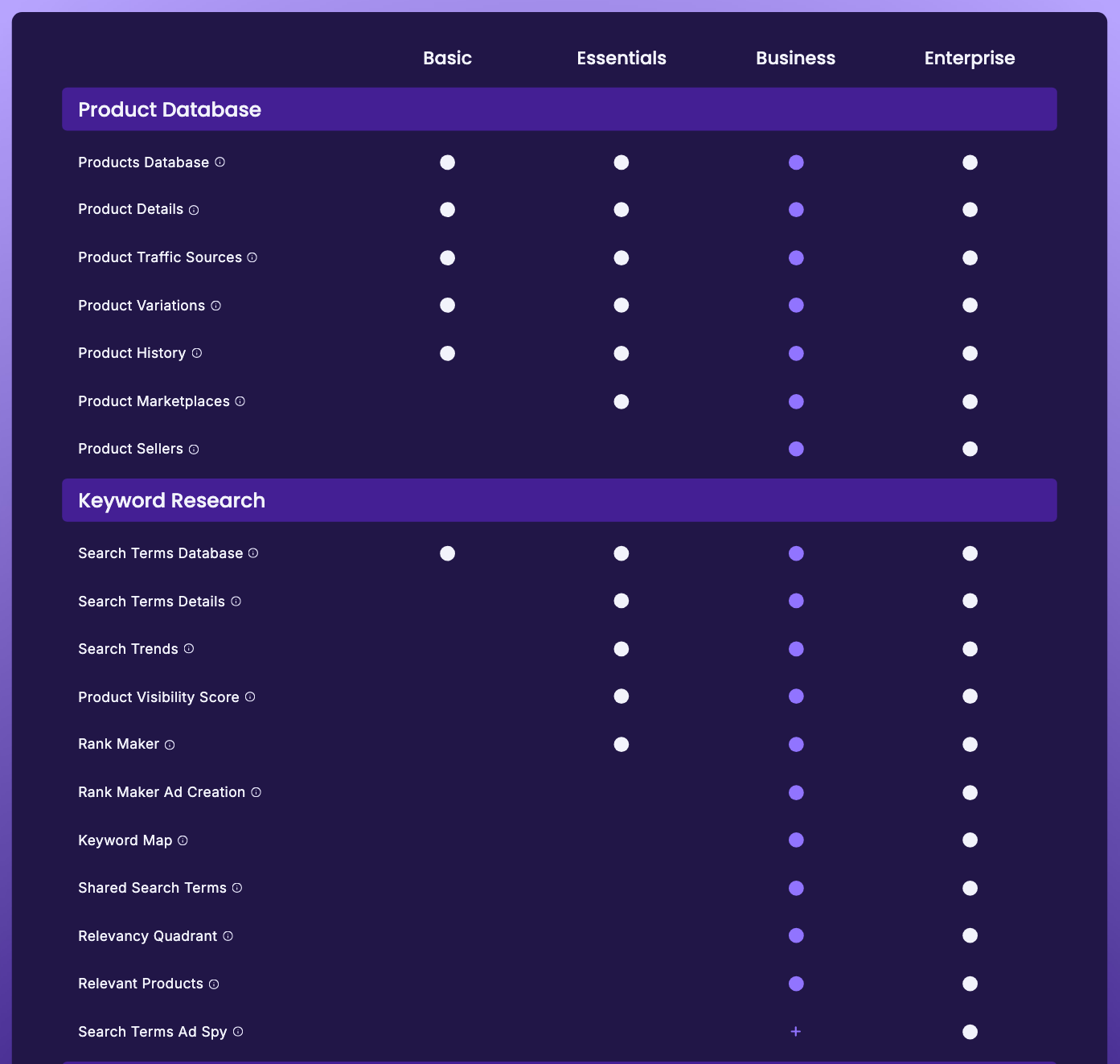
SmartScout’s pricing page doesn’t list a feature called Competitor Keywords (checked 10 October 2026). Competitor keyword research now runs through three tools: Rank Maker shows every term one competitor’s ASIN ranks for (Essentials and up), Keyword Detective compares several products’ shared and missing terms (Business), and Ad Spy covers the paid side (a Business add-on, included on Enterprise).
Rank Maker starts on the Essentials plan · 7-day money-back guarantee Affiliate link
Whether SmartScout as a whole suits you is covered in our SmartScout review. This page maps each competitor-keyword question to the SmartScout tool, and the plan, that answers it.
Correction (10 October 2026): this page previously said Competitor Keywords is unlocked on Essentials at $97 a month and that Ad Spy sits on Enterprise only. SmartScout’s pricing table doesn’t name Competitor Keywords, Essentials now costs $99 a month billed yearly or $119 monthly, and Ad Spy is also sold as a sales add-on on Business.
Which SmartScout tool answers which competitor question
| Your question | SmartScout tool | Cheapest plan |
|---|---|---|
| Which keywords does this competitor rank for? | Rank Maker: enter the competitor’s ASIN and see every term it ranks for, organic and paid | Essentials |
| Which terms do my competitors share that I’m missing? | Keyword Detective (pricing row: Shared Search Terms) | Business |
| Is a competitor’s term relevant to my listing? | Relevancy Quadrant | Business |
| Which keywords are competitors bidding on? | Ad Spy | Business add-on; included on Enterprise |
| Which brands win the visibility on a keyword set over time? | Share of Voice | Enterprise |
Essentials costs $99 a month billed yearly or $119 monthly, and Business $239 or $299 (checked 10 October 2026). Enterprise is priced after a demo, and SmartScout publishes no price for the Ad Spy add-on. There is also a Keyword Spy tab in SmartScout’s product view, next to Rank Maker (visible in the screenshot on our Rank Maker review). SmartScout’s Rank Maker page lists Keyword Spy among the tools to pair with Rank Maker and says it shows “which keywords competitors are bidding on”. It doesn’t appear in the pricing table, so we can’t say which plans include it.
A competitor keyword workflow in SmartScout
- List your real competitors: the products you lose sales to, not only the category leaders.
- Run each one through Rank Maker (Essentials). Sort by Click Through Share or Conversion Share rather than volume, to see which terms actually bring each rival traffic and sales.
- Put them side by side in Keyword Detective (Business) to find the terms they share and you lack. On Essentials, compare the Rank Maker lists yourself.
- Check relevance with the Relevancy Quadrant (Business), or your own judgement, before adding a term to your listing.
- Check the paid side with Ad Spy if you are bidding against them.
- Track the terms you add in Rank Maker, where SmartScout says tracking is unlimited.
Steps 1, 2 and 6 run on Essentials; steps 3 to 5 use Business features or the Ad Spy add-on. The SmartScout pricing page compares what each plan adds.
What happened to the Competitor Keywords name
Earlier versions of this page reviewed “Competitor Keywords” as an Essentials feature. SmartScout’s pricing page, features hub and site navigation don’t use that name (checked 10 October 2026). The nearest pricing-table rows are Rank Maker (Essentials) and Shared Search Terms, which SmartScout’s tooltip says is Keyword Detective (Business). SmartScout’s own Keyword Detective page answers “Can Keyword Detective identify keywords my competitors rank for?” with “Yes”, saying it reveals “which search terms competitors’ products rank for”. We can’t tell from SmartScout’s public pages which tool the old name referred to, so this page maps the job instead.
When another tool fits better
If you want reverse-ASIN research outside SmartScout, the usual alternative is Helium 10’s Cerebro, which Helium 10’s own menu labels “Discover Competitor Keywords”. On Helium 10 Platinum, the pricing table caps keyword research at 100 searches a month (checked 10 October 2026). Our best Amazon reverse ASIN tools compares the options across vendors.
What this page is based on
SmartScout’s pricing page (comparison table and tooltips), its Rank Maker and Keyword Detective pages, and Helium 10’s site and pricing page, all checked on 10 October 2026, plus the product-view screenshot from our complimentary SmartScout Business account (2 August 2026). Our methods are on how we test.
Frequently Asked Questions
Does SmartScout still have a Competitor Keywords feature?
Not under that name. SmartScout's pricing table had no Competitor Keywords row when we checked on 10 October 2026. Competitor keyword research now runs through Rank Maker, Keyword Detective and Ad Spy.
Which SmartScout plan shows the keywords a competitor ranks for?
Essentials and up, through Rank Maker, which lists the organic and paid search terms any ASIN ranks for. Essentials costs $99 a month billed yearly or $119 monthly (checked 10 October 2026).
Can SmartScout show which keywords competitors bid on?
Yes, through Ad Spy, which SmartScout includes on Enterprise and sells as a sales add-on on Business, with no published price. It isn't available on Basic or Essentials.
Is Keyword Detective the same as Competitor Keywords?
It covers the closest job: comparing several products to find the search terms they share and the ones you lack. SmartScout's own Keyword Detective page says it reveals which search terms competitors' products rank for. It needs the Business plan.