Best Amazon Keyword Research Tools for 2026: 6 Paid Picks, Plus the Free Options
Affiliate disclosure: we may earn a commission if you buy through links on this page. How we make money How we check facts
The best Amazon keyword research tool is Helium 10’s Cerebro, if you will pay for Diamond. Helium 10 has merged Magnet into Cerebro, so one tool covers reverse-ASIN lookups on up to 10 competitors and seed-keyword discovery. Diamond costs $279 a month billed yearly; Platinum, at $99, caps Cerebro at 100 searches a month (Helium 10’s pricing page, checked 10 October 2026).
Cerebro: 100 searches a month on Platinum, 300 a day on Diamond Affiliate link
On a smaller budget, SmartScout’s Essentials plan includes unlimited keyword research and tracking for $99 a month billed yearly, and four other tools each win a narrower job. If you want to spend nothing, the free section below covers what still works; two well-known free tools have shut down. And if you came for an Amazon keyword scraper, there is a section on that too.
How we picked. We compared each tool on the keyword job it does best, on what each plan allows according to the vendor’s pricing table and help center, and on price, checked 10 October 2026. The one first-hand result on this page comes from the complimentary SmartScout Business account disclosed in how we test; everything else is attributed to the vendor.
Quick picks
| Keyword job | Pick | Price (10 Oct 2026) |
|---|---|---|
| All-round keyword research | Helium 10 Cerebro | Diamond $279/mo yearly; Platinum $99 with 100 searches |
| Best value, with rank tracking | SmartScout Rank Maker | Essentials $99/mo yearly, $119 monthly |
| Keywords inside a research suite | Jungle Scout Keyword Scout | Growth Accelerator $49/mo yearly |
| Turning keywords into a listing plan | Data Dive | Starter about $32/mo yearly, $39 monthly |
| A cheap suite-style database | SellerSprite | $39/mo (list $49), 3-day trial |
| A raw search-term database | MerchantWords | Silver $35/mo, $350/yr |
| Amazon’s own search data, free | Brand Analytics | Free with Brand Registry |
The six paid picks, by keyword job
1. Helium 10 Cerebro: best all-round keyword tool
Cerebro started as Helium 10’s reverse-ASIN tool. Paste in your own or a competitor’s ASIN and it lists the keywords that product ranks for, organic and sponsored, with search volume and filters for organic rank, search volume and title density; Helium 10’s Cerebro page says you can analyze up to 10 ASINs side by side to see overlaps and gaps (Helium 10). Helium 10’s help center says Magnet, its seed-keyword tool, has been merged into Cerebro (notice last updated 6 January 2026), so the same tool now runs keyword-based discovery too. Results export to a file, and with Amazon Brand Analytics connected, Helium 10 says you also see each keyword’s click share and conversion share.
The plan decides how much you can use it:
| Plan | Price (10 Oct 2026) | Cerebro allowance |
|---|---|---|
| Platinum | $99/mo billed yearly, $129 monthly | 100 searches a month; each ASIN in a multi-ASIN search counts as one |
| Diamond | $279/mo billed yearly, $359 monthly | 300 searches a day (help center), plus keyword rank tracking |
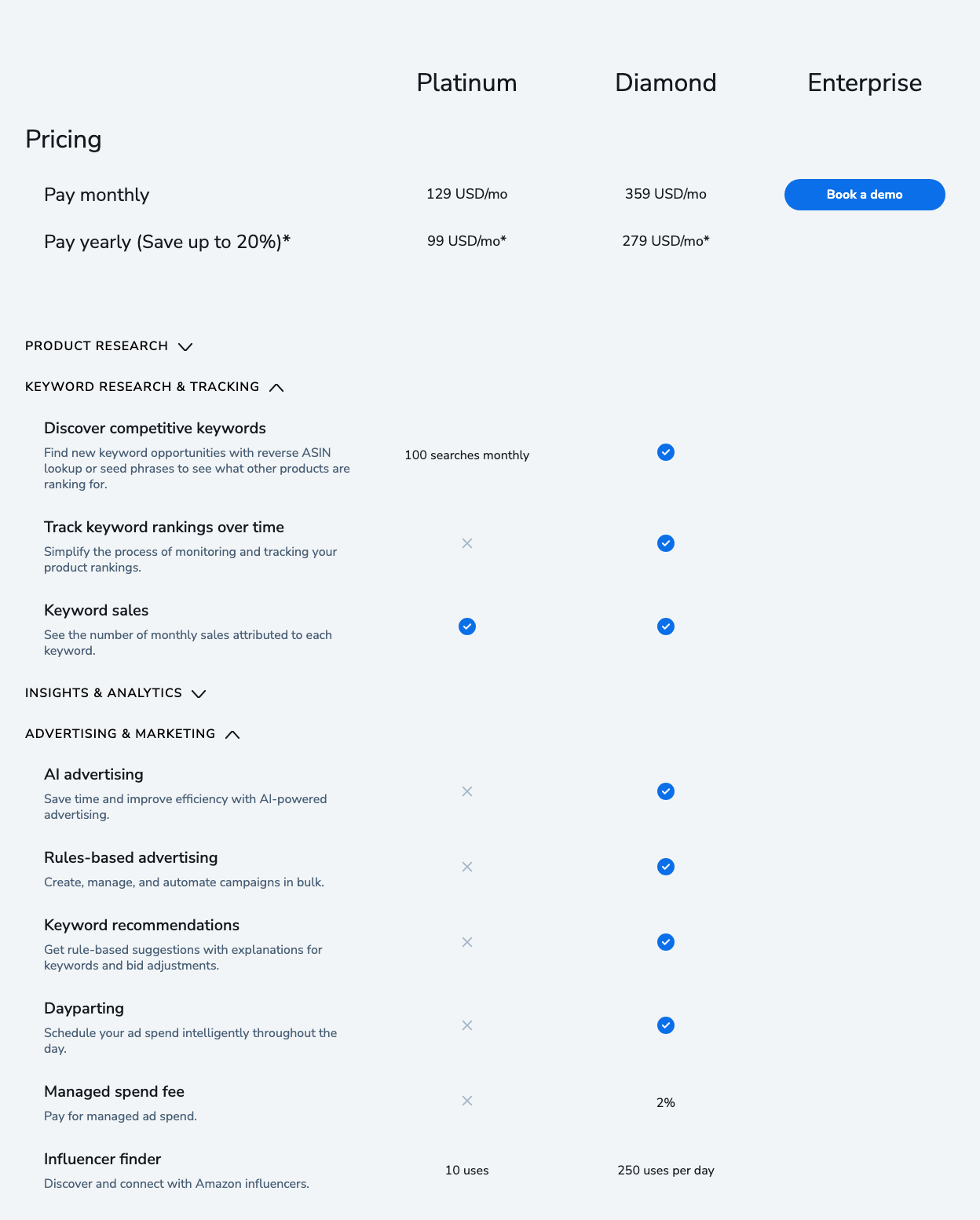
On Platinum, a full 10-ASIN search uses a tenth of the month’s allowance, and once you reach 100, Helium 10’s help center says Cerebro freezes until your next billing cycle. That is why we recommend Cerebro on Diamond if keyword research is your main job. Keyword rank tracking isn’t on Platinum either, except as an add-on from $19 a month. Helium 10’s pricing page lists no free plan, and there is no free trial.
Who should skip it: sellers on a Platinum budget whose main job is keyword research; SmartScout and Jungle Scout give you more searches for the money. Our Helium 10 review covers the rest of the suite, and Helium 10 keyword search history explains its search-volume trends.
2. SmartScout Rank Maker: best value
Rank Maker is SmartScout’s reverse-ASIN tool. SmartScout’s Rank Maker page claims 1,000+ keywords per ASIN, 20+ data points per keyword and 18 months of Visibility Score history from a dataset starting in August 2024, with CSV and Excel export and a Campaign Builder that turns selected keywords into PPC campaigns (SmartScout, checked 10 October 2026). On our complimentary SmartScout Business account, Rank Maker returned 2,476 keywords for one Scrub Daddy listing on 2 August 2026, 89% organic and 11% paid; the screenshot is in our SmartScout review.
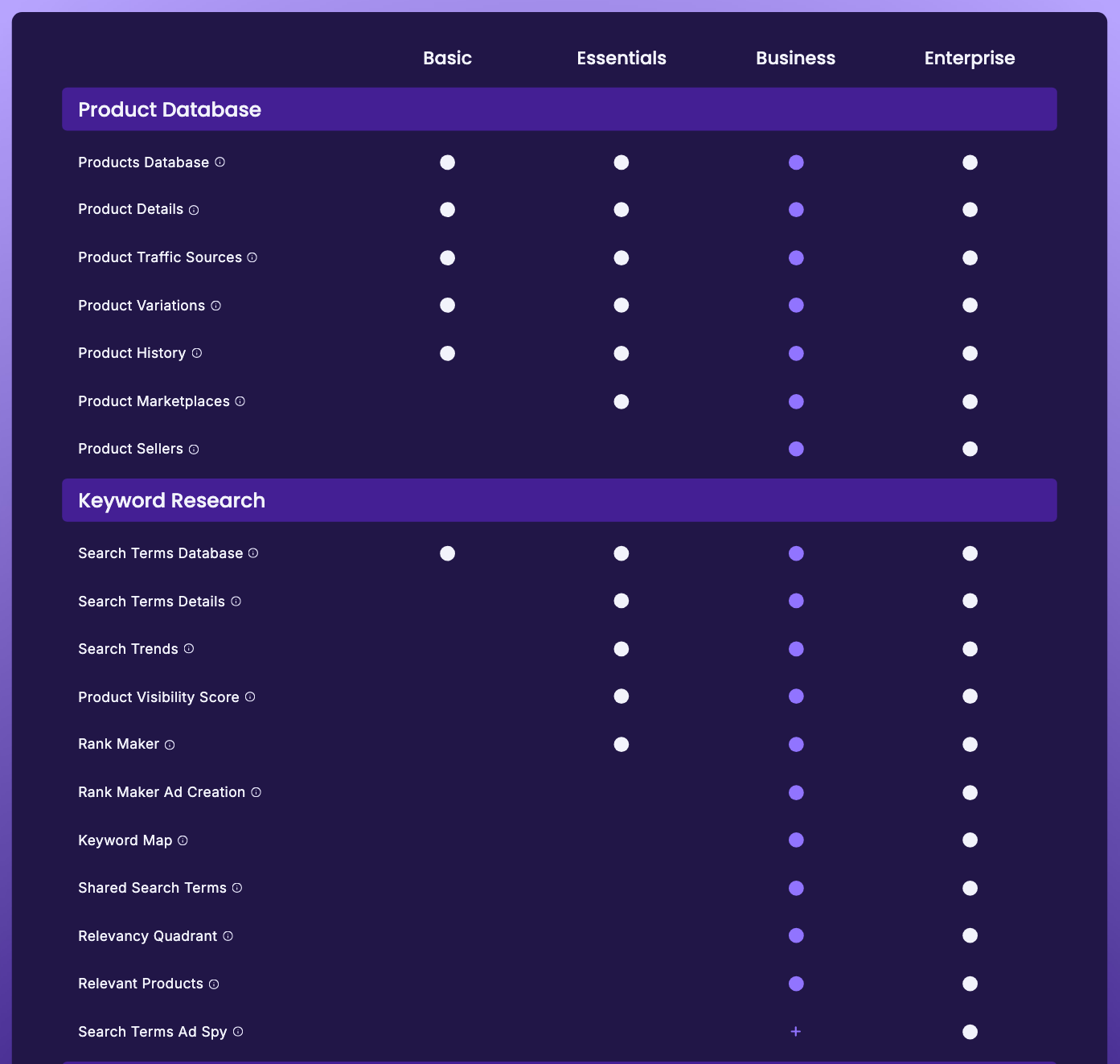
The plan question has a trap. Rank Maker’s own page says it “is included in every SmartScout plan”, but SmartScout’s pricing table starts Rank Maker at Essentials and Rank Maker Ad Creation, the campaign half, at Business. Go by the table. The Search Terms Database, a searchable list of documented search terms with volume and CPC filters, is on every plan, Basic included.
SmartScout Basic costs $29 a month billed yearly, or $49 month to month. Essentials is $99 billed yearly ($119 monthly) and Business is $239 billed yearly ($299 monthly). The Essentials card lists “Unlimited Keyword Research & Tracking”. There is no free trial; each self-serve plan has a 7-day money-back guarantee.
Who should skip it: sellers who want listing writing and PPC management in the same subscription. SmartScout pricing has the full tier map.
3. Jungle Scout Keyword Scout: best inside a research suite
Keyword Scout runs three kinds of search: a keyword, a reverse search on one ASIN, or a multi-ASIN search on up to 10 ASINs (Jungle Scout help center). It shows historical search volume with monthly and quarterly trends and exports to CSV on plans that include export. Jungle Scout’s help center also says reverse-ASIN results only include keywords where the product ranks in the top 100 search results.
Jungle Scout’s pricing table (checked 10 October 2026) gives Starter 50 Keyword Scout searches a month with one month of keyword history and no export, and Growth Accelerator 250 searches with a year of history; Brand Owner shows no cap and two years of history. Growth Accelerator costs $49 a month billed annually, or $79 monthly, and also tracks rank for up to 500 keywords (5,000 on Brand Owner).
Who should skip it: anyone who would buy Starter only for keyword research. Keyword Scout makes sense if you are buying Jungle Scout for product research anyway, which is our product research pick.
4. Data Dive: best for turning keywords into a listing plan
Most keyword tools stop when you export the list; Data Dive starts there. A Dive builds a Master Keyword List from a set of competitors, showing each one’s organic and sponsored rank, search volume and a relevancy percentage, and by default keeps keywords with at least 30% relevancy (Data Dive help center). Rank Radar tracks your ranks daily with PPC data alongside, and the AI Copywriter drafts listing copy from the list in modes Data Dive calls Classic AI, COSMO and COSMO + RUFUS.
Data Dive Starter is $39 a month, or about $32 a month billed yearly; Standard is $149 or $124; Enterprise is $490 or $408 (checked 10 October 2026). Starter covers 100 Dive ASINs and 25 Rank Radar keywords, and there is no free trial or money-back guarantee.
Who should skip it: beginners who still need a broad first suite more than a planning layer.
5. SellerSprite: cheapest suite-style keyword database
SellerSprite Basic is $39 a month (shown against a $49 list price) or $390 a year; Standard $79 or $790; Advanced $129 or $1,290; VIP $189 or $1,890 (SellerSprite pricing, checked 10 October 2026). There’s a free 3-day trial of the monthly plan, and SellerSprite’s refund terms conflict: its 2022 terms of service promise a 14-day money-back guarantee on a first purchase, while its 2026 refund policy refunds only unused time. The monthly Basic plan includes no keyword tracker; on annual billing, Basic tracks 250 keywords. An older SellerSprite reverse-ASIN FAQ (14 October 2025) also says unpaid members get 10 free searches a month, but that FAQ is out of date on other points, so treat the allowance as unconfirmed.
Who should skip it: anyone who needs more than a few days to judge a tool: the trial lasts 3 days, and SellerSprite’s own refund documents disagree on whether a first purchase can be refunded in full.
6. MerchantWords: best raw search-term database
MerchantWords is a keyword database rather than a workflow. It says its ASIN Plus reverse lookup draws on 1.6 billion unique Amazon keywords from real shopper searches (MerchantWords). MerchantWords Silver is $35 a month or $350 a year; Gold $79 or $790; Platinum $149 or $1,490; Enterprise is $749 a month through sales. There is no free trial (checked 10 October 2026). Silver covers 500 searches in one country; Platinum is unlimited and covers all 11 marketplaces MerchantWords supports.
Who should skip it: sellers looking for one platform that also writes listings and tracks rank.
Best free Amazon keyword research tools
Many people looking for an Amazon keyword tool want a free one, whether that is a free Amazon keyword finder, a free index checker or a free browser extension. This is what still works, checked on 10 October 2026.
Amazon Brand Analytics is the best free source if you can get in. It is free with a Professional selling account if you are a brand representative for a brand enrolled in Brand Registry (Amazon). Top Search Terms shows a search frequency rank for terms across the store, and Search Query Performance shows impressions, clicks, cart adds and purchases for your own catalogue. Our guides to Top Search Terms and Search Query Performance walk through both, and best Amazon search analytics tools covers the paid tools built on them.
Product Opportunity Explorer, in Seller Central under Growth, reports search terms and search volume for each niche from Amazon’s own data.
Helium 10’s free Amazon keyword tool is, in Helium 10’s words, a “Limited Demo of Magnet”: enter a seed term or an ASIN, pick one of 10 marketplaces, and it returns related keywords (Helium 10). Helium 10’s own pages disagree on what comes next: that page invites you to sign up free for “the full version”, while its help-center plan guide lists neither Cerebro nor Magnet on the free account. Helium 10’s old “index checker for Amazon keywords” page now redirects to this free tool; Index Checker itself is limited to 6 uses a month on the free account, against 150 on Platinum, according to the same guide. The Helium 10 Chrome extension is free to install and lists keyword features (Xray Keywords and Search Expander) on its Chrome Web Store page, though Helium 10’s pricing FAQ says full access needs Platinum or above. Our Helium 10 free tools guide lists what else is free.
SmartScout’s Chrome extension gives 100 free full-feature uses a month with no credit card, according to its Chrome Web Store listing. On a search results page, its Search Summary shows the keyword’s search volume, 30-day revenue and units sold. Details are in our SmartScout extension review.
Keyword Tool Dominator offers 2 free searches a day per keyword source, with no sign-up. It pulls Amazon’s autocomplete suggestions and ranks them by its own Popularity Score, and its page says it doesn’t show monthly search volume because Amazon doesn’t publish it (Keyword Tool Dominator).
Amazon’s own search bar is the free source autocomplete tools read: type a seed term and note the suggestions.
Two free tools that have gone. Sonar, the free keyword tool Sellics used to run, no longer loads, and Sellics’ own site now redirects to Perpetua. Scientific Seller’s site says it is closing down. Pages that still recommend either are out of date.
Amazon keyword scraper: what works, and what gets you blocked
Plenty of people arrive here searching for an Amazon keyword scraper rather than a keyword suite. That’s a different question: not which subscription to buy, but how to extract keyword data at volume, such as every term behind a competitor ASIN, or the same job across twenty competitors, in a file you can work with.
The tools that do this job properly are licensed data platforms, not scrapers.
What “scraping Amazon keywords” means
Three jobs get filed under one word:
- Reverse-ASIN extraction: take a competitor’s ASIN and get back the keywords it ranks for. This is what most people mean.
- Bulk export: get those results into a CSV, across many ASINs, without clicking one at a time.
- Listing scraping: pulling titles, bullets and backend terms off competitor listings to mine phrases.
You can buy the first two. The third is where people start writing scripts, and it is the one that causes trouble.
The licensed route: reverse-ASIN tools that export
- Helium 10’s Cerebro takes up to 10 ASINs at once and returns the keywords they rank for, organic and sponsored, with search volume. Helium 10’s help center describes an Export Data button that downloads the results. On Platinum, each ASIN counts as one of the month’s 100 searches.
- SmartScout’s Rank Maker advertises 1,000+ keywords per ASIN with CSV and Excel export. SmartScout’s pricing table lists Excel exports, capped at 20,000 rows a month, from the Business plan, so check that the export you need works on Essentials before you rely on it. Its Search Terms Database is the search-term-first alternative, and it is on every plan.
- Jungle Scout’s Keyword Scout downloads results as a CSV on Growth Accelerator and Brand Owner; Starter has no exports.
The free route most scraper searches are after
If “scraper” stands in for “I’d rather not pay”, Amazon gives away real search data, free, if you have Brand Registry: Top Search Terms and Search Query Performance, described above. The catch is that both need Brand Registry, which in turn needs a registered trademark or, in some cases, a pending application, according to Amazon’s Brand Analytics guide. If you sell wholesale, arbitrage or unbranded products, that door is shut, and a paid reverse-ASIN tool is the realistic answer.
Why we won’t point you at scraping Amazon directly
It breaches Amazon’s Conditions of Use. The license to use Amazon “does not include any resale or commercial use of any Amazon Service, or its contents; any collection and use of any product listings, descriptions, or prices”, or “any use of data mining, robots, or similar data gathering and extraction tools” (Amazon Conditions of Use, last updated 14 August 2026). The same section says no part of Amazon’s services or content may be “reproduced, duplicated, copied, sold, resold, visited, or otherwise exploited for any commercial purpose” without Amazon’s written consent.
It breaks. Amazon’s pages sit behind bot checks and markup that changes without notice, so a scraper degrades quietly and the data goes stale before you notice. Run it from the same connection as your Seller Central login and you’ve attached that risk to the account that pays your bills.
The data is worse. Amazon doesn’t show search volume anywhere on the storefront, so a scraper can capture positions (which ASIN ranks where, for a term you already thought of) but not the volume figures you wanted. The search volumes in keyword tools are modelled; Helium 10’s help center, for example, describes its own as estimates.
If you need search-term data programmatically, the sanctioned route is Amazon’s Selling Partner API, where those reports are Brand Analytics reports, open to brand-registered sellers with the Brand Analytics role. So there is no Amazon keyword scraper worth building: there are reverse-ASIN tools that export, and a free first-party report if you own a brand.
Keyword tool stacks by seller type
| Stack | Build it from | Best for |
|---|---|---|
| Starting out | Free tools or Brand Analytics, then Jungle Scout Growth Accelerator | Low cost, with product research included |
| Best value | SmartScout Essentials | Unlimited keyword research and tracking |
| Full suite | Helium 10 Diamond | Cerebro without the monthly cap, plus rank tracking and PPC |
| Listing-led | Your suite + Data Dive | Turning keyword data into a listing plan |
| Database-first | MerchantWords or SellerSprite + a listing tool | Mining terms at volume |
How to choose the right Amazon keyword software
- Name the keyword job: discovery from a seed term, competitor mining by ASIN, database expansion, or turning keywords into a listing.
- Check the plan’s limits, not the tool list. Cerebro on Platinum (100 searches a month) and Keyword Scout on Starter (50) are samplers; the plans above them are where these tools become usable every day.
- Use Amazon’s free data first if you have Brand Registry. It is the only search data that comes from Amazon itself.
- Don’t confuse more keywords with better execution. Some tools find keywords; Data Dive helps you decide what to do with them.
For the reverse-ASIN job on its own, including the free options, see best Amazon reverse ASIN tools. For what to do with the keywords once you have them, see best Amazon listing optimization tools, and for the rest of the stack, best Amazon seller tools.
Frequently Asked Questions
What is the best Amazon keyword research tool?
Helium 10's Cerebro, which now includes Magnet's seed-keyword search, covers the most keyword jobs in one tool: reverse-ASIN lookups on up to 10 ASINs, seed-keyword discovery and filtering. It is best on Diamond, at $279 a month billed yearly, because Platinum caps it at 100 searches a month (checked 10 October 2026). SmartScout Essentials, at $99 a month billed yearly with unlimited keyword research and tracking, is the better value.
What is the best free Amazon keyword research tool?
Amazon Brand Analytics, if you are a brand-registered seller, because it reports Amazon's own search data at no cost. Without Brand Registry, Helium 10's free keyword tool runs a limited Magnet demo, Keyword Tool Dominator gives 2 free searches a day from Amazon's autocomplete, and SmartScout's free Chrome extension shows a keyword's search volume on Amazon's results page.
Is Helium 10 better than Jungle Scout for keyword research?
Helium 10 has more keyword tooling, but the plan limits decide it. Helium 10 Platinum allows 100 Cerebro searches a month, while Jungle Scout's Growth Accelerator allows 250 Keyword Scout searches for $49 a month billed annually and Brand Owner shows no cap. On Diamond, Helium 10's help center lists 300 Cerebro searches a day.
Is there an Amazon keyword scraper that works?
The tools that do this job are licensed data platforms. Helium 10's Cerebro and SmartScout's Rank Maker both take a competitor ASIN and return the keywords it ranks for, with export. Scraping Amazon yourself breaches its Conditions of Use, which exclude any use of data mining, robots or similar data gathering and extraction tools, and Amazon's storefront shows no search volume to scrape.
Do Sonar and Scientific Seller still work?
No. Sonar's website no longer loads, and Scientific Seller's site now says it is closing down (both checked 10 October 2026). Brand Analytics, Helium 10's free keyword tool and Keyword Tool Dominator are free alternatives that still work.
Do I need a separate keyword tool if I already have a research suite?
Usually not. Helium 10, Jungle Scout and SmartScout all include keyword research, so a second tool only makes sense when one job outgrows your plan. Examples are Data Dive for turning keywords into a listing plan, or MerchantWords for raw database mining.