Helium 10 Alerts: Hijacker and Listing-Change Monitoring, Limits and Setup
Affiliate disclosure: we may earn a commission if you buy through links on this page. How we make money How we check facts
Helium 10 Alerts watches the products in your connected Seller Central account and tells you when something changes that can cost you sales: another seller joins your listing, you lose the Buy Box, the listing is suppressed, or its title, price, category or dimensions change. Platinum covers 5 ASINs and Diamond 200, according to Helium 10’s help center and pricing table (checked 10 October 2026).
Alerts covers 5 ASINs on Platinum, 200 on Diamond Affiliate link
Correction (10 October 2026): this page previously said Platinum monitors 100 ASINs and Diamond 300, that text alerts need Diamond, and that Helium 10 refreshes each monitored product daily. Helium 10’s own documents give 5 and 200 ASINs, don’t tie text alerts to a plan, and say product information updates about every four days.
What Helium 10 Alerts monitors
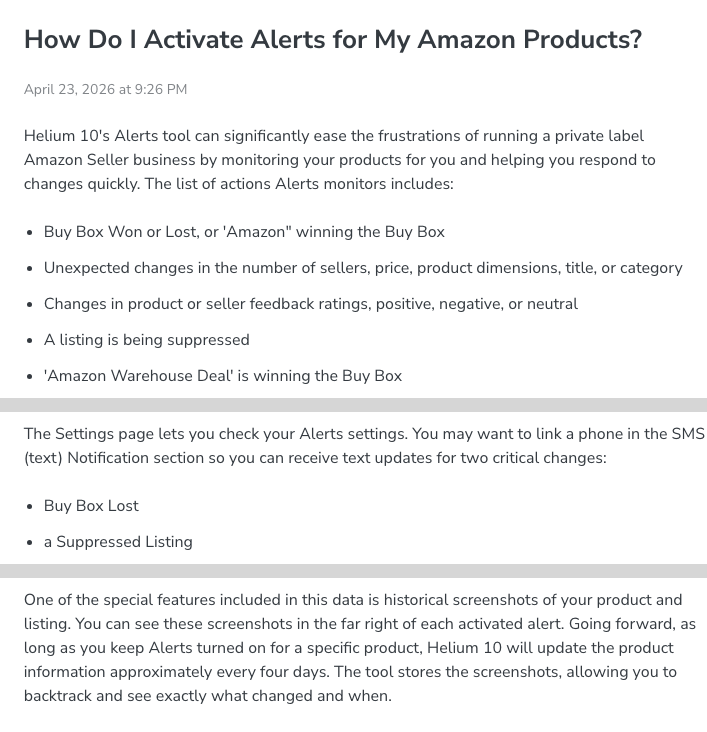
Helium 10’s help article How Do I Activate Alerts for My Amazon Products? (updated 23 April 2026) lists these events:
- the Buy Box won or lost, including Amazon itself winning it;
- an “Amazon Warehouse Deal” offer winning the Buy Box;
- unexpected changes in the number of sellers, price, product dimensions, title or category;
- changes in product or seller feedback ratings, positive, negative or neutral;
- a listing being suppressed.
The dashboard counts how many monitored products hold the Buy Box, have lost it, or have no Buy Box winner, and a Buy Box Status filter lists them (help center, 23 April 2026). For each product, Alerts also shows the categories it ranks in, a recent ranking chart, and a seller-count history over 30 days, 90 days, 365 days or all time since monitoring began.
Helium 10’s Alerts settings guide says Alerts notifies you “as soon as an event happens”, and the Alerts product page promises monitoring “in real-time, 24/7”. Alerts also keeps dated screenshots of each monitored listing, and the help center says that product information and the screenshots update “approximately every four days” while monitoring is on. Helium 10 doesn’t say how quickly each type of event is detected. The product page adds that Alerts helps you report an active hijacker to Amazon.
What an Amazon listing hijacker is
Helium 10’s glossary describes a hijacker as another seller who competes on your listing, either with a fake or knock-off of your product or with your genuine product bought at a discount and resold, sometimes using your images and copy. Alerts can’t stop that from happening. A 2021 Helium 10 help article on hijackers says that when Alerts detects unauthorized sellers on your listing, it sends you email and text alerts, which is why the seller-count and Buy Box events above matter most for private-label brands.
What Alerts doesn’t do
- It only watches your own products. Helium 10’s Alerts settings guide (updated 22 October 2025) says Alerts “cannot be used to notify you of changes to your competitors’ listings” and points to Market Tracker for that.
- It reports a change after it happens. A hijacker or an Amazon catalog edit still happens; Alerts shortens the time before you notice.
- Text messages cover two events. Helium 10’s current Alerts guides limit SMS to Buy Box lost and a suppressed listing; only the older hijacker article mentions texts about unauthorized sellers. Everything else arrives by email or push notification.
- It doesn’t track keyword ranks. Rank drops are Keyword Tracker’s job, which Helium 10’s pricing table puts on Diamond or sells as a paid add-on for Platinum.
How many ASINs each plan covers
| Plan (checked 10 October 2026) | ASINs Alerts can monitor | Price |
|---|---|---|
| Platinum | 5 | $99/mo billed yearly, $129 monthly |
| Diamond | 200 | $279/mo billed yearly, $359 monthly |
| Enterprise | Up to 5,000 | From $1,499/mo, billed annually |
The limits come from Helium 10’s plan guide (updated 13 May 2026). The pricing page’s comparison table doesn’t name Alerts, but its “Amazon fraud detector” row (“Get instant updates of fraud on your listing”) shows the same 5 and 200, and Helium 10’s Alerts page is titled “Amazon Fraud Detector & Alerts”. The same Alerts page still promises surveillance for “an unlimited amount of ASINs”, which contradicts both; plan on 5 and 200.
The help center also describes a limited free account that can monitor 2 ASINs. It isn’t a plan on the pricing page, and there’s no free trial of the paid plans. Our Helium 10 pricing guide covers what else each plan includes.
How to set up Helium 10 Alerts
- Connect Seller Central. Alerts can’t monitor anything until your Amazon seller account is connected to Helium 10.
- Open Alerts. Helium 10 lists it under Business Operations in the Products menu. Your products appear in a list, but none is monitored yet.
- Switch products on. Use the On/Off toggle on each product you want watched. Helium 10 says gathering a product’s data can take up to an hour.
- Choose your notifications. In Settings, tick the events you want and how each one reaches you: email, SMS or push. Email is required; add a phone number for SMS.
- Add the mobile app if you want alerts on your phone. Helium 10’s mobile app guide says the iOS and Android app’s Updates tab shows real-time notifications generated by Alerts, filterable by event type such as Title Changed or Buy Box Lost.
Is Helium 10 Alerts worth it?
Alerts earns its place when a lost Buy Box or a silent catalog change would cost you more than checking your listings by hand. Five ASINs covers a small private-label catalog on Platinum. A brand with dozens of ASINs needs Diamond’s 200, and the jump from Platinum to Diamond buys much more than Alerts, so weigh it with the rest of the plan (see Platinum vs Diamond) and the rest of the suite (see our Helium 10 review).
Alerts sits with Follow-Up, Inventory Management and Helium 10’s other daily operations tools in the Helium 10 features guide.
Frequently Asked Questions
What does Helium 10 Alerts monitor?
Your own listings. Helium 10's help center lists Buy Box won or lost (including Amazon or an Amazon Warehouse Deal winning it), changes in the number of sellers, price, product dimensions, title or category, changes in product and seller feedback ratings, and a listing being suppressed.
How many ASINs can Helium 10 Alerts monitor?
Helium 10's plan guide lists 5 ASINs on Platinum, 200 on Diamond and up to 5,000 on Enterprise, and the pricing table's Amazon fraud detector row shows the same 5 and 200 (checked 10 October 2026). Its limited free account gets 2 ASINs.
Can Helium 10 Alerts send text messages?
Yes, but Helium 10's current Alerts guides limit text messages to two events: Buy Box lost and a suppressed listing. An older 2021 help article says unauthorized-seller alerts also go by text. Other alerts go by email, which is required, or as push notifications, and Helium 10's mobile app also lists Alerts notifications in its Updates tab.
Can Helium 10 Alerts watch competitors' listings?
No. Helium 10's help center says Alerts cannot notify you of changes to competitors' listings and recommends Market Tracker for competitor research.
Do I need to connect Seller Central to use Alerts?
Yes. Alerts monitors products from a Seller Central account connected to Helium 10, and each product must be switched on before it is monitored. Helium 10 says gathering a product's data can take up to an hour after you switch it on.