How We Check and Review Amazon Seller Software
Last updated
Every claim on this site should be checkable against the page it came from. This is how we get there — what we verify, how, what our ratings mean, and, just as usefully, what we do not do. If any of it does not match what you find on our pages, that is a fault worth reporting.
Verification means opening the vendor’s page ourselves
When we state a price, a plan tier, or a discount, we have looked at the vendor’s own live page in a browser at the time of writing. Not from memory, not from a competitor’s summary, not from a coupon aggregator. Then we record the date we did it, and put that date next to the claim.
SmartScout is the clearest worked example. When we checked its pricing page on 1 August 2026, Basic cost $29 a month on monthly billing, Essentials $97 and Business $187. On 10 October 2026 the same cards read $49, $119 and $299, and each plan included one user instead of two or three. Software pricing moves quietly, and a figure that was right in August is not automatically right now. A price claim without a date is a claim you cannot judge.
Partner codes get the same treatment. Our SmartScout coupon page gives the day we last saw our partner code work at a checkout, 1 August 2026, and says that was before the price rise.
We check tables in a real browser, not through a fetcher
This sounds like a technical detail. It costs people money.
We found that automated page-fetching misreads vendor pricing comparison tables — the kind with a column per plan and ticks down the rows. The text comes back, the alignment does not, and a feature ends up attributed to the wrong tier. So anything that depends on which plan a feature sits on gets read in a real browser, off the rendered page.
For the 10 October 2026 check, scripted browser sessions loaded each vendor’s pricing page, switched between monthly and yearly billing where the page offers both, read the prices off the rendered page and saved screenshots. A second pass, run separately later that day, re-read every price.
Tier claims are where buyers lose money — somebody pays for the cheap plan and finds the tool they came for starts one tier up.
What a page carries underneath can be wrong as well. Helium 10’s pricing page includes FAQ markup for search engines that visitors never see, and on 10 October 2026 it still said the 2% Helium 10 Ads fee applied only to ad spend above $20,000 a month. The FAQ visitors can read mentions no threshold, and Helium 10’s help center (updated 20 August 2026) says the fee applies to all ad spend in profiles set to Managed, with “no minimum spend requirement or threshold”. We had repeated the old threshold ourselves until that check, and our Helium 10 Ads page now carries a dated correction.
Screenshots show what a page said, and when
A claim about a vendor’s page is easier to trust when you can see the page, so a screenshot that backs up a claim in an article carries a caption. On screenshots taken for the 10 October 2026 check, on those from our SmartScout account in August 2026 and on those from our Helium 10 account in October 2026, the caption names the source and the capture date, so you can tell a current screenshot from an old one. Images kept from the site’s 2025 pages are dated less precisely: their captions give the month or year they date from, or say that the capture date was not recorded. Most of the screenshots are one of three kinds:
- Vendor pages: pricing tables, help-center articles and browser-store listings, captured from the public page. The current set dates from the 10 October 2026 check.
- Inside a tool: screens from inside the product. The SmartScout ones, such as Rank Maker and Ad Spy, were captured on our complimentary SmartScout Business account on 2 August 2026. The Helium 10 ones from October 2026, such as Black Box, Cerebro and Listing Analyzer results, were captured on our own Helium 10 account, which is on the Diamond plan, on 12 October 2026, with account details blurred. Some older Helium 10 screens, such as Cerebro’s start screen and Market Tracker’s welcome screen, are images kept from the site’s 2025 pages.
- Archive: older captures kept to show what changed, such as Helium 10’s 2025 pricing cards. Their captions give the month or year they date from and say the prices are no longer current.
The capture below is the source for the SmartScout prices above: the monthly view of SmartScout’s pricing page on 10 October 2026.
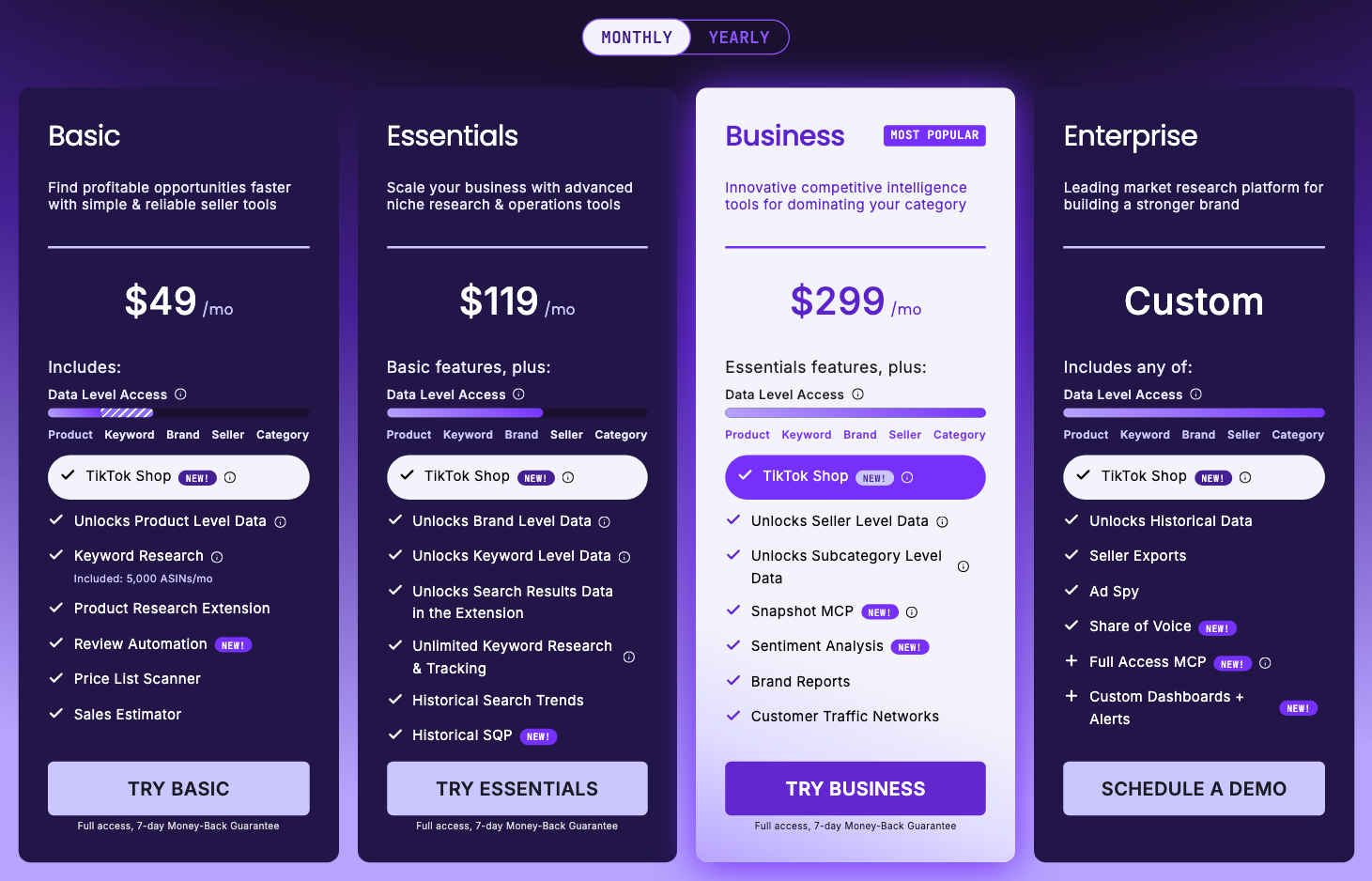
A screenshot shows what the page said on the day it was captured, not what it says today. If the live page has changed since, tell us and we will re-check it.
We read the vendor’s terms when a claim depends on them
If a claim rests on what a vendor’s terms permit, we read the terms rather than guess.
The stacking question is the one that matters on SmartScout: can the 25% coupon be combined with annual billing for a bigger total discount? It does not work. SmartScout’s Terms of Use, last updated 7 July 2026 and re-read on 10 October 2026, say in section 12.5: “Unless otherwise stated, promotional offers may not be combined with other discounts.” And when we last confirmed our partner code at checkout, on 1 August 2026, it was a monthly-billing offer: 25% off the first three months. So a total that adds the coupon to the annual saving is a price nobody can actually buy. We say 25% and explain why, which is the less impressive number and the true one.
We say so when a vendor contradicts itself
Vendors are not always consistent across their own site, and when they are not we report the contradiction rather than pick the version that suits us.
SmartScout’s affiliate-programme page advertises a “7-day free trial”. Its pricing page offers a 7-day money-back guarantee. Those are different products: one costs you nothing, the other takes your payment and refunds you if you ask. There is no free trial, and we say so plainly even though the more marketable claim was sitting there ready to copy. Both pages still said the same on 10 October 2026.
Jungle Scout is another case. Its comparison table and the FAQ on its pricing hub give the Brand Owner plan 3 seats, while the FAQ on its Catalyst plans page says 10. We go with the table.
We publish corrections, and we say when we were wrong
We get things wrong. When we do, we fix the page and leave a note saying what changed, rather than editing quietly and hoping nobody noticed.
Two live examples. We previously described SmartScout’s Share of Voice as a Business-tier feature; it is Enterprise-only. That page was corrected on 2 August 2026, but two other pages kept the old claim until 10 October 2026, and our Search Trends Explorer review now carries a dated correction saying so. And since 2 August 2026 our Rank Maker review has carried a section headed “A correction to our own earlier version” — we had placed the historical keyword suite on Enterprise when it starts at Essentials. That correction is the difference between booking a sales call and buying Essentials at a checkout, for $99 a month billed yearly or $119 month to month (checked 10 October 2026), which is exactly why it is on the page instead of in a changelog nobody reads.
How our ratings work
Ratings run 0 to 5, in half points. They are editorial judgement, not a computed score. There is no weighted rubric behind them, no percentages assigned to features and support and value. Anyone publishing one has usually reverse-engineered it from the number they already wanted.
What the numbers mean in practice:
| Rating | What it means |
|---|---|
| 4.5 | Best in its lane. We would buy it ourselves for the job it does, and the caveats are about fit rather than quality. |
| 4 | Good, with a real limitation we name — a gap in coverage, a tier that puts the useful part out of reach, or a workflow that fights you. |
| 3.5 | Works, but narrowly. Usually a supporting feature rather than a reason to buy a subscription, or a tool that only pays off in a specific situation we describe. |
Nothing on the site currently sits below 3.5. Read that as the limit of what we cover rather than proof everything is good — we write about tools worth considering, and when something is the wrong buy we say so in the copy instead of dressing it up as a number. Most pages carry no rating at all, because a pricing guide or a feature explainer is not a verdict.
A rating has never moved because of a commission, and it never will.
Affiliate links, and the limit we put on them
We earn commissions through partner links and partner codes for four tools: Helium 10, Jungle Scout, SmartScout and Data Dive. Our affiliate disclosure sets out the details, including the complimentary SmartScout account. The arrangement comes with a hard limit: one affiliate link per article, placed early, and never more. That is not a guideline we try to honour — it is a check that runs against every page before each deploy and fails if a second link appears.
Pages that bury eight identical links through the body are optimising for clicks, not for the reader. One link, near the top, where you can take it or ignore it.
A commission never changes a verdict, a rating, or a recommendation. The most useful thing we publish is often “do not buy this”, and that only stays useful if we are willing to lose the sale.
What we do not do
The limits matter as much as the method.
- We do not pass off public pages as in-app screens. In-app screenshots come only from accounts we hold: Helium 10, on our own Diamond plan, and SmartScout, on a complimentary Business plan. For other tools our screenshots show the vendor’s public pages, and every caption says which.
- We do not claim long-running hands-on trials we have not run. No “we tested this for six months” unless we did.
- We do not imply we pay for every tool we hold an account on. Our SmartScout account is a complimentary Business plan, provided because we are an affiliate. It gets us into the product to verify what it does, which is how we were able to confirm what Ad Spy shows on a plan below Enterprise. It does not make us a paying customer, and we will not describe ourselves as one.
- We do not republish vendor marketing statistics as our own findings. Where we cite a vendor’s own number or claim, it is attributed in the sentence — “SmartScout’s own Rank Maker page says”, “their pricing page lists” — so you can see whose measurement it is.
- We do not invent coupon codes. We publish a partner code only after seeing it apply at a checkout, with the date we last saw it work, and a vendor’s own code only when the vendor lists it, credited to the vendor’s page. A large share of the codes circulating in this niche were never issued by anyone.
How often we re-check, and what triggers an update
Deal and pricing pages are re-checked most often, because they go stale fastest. Reviews get re-checked when something underneath them moves.
The most recent full check was on 10 October 2026, across the pricing pages of Helium 10, SmartScout, Jungle Scout, Data Dive, sellerboard, SellerSprite, MerchantWords, Teikametrics and Keepa. SmartScout had raised every self-serve price; Helium 10, Jungle Scout and Data Dive prices had not moved. Partner codes were not re-tested at a checkout that day, so each one still shows the date it was last confirmed.
An update is triggered when a vendor changes pricing or plan structure, when a code stops applying at checkout, when a feature moves between tiers, when a reader tells us something is wrong, or when we find our own error. Each price carries its own check date. A page’s “Updated” date moves when its content changes in substance (a corrected fact, a re-checked price, a rewritten section), not when a comma changes.
We do not run an automated price monitor, so nothing re-checks a page between our checks. The date stamp is the signal to trust: if it is old, treat the number as old. Before each deploy, a script compares the prices in our articles with our list of verified prices and blocks the deploy on a mismatch, and it warns us once that list is more than 60 days old. It doesn’t catch every case, so it backs up reading the vendor’s page rather than replacing it.
Tell us we got something wrong
If a price has moved, a code has stopped working, or a tier claim does not match what you see at checkout, tell us, ideally with a link to the vendor’s page or a screenshot of it. Corrections get made on the page, and where the error was material we add a dated correction note saying what changed rather than removing the evidence.
More about who we are and why we cover this category is on our about page.