SmartScout Rank Maker (2026): Keyword Intelligence, Visibility Score & Campaign Builder
Affiliate disclosure: we may earn a commission if you buy through links on this page. How we make money How we check facts
SmartScout Rank Maker is the platform’s flagship keyword tool, and it is where SmartScout now shows the keyword rank history it once listed as Historic Keyword Ranking. If that older name brought you here, this is the right page: SmartScout no longer uses it, and Rank Maker does the job it described.
Rank Maker starts on the Essentials plan Affiliate link
The rename matters more than a rename usually does, because it changes the price. This page used to describe the old feature as part of SmartScout’s Enterprise historical data suite. It is not. Rank Maker starts on Essentials: $99 a month billed yearly or $119 monthly (SmartScout’s pricing page, checked 10 October 2026). The campaign-building half starts on Business, at $239 a month billed yearly or $299 monthly. That gap is the most useful thing to understand before you buy, and the SmartScout review covers the platform decision around it.
What happened to Historic Keyword Ranking
SmartScout has retired the name. Both /historic-keyword-ranking and /historical-keyword-ranking return 404, and the phrase appears nowhere in the current pricing table, the plan cards, the features hub or the site navigation. The one place we found it is SmartScout’s old Data Levels page, which lists it under Keywords next to “Brand Comparison”, another retired name, without describing either.
The function survived the name. Two parts of Rank Maker now do the job: the Visibility Score, a rolling time-series of how visible a product has been across all its ranking keywords, and, according to SmartScout, a rank-history sparkline on each tracked keyword. Between them you get the answer the old feature promised: where has this listing actually been, not just where is it today.
Pages that still describe Historic Keyword Ranking as a current feature are describing a name you can no longer find in SmartScout.
Quick verdict
| Snapshot | Verdict |
|---|---|
| Best for | Sellers who want reverse-ASIN keyword discovery, ranking history and PPC targeting in one place |
| Good fit | Existing SmartScout users on Essentials or above who currently do keyword work elsewhere |
| Weak fit | Anyone on Basic: Rank Maker is not on that plan, whatever the marketing says |
| Biggest gotcha | The Campaign Builder half is Business-only, at more than twice the Essentials price |
| History window | From August 2024 onward: close to two years on the listing we checked |
| Best next page | SmartScout pricing for the tier decision |
What Rank Maker actually looks like
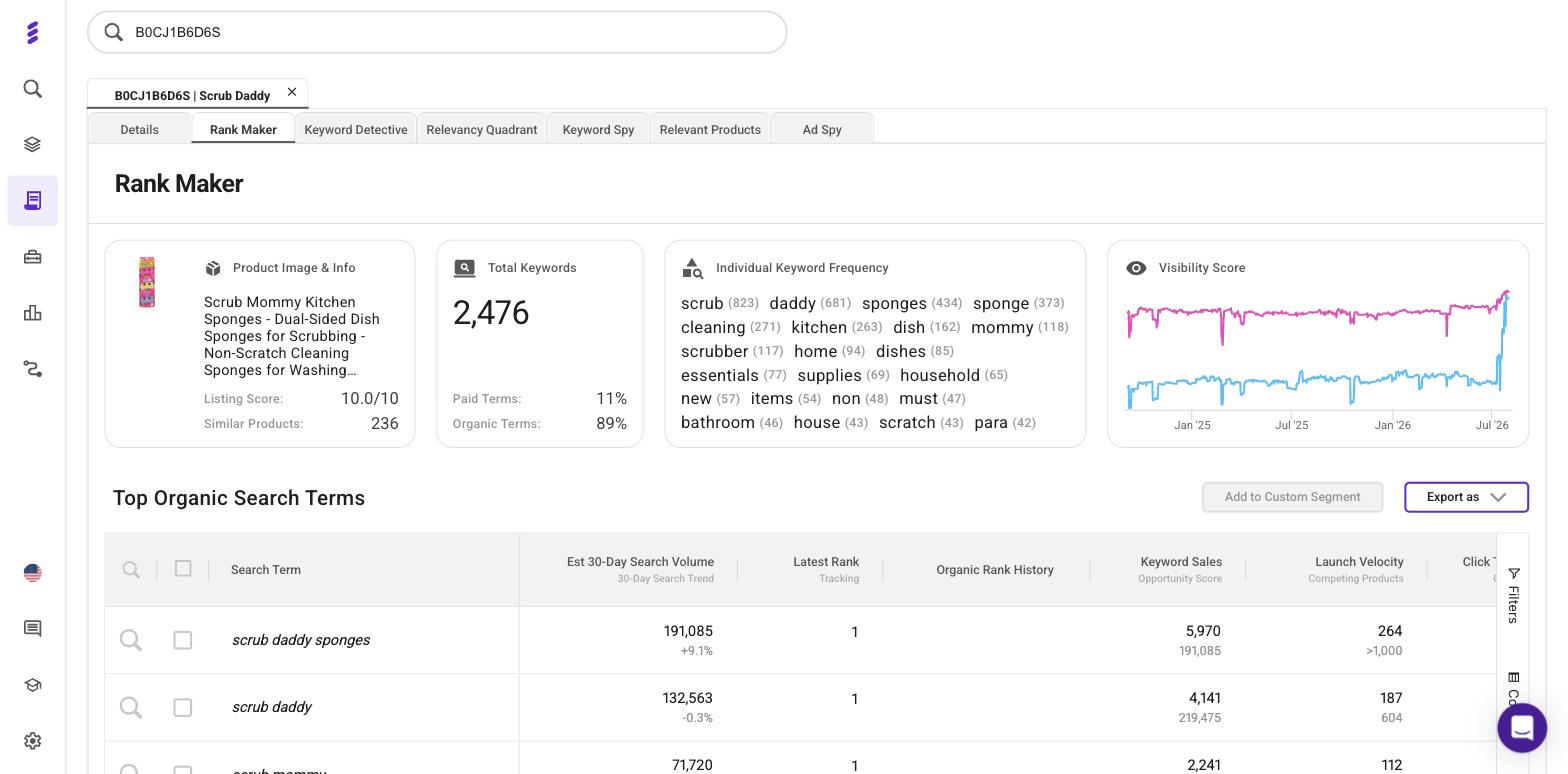
We ran it against ASIN B0CJ1B6D6S, a Scrub Daddy brand listing for Scrub Mommy sponges, on the complimentary Business account SmartScout gives us as an affiliate, on 2 August 2026. A few things are worth reading off that screen, because they settle questions the marketing copy leaves vague.
The keyword count holds up. That single ASIN returned 2,476 ranking keywords, split 89% organic and 11% paid, against a listing score of 10.0/10 and 236 similar products. SmartScout’s “1000+ keywords per ASIN” claim held comfortably for this established listing.
The history window is longer than the stat bar says. The Visibility Score chart’s axis is labelled from Jan ‘25 to Jul ‘26, but both lines start around September 2024, about four months before the first label, and run to the start of August 2026. That is close to two years of the two-line trend, more than the “18 Months of Visibility History” SmartScout advertises, and it fits the other line on its page: data “from Aug 2024 onward”.
The column names are as advertised. Opportunity Score and Launch Velocity are there, alongside Est 30-Day Search Volume with a trend delta, Latest Rank (with a “Tracking” label), Keyword Sales, Competing Products, and an Organic Rank History column, which is empty for the rows visible in our capture. For scrub daddy sponges the tool reported 191,085 estimated monthly searches, up 9.1%, at organic rank 1, with a Launch Velocity of 264.
And one thing the marketing does not tell you: Rank Maker is not a standalone tool. It is a tab inside a product view, sitting alongside Keyword Detective, Relevancy Quadrant, Keyword Spy, Relevant Products and Ad Spy. You reach all of them by searching an ASIN first, so think of Rank Maker as one view of a product rather than a separate app.
The six sub-features, and what each is for
SmartScout calls Rank Maker “SmartScout’s flagship keyword intelligence tool for Amazon sellers”. In practice it is six tools sharing a screen.
Top Organic Search Terms Table
The core of the product. Enter an ASIN and it returns the organic search terms that product ranks for — SmartScout claims over 1,000 keywords per ASIN, with more than 20 data points against each. It exports to CSV and Excel and lets you save custom segments, so a keyword set becomes a reusable working list rather than a one-off query (both buttons are in our capture). SmartScout also promises rank-history sparklines in the table, on tracked keywords at least.
This is the reverse-ASIN job, and it is the reason to open Rank Maker at all.
Visibility Score
A rolling time-series of how visible a product has been across every keyword it ranks for, rather than its position on any single term. It is the closest thing SmartScout has to a single health number for organic search, and the closest current match for what Historic Keyword Ranking described.
The value is in the shape of the line, not the number. A listing can hold its top three terms and still be quietly bleeding visibility across the long tail; the Visibility Score is the view that catches that.
Keyword Frequency Map
A word-cloud view of the individual words used most often across a product’s ranking keywords. It is the least analytical of the six and the most useful for listing copy: it tells you which words Amazon’s shoppers actually type, weighted by how often they appear across the terms you already rank for.
Product Snapshot
A summary panel for the ASIN you are looking at: a listing score, the keyword count, the paid versus organic split, and the number of similar products. Nothing here is deep, but the paid-versus-organic split is the number worth reading first — it tells you whether a competitor’s position is bought or earned.
Campaign Builder
Connect an Amazon Advertising account and Rank Maker will build PPC campaigns straight from the keyword table. This is the part that turns research into execution, and it is also the part sitting behind a higher plan tier than the rest of the tool. More on that below.
Rank Tracking
SmartScout’s phrasing is “Track unlimited keywords with no caps or throttling”, with historical sparklines on each tracked term. That is unusual in this category, where rivals such as Jungle Scout and Data Dive cap tracked keywords by plan. Our page on SmartScout keyword rank tracking compares it with those metered trackers; it is for the seller who already knows which keywords to watch.
The data behind each keyword
SmartScout advertises “20+ Data Points per Keyword”. The named ones are:
| Data point | What it answers |
|---|---|
| Estimated 30-day search volume | How much demand the term carries |
| Latest organic rank | Where the ASIN sits today |
| Historical rank sparkline | Where it has been |
| Opportunity Score | Which terms are quick wins: SmartScout says it is for prioritising them |
| Launch Velocity | SmartScout’s estimate of the sales velocity needed to rank for the term |
| Competing products count | How crowded the term is organically |
| Click Through Share | How much of the term’s click volume the listing takes |
| Conversion Share | How much of the term’s conversion volume it takes |
| Sponsored products count | How crowded the term is on paid |
| Estimated PPC Bid | What the term is likely to cost |
Click Through Share and Conversion Share are the two that most repay attention. They are the difference between ranking for a term and owning it, and they are the numbers that tell you whether a keyword is worth defending.
The limits: SmartScout gives Opportunity Score and Launch Velocity one-line descriptions but does not publish the formulas behind them. Treat both as directional heuristics for sorting a list, not as measurements you can audit. When an Amazon Advertising account is connected, ROAS, ACOS, CTR and CVR appear alongside them.
How the six pieces fit together
Read on their own the sub-features look like a feature list. Used in order they are a workflow, and the order is the point.
- Start with a competitor’s ASIN, not your own. The Top Organic Search Terms Table is a reverse-ASIN tool first; pointing it at a listing that already outranks you is where the unknown terms come from.
- Sort by Click Through Share, not by volume. High-volume terms with low share are the ones where the position exists but the traffic does not.
- Check the rank history before acting. SmartScout says tracked keywords get a sparkline in the table. A term someone has been climbing for six months is a different proposition from one they took last week.
- Save the survivors as a custom segment. That turns a query into a list you can come back to.
- Read the Visibility Score for your own ASIN afterwards. It tells you whether the gap you just found is a single weak term or a broader slide.
- Push the list into the Campaign Builder — if you are on Business — or into rank tracking if you are not.
Steps one to five run on Essentials. Only step six needs the higher plan.
How much history you actually get
SmartScout’s own Rank Maker page gives three different answers, so be precise. The stat bar says “18 Months of Visibility History”. The feature copy says “past 12 to 18 months”. The deep-dive section says “Historical data from Aug 2024 onward”.
Our capture sides with the third. On 2 August 2026, the Visibility Score chart for the listing above started around September 2024 and ran to the start of August 2026: close to two years, not eighteen months. So the safe reading is history from August 2024 onward, not a fixed window. How much a given ASIN shows depends on when it entered SmartScout’s dataset. If you need seasonality from before August 2024, this is not the tool, and no amount of plan upgrading changes that. The data simply does not go back further.
The plan-tier contradiction
SmartScout’s Rank Maker page states, verbatim: “Rank Maker is included in every SmartScout plan.” It still said so when we rechecked for this update.
Its own pricing table says otherwise, twice.
| Pricing-table row | Ticked for | Not on |
|---|---|---|
| Rank Maker | Essentials, Business, Enterprise | Basic |
| Rank Maker Ad Creation | Business, Enterprise | Basic, Essentials |
The first row was labelled “Search Terms Rank Maker” when we checked in August; SmartScout has since shortened it.
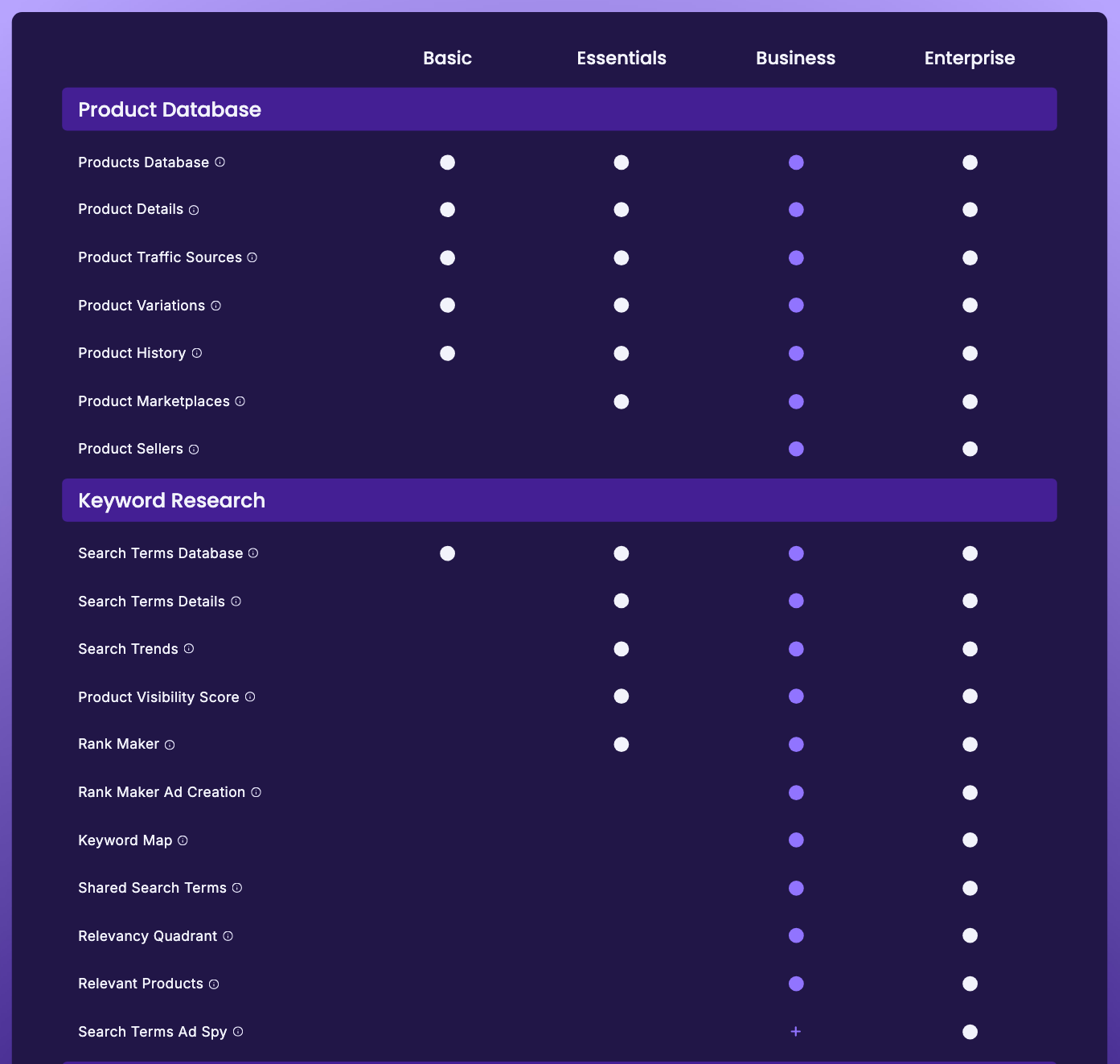
Two things follow. First, Rank Maker is not on Basic. Basic ($29 a month billed yearly, $49 monthly) gets the Products Database, the Search Terms Database, the sales estimator, the FBA calculator and the Chrome extension, but not the keyword tool. Anyone buying Basic on the strength of that sentence has bought the wrong plan. The Essentials plan card now reads “Unlimited Keyword Research & Tracking”, with a tooltip that says “Via Search Terms Explorer and Rank Maker.”
Second, Rank Maker is split across two plans. Everything described above (the search-terms table, the Visibility Score, the frequency map, the snapshot, the tracking) arrives at Essentials. The Campaign Builder, listed in the table as “Rank Maker Ad Creation”, does not arrive until Business. If your reason for wanting Rank Maker is to push keywords into PPC campaigns without retyping them, your real entry point is Business, not Essentials (prices in the table under “What it costs”).
We are not calling this dishonest marketing. It reads like a page written before the pricing table caught up. But it is wrong on the page as it stands, and it is wrong in the direction that costs the buyer money.
A correction to our own earlier version
Correction (2 August 2026): this page previously said the historical keyword suite sat on Enterprise. That was wrong, and we are flagging it rather than quietly editing it.
The mistake came from mapping “Historic Keyword Ranking” onto SmartScout’s historical data suite, Scope, whose full version is sold through Enterprise. That suite is real. SmartScout’s pricing table now lists it as “Historical Data via Scope”, with six rows: Historical Buy Box and Pricing Intelligence on every plan, Search Trends from Essentials, and Brand/Segment/Subcategory KPIs, Market Share and Share of Voice on Enterprise only. There is still no keyword-rank-history row in it. Keyword ranking history lives in Rank Maker, and Rank Maker starts at Essentials: one plan up from entry, not three.
If you read the earlier version and concluded you needed an Enterprise quote to see keyword history, you did not. Enterprise is priced per account and never published, so that correction is the difference between booking a sales call and buying Essentials at a checkout.
Rank Maker vs SmartScout rank tracking
These are two pages on our site, but on SmartScout’s site they are now one: its old /rank-tracker address redirects to the Rank Maker page. The boundary between the two jobs still matters.
| Job | Right tool | Why |
|---|---|---|
| Find keywords you did not know a product ranked for | Rank Maker | Reverse-ASIN discovery, 1,000+ terms per ASIN |
| Understand long-run visibility across all terms | Rank Maker | The Visibility Score is the only view of the whole surface |
| Score and prioritise a keyword list | Rank Maker | Opportunity Score, shares, competing counts, estimated bid |
| Build PPC campaigns from that list | Rank Maker (Business) | Campaign Builder connects to Amazon Advertising |
| Watch positions on terms you have already chosen | Rank tracking, inside Rank Maker | Unlimited tracked keywords, each with a rank-history sparkline (per SmartScout) |
The short version: discovery and diagnosis first, monitoring second. If you do not yet know which keywords matter, start with the search-terms table. If you do, the tracking toggle is the part you will use most.
Where Rank Maker is the wrong tool
- You need shared-keyword overlap between products. That is Keyword Detective, and it is a Business feature.
- You need the keywords competitors bid on, not only the ones they rank for. That is Ad Spy, a Business add-on included on Enterprise. Our SmartScout competitor keyword research guide maps each competitor-keyword question to the tool and plan that answers it.
- You need the wider search-term list rather than one ASIN’s terms. That is the Search Terms Database, with Search Terms Details for one term’s history.
- You need demand direction rather than position. That is SmartScout’s Search Trends.
- You need to know whether a listing surfaces at all. That is listing visibility tracking, a different question from where it ranks.
- You need category-level visibility share. That is Share of Voice, and it is Enterprise-only.
About that “40% sales lift”
SmartScout’s Rank Maker stat bar reads “40% Avg. Sales Lift Reported”. On the same page, the support for that figure is one testimonial from one seller who says sales were up 40% within six weeks.
That is a marketing claim, not a study. We are repeating it here only because you will see it, and because you should know how thin the evidence beneath it is. One customer quote is not an average.
What it costs
Rank Maker is not sold separately. You buy the plan.
| Plan | Billed yearly | Billed monthly | What you get of Rank Maker |
|---|---|---|---|
| Basic | $29/mo | $49/mo | Nothing |
| Essentials | $99/mo | $119/mo | Everything except Campaign Builder |
| Business | $239/mo | $299/mo | The full tool, including Campaign Builder |
| Enterprise | Custom | Custom | The full tool |
Prices from SmartScout’s pricing page, checked 10 October 2026. SmartScout doesn’t print yearly totals; at $99 a month billed yearly, Essentials works out to $1,188 a year.
Correction (10 October 2026): SmartScout raised its prices after our 1 August 2026 check. This table previously showed Basic at $29 a month, Essentials at $97 and Business at $187 on monthly billing, with coupon prices worked out from those figures that no longer apply.
Discount codes, and the dates we last confirmed them at a checkout, are on our SmartScout coupon page. SmartScout’s terms say promotional offers can’t be combined with other discounts unless stated otherwise.
SmartScout’s paid plans have no free trial; each self-serve plan carries a 7-day money-back guarantee instead. If you want to see the data before paying anything, the free Chrome extension is the cheapest way in: its Chrome Web Store listing offered 100 free full-feature uses a month when we checked on 10 October 2026.
Pros
- Reverse-ASIN depth: 1,000+ keywords per ASIN with 20+ data points each (SmartScout's figures)
- Visibility Score shows visibility across every ranking keyword, not one term at a time
- Unlimited keyword tracking, with 'no caps or throttling' (SmartScout's words)
- Campaign Builder closes the loop from research to live PPC campaigns
- Click Through Share and Conversion Share are useful prioritisation numbers
- Starts at Essentials, not Enterprise
Cons
- Not on the Basic plan, despite SmartScout's page saying it is on every plan
- Campaign Builder needs Business, more than twice the Essentials price
- History starts in August 2024, so there is no seasonality from before then
- Opportunity Score and Launch Velocity have one-line descriptions but no published formulas
- The headline 40% sales-lift claim rests on a single testimonial
- Ad metrics require a connected Amazon Advertising account
What this page is based on
Our complimentary SmartScout Business account, for the Rank Maker capture shown above (2 August 2026). Also SmartScout’s Rank Maker page, pricing page (plan cards, comparison table and tooltips), features hub and Data Levels page, and the retired /historic-keyword-ranking, /historical-keyword-ranking and /rank-tracker addresses, all rechecked on 10 October 2026. Our methods are on how we test.
Read this next
- Best Amazon reverse ASIN tools: how Rank Maker compares with other vendors’ reverse-ASIN tools
- Best Amazon keyword research tools: the wider category decision
Frequently Asked Questions
What happened to SmartScout Historic Keyword Ranking?
The name is retired. Both /historic-keyword-ranking and /historical-keyword-ranking return 404, and the phrase is absent from SmartScout's pricing table, plan cards, features hub and navigation. The job it described, long-run keyword position history, now lives inside Rank Maker as the Visibility Score and, according to SmartScout, a rank-history sparkline on each tracked keyword.
Which SmartScout plan includes Rank Maker?
Essentials, at $99 a month billed yearly or $119 monthly (checked 10 October 2026). SmartScout's Rank Maker page says the tool is included in every plan, but its own pricing table leaves the Rank Maker row unticked for Basic. The campaign-building half, listed as Rank Maker Ad Creation, needs Business at $239 a month billed yearly or $299 monthly.
How far back does SmartScout keyword ranking history go?
Back to August 2024 at most. SmartScout's Rank Maker page advertises 18 months of visibility history but also says its data runs from August 2024 onward, and the chart we captured on 2 August 2026 went back to around September 2024, close to two years. How much history an ASIN shows depends on when it entered SmartScout's dataset.
Is Rank Maker the same thing as SmartScout Rank Tracker?
Rank tracking is one of Rank Maker's six sub-features, and it is no longer a separate product: SmartScout's old /rank-tracker address now redirects to the Rank Maker page. Rank Maker covers discovery, scoring, tracking and campaign building; tracking is the part you use once you know which keywords matter.
Does Rank Maker really deliver a 40% sales lift?
That number is a SmartScout marketing claim. It appears in their stat bar as '40% Avg. Sales Lift Reported' and is supported on the page by exactly one customer testimonial. Treat it as advertising, not as a measured result.
Do you need an Amazon Advertising account to use Rank Maker?
Only for the Campaign Builder and the paid-performance columns. Keyword discovery, the Visibility Score and rank tracking all work without one. ROAS, ACOS, CTR and CVR only populate once an ad account is connected.