SmartScout Free Trial: There Isn't One. Here Is What You Get Instead
Affiliate disclosure: we may earn a commission if you buy through links on this page. How we make money How we check facts
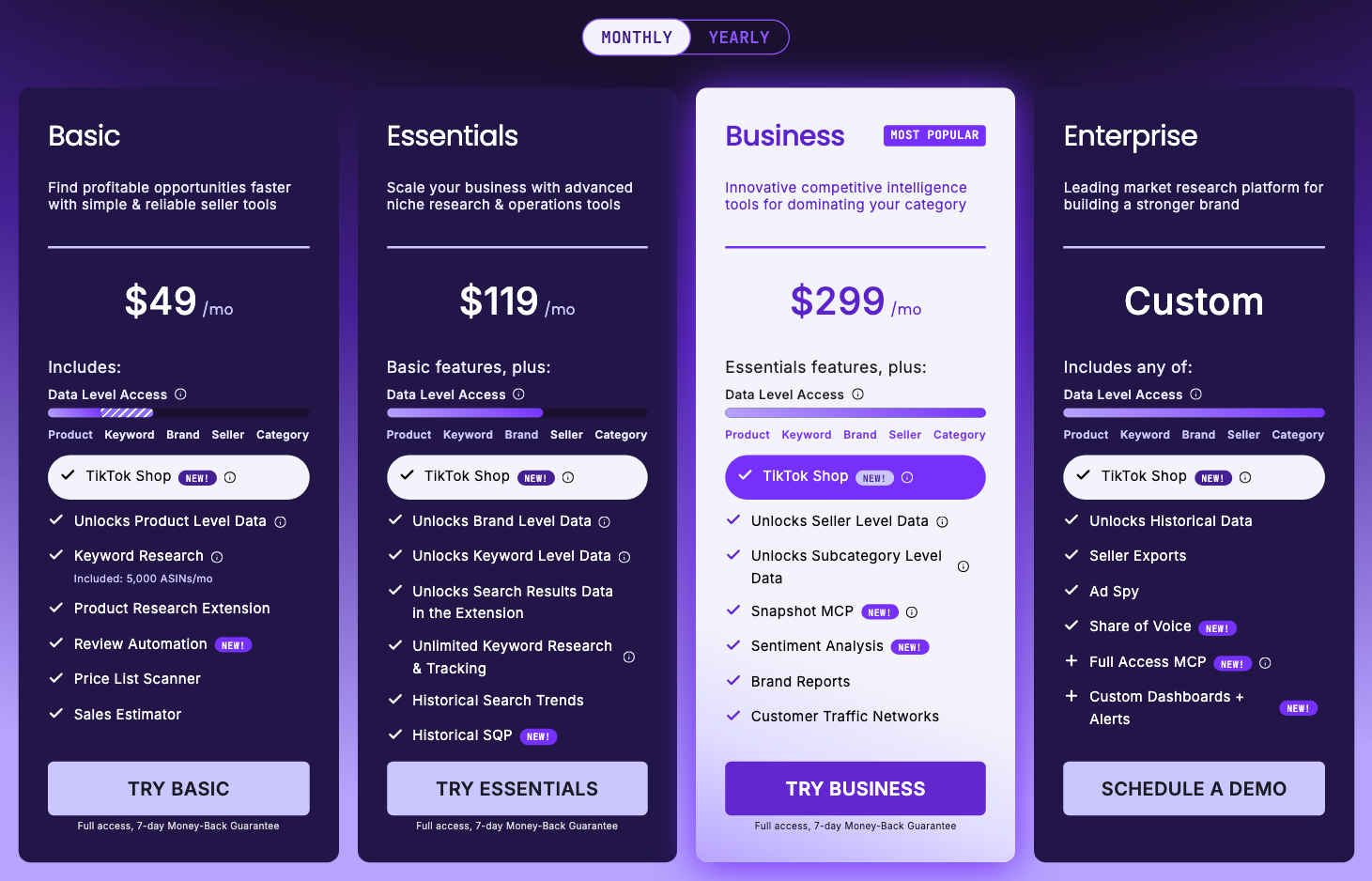
There is no SmartScout free trial. SmartScout charges when you subscribe and gives new customers a 7-day money-back guarantee instead: its pricing page, checked 10 October 2026, says “Full access, 7-day Money-Back Guarantee” under every self-serve plan and never mentions a trial. Since you pay either way, decide before you start what the seven days have to prove.
No free trial · 7-day money-back guarantee for new customers Affiliate link
The rest of this page covers how the guarantee works under SmartScout’s current terms, where the free-trial idea comes from, how to cancel and claim a refund, the free ways to see SmartScout’s data, and how to get a real answer out of the week.
What you expect vs what you get
| What people search for | What SmartScout actually does |
|---|---|
| A 7-day free trial | A 7-day money-back guarantee |
| No card required | Card required at the subscription step (checked 1 August 2026) |
| No charge until day 8 | Charged when you subscribe |
| Cancel and owe nothing | Cancel, then request the refund separately |
| A trial for anyone | A guarantee for new customers only, once each |
| A free plan afterwards | No free plan; a free Chrome extension and a free brand report |
The difference is small in money and large in behaviour. A free trial lets you forget about it. A money-back guarantee doesn’t: if you drift past day seven, you have bought a month.
Why so many pages say there is a free trial
SmartScout uses both phrases on its own website. We checked each of these on 10 October 2026:
- The pricing page, where you buy, says “Full access, 7-day Money-Back Guarantee” and has no trial wording.
- The homepage FAQ says you can “Start with full platform access and a 7-day money-back guarantee”.
- The affiliate-programme page, which briefs the people who write about SmartScout, still offers discount codes “in addition to SmartScout’s 7-day free trial.”
- The wholesale landing page shows a “Try SmartScout Free for 7 Days” call to action, with “Full refund within 7 days” in the line beneath its button.
- The Brand Reports page offers a free brand report and says “No Credit Card payment needed. Try out SmartScout for free through this page”, without saying what that free access covers beyond the report.
- SmartScout’s comparison page lists its own free trial or plan as “None”, next to a 7-day money-back guarantee.
So the affiliates aren’t inventing the trial. They are repeating SmartScout’s own copy, which its pricing page and terms contradict: on a paid plan you pay first, and the guarantee is how you get the money back.
Correction (10 October 2026): we previously quoted a section headed “FREE TRIAL” in SmartScout’s terms of use. The current terms, last updated 7 July 2026, contain no trial wording at all, and the pricing page no longer says “cancel at any time”.
How the 7-day money-back guarantee works
SmartScout’s terms of use are unusually specific here, and the specifics matter more than the headline.
Full refund inside seven days. Section 9.3 gives users the right to cancel a service they are unsatisfied with and “receive a full refund within 7 days of the date the contract was entered into.”
New customers only, once each. The same section says the guarantee “applies exclusively to new customers and is limited to one-time use per customer within the first seven days of account creation,” and “does not apply to any customer who has previously received a refund under this offering.” You get one. Use it on the plan you actually want to evaluate, not on a cheap tier you are curious about.
The clock may start before you pay. Note the wording: the first seven days of account creation. Registration and subscription were separate steps when we last walked through signup, on 1 August 2026: the form asked for name, email, password and phone, and the card came later. If you create an account on Monday and subscribe on Thursday, you may have three days left rather than seven. Do both on the same day.
No reason required. Users “must send an unambiguous notice”; no reason is needed, though one is encouraged. SmartScout then verifies eligibility and issues the refund.
Access ends with the refund. “Users will lose access to the purchased service upon issuance of the refund.” Export or screenshot anything you want to keep before you ask.
UK buyers. Section 8.2 says “the right to cancel does not apply to contracts concluded through this Website due to the nature of the products and services offered.” Your practical remedy is the 7-day guarantee, so treat the deadline as real.
EU consumers. Section 8.1 gives European consumers the statutory 14-day right of withdrawal, but notes that for digital content the right can be waived. Read what you accept at checkout.
How to sign up for SmartScout
- Decide on a discount first, if you want one. SmartScout’s own coupons page lists SMARTSCOUT25 for 25% off the first three months (checked 10 October 2026), and our partner link applied a 25% code automatically when we last confirmed it, on 1 August 2026.
- Register with your name, email, password and phone number. The sign-up form asked for those four details and no card when we looked at it again on 10 October 2026.
- Choose your plan. This is the step that matters: pick the tier that holds the feature you came to test, not the cheapest one. Our SmartScout pricing guide maps features to tiers.
- Enter card details, and check that any discount shows before you submit.
- Put the refund deadline in your calendar now. Day seven, not day eight.
How to cancel a SmartScout subscription
Cancelling and refunding are two different actions, and doing the first doesn’t do the second. That is the most common way people lose money they meant to get back.
To cancel: SmartScout’s terms say an open-ended subscription can be ended “at any time by sending a clear and unambiguous termination notice” or “by using the applicable controls within the Service.” The email route is support@smartscout.com.
Allow 14 days. The same clause, section 7.2, says “Terminations take effect 14 days after the Owner receives the notice.” If your renewal date falls inside that window, we read that as meaning you could be billed for one more period, so cancel well before renewal rather than on the last day.
Why it renews at all: section 7.1 makes the subscription a recurring fee that you must pay “on time to maintain” it. Nothing lapses on its own.
Correction (10 October 2026): this section previously quoted older terms saying a cancelled account stays active until the end of the billing period. The current terms no longer say that; they set the 14-day notice period above.
How to get a SmartScout refund
Inside the seven days, cancelling is not enough. You have to ask.
- Check you qualify. New customer, within seven days of account creation, no previous refund under the offer.
- Email support@smartscout.com with an unambiguous request. The terms require clarity, not eloquence. “I am requesting a refund under the 7-day money-back guarantee for the account registered to this email address” does the job. Include the account email and the plan.
- Give a reason. It isn’t required, but the terms encourage it, and a specific one (“the seller data I needed sits on a higher tier than I bought”) is more likely to end in a clean resolution than silence.
- Save your work first. Access ends when the refund is issued.
- Cancel as well, so there is no doubt about renewal while the request is processed.
Outside the window, the guarantee is gone, and a refund becomes SmartScout’s decision rather than something the guarantee entitles you to. Cancel instead, mindful of the 14-day notice period.
Is there any free way to use SmartScout?
A few, and each is narrower than a trial. We checked all three on 10 October 2026.
- The Chrome extension. The SmartScout Chrome extension is free on the Chrome Web Store, where its listing offers 100 full-feature uses a month with no contract or card, and shows 10,000 users and a 4.1 rating from 15 ratings. That allowance was 1,000 uses a month when we checked on 1 August 2026. The extension shows product, profit and search-page data while you browse Amazon, which is a fair way to judge SmartScout’s numbers before paying.
- A free brand report. SmartScout’s Brand Reports page has a “Get Your Free Brand Report” button and says no credit card payment is needed. The button opens SmartScout’s sign-up form, which asks for your name, email, password and phone number and offers a “zero-risk guarantee”, not a trial. Neither page says what else the free access includes or for how long. Our Brand Reports review covers what a report contains and how to test one against a brand you know.
- Public previews. SmartScout’s Search Trends page embeds a free preview of trending Amazon search terms, with search counts and growth figures, and our Search Trends review explains how to read it.
None of these is a free plan. SmartScout’s pricing page lists no free plan, and the databases people subscribe for (brands, sellers and subcategories) sit behind the paid plans.
How to spend seven days properly
Seven days is enough to answer a specific question and not nearly enough to browse. Decide what you are testing before day one.
Day 1: calibrate, don’t explore. Pick a category you know well and check SmartScout against your own knowledge: are the sellers who show up the ones you know are there, and are the brand-level numbers in the right range? SmartScout’s founder, Scott Needham, puts its accuracy “within 80-90%” on most brands and products, and says it tracks the roughly 30 million products that generate revenue rather than all of Amazon (SmartScout’s accuracy page, checked 10 October 2026). Find out what that means in your niche before you rely on it.
Days 2 to 3: run one live decision. Take a sourcing or category question you have this week and answer it end to end. Who owns the Buy Box in this subcategory? Which brands here are worth approaching? How concentrated is this market? The test is whether the tool told you something you didn’t already know.
Days 4 to 7: check the answer changed something. Compare what SmartScout gave you against what your existing tools already said. If they agree, you have paid for a second opinion. If SmartScout surfaced a seller, brand or category structure you would have missed, that is the case for keeping it. Also confirm the features you were counting on are on your tier: brand search starts on Essentials, and seller data, subcategories and exports start on Business. Finding that out in month two is expensive.
Day 7, in the morning: keep, change tier, or ask for the refund. Not day eight.
Paying less for the week you evaluate
If a trial existed, a coupon would hardly matter. Because the first month on a paid plan is charged up front, a discount is what makes the evaluation cheaper.
SmartScout’s own coupons page lists SMARTSCOUT25 for 25% off the first three months (checked 10 October 2026). Our partner link at the top of this page applied REVENUEGEEKS25 for the same 25% when we last confirmed it at checkout, on 1 August 2026; SmartScout has raised its prices since, and we haven’t re-tested it. Refund inside seven days and you pay nothing either way. Our SmartScout coupon code guide explains when yearly billing is the cheaper route, which on Basic it now is from the first month.
One caveat, since the internet is full of the opposite claim: don’t expect a coupon to stack with yearly billing. SmartScout’s terms say promotional offers may not be combined with other discounts unless stated otherwise, and when we tested the partner code on 1 August 2026, it worked on monthly billing only. The most any SmartScout code has taken off in our checks is 25%, for three months.
Still deciding whether the platform is right for you at all? Our SmartScout review covers what it does well and where it frustrates, and the SmartScout alternatives roundup is the better read if you suspect the job you have is not the one SmartScout is built for.
Frequently Asked Questions
Does SmartScout have a free trial?
No. SmartScout's pricing page, checked 10 October 2026, offers a 7-day money-back guarantee on each self-serve plan and never mentions a trial. Some of SmartScout's own pages, including its affiliate page, still use free-trial wording.
Do you need a credit card to sign up for SmartScout?
Yes, to subscribe. When we walked through signup on 1 August 2026, the registration form asked only for name, email, password and phone number, and card details came at the subscription step, where you are charged.
How do I cancel my SmartScout subscription?
Use the controls in your account or email support@smartscout.com. SmartScout's terms, last updated 7 July 2026, say a cancellation takes effect 14 days after SmartScout receives the notice, so don't leave it until the day before renewal.
How do I get a refund from SmartScout?
Send an unambiguous refund request to support@smartscout.com within seven days. The guarantee covers new customers once, within the first seven days of account creation, and your access ends when the refund is issued.
When does the 7-day clock start?
SmartScout's terms tie the guarantee to the first seven days of account creation, not the day you subscribe. Register and subscribe on the same day if you want all seven.
Is the SmartScout Chrome extension free?
Yes. Its Chrome Web Store listing offers 100 free, full-feature uses a month with no contract or card (checked 10 October 2026). SmartScout has no free plan, but its Brand Reports page also offers a free brand report without a card.