Keepa Extension: Chrome, Firefox, Edge and Opera, but Nothing for Safari
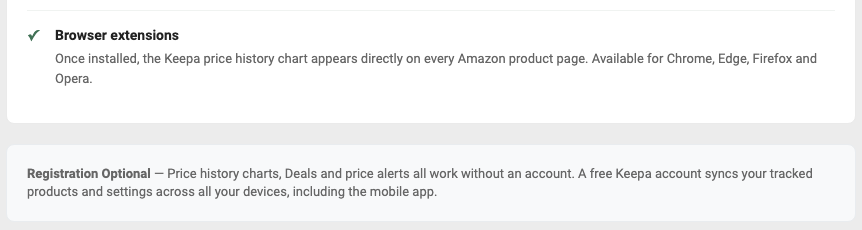
Keepa’s free extension is official on Chrome, Edge and Firefox, including Firefox for Android, and Keepa says its Chrome version also works in Opera. There is no Safari extension (checked 11 November 2026). On iPhone, iPad and Android, Keepa offers its own app. Once installed, the price-history chart, which Keepa calls the Keepa Box, appears on every Amazon product page, below the product image and details.
Every user count, rating and date below was read on the store’s own listing on 11 November 2026. The rest comes from Keepa’s Apps page, its FAQ and its news page, read the same day.
Which browsers have an official Keepa extension?
| Browser | Official listing | Users and rating | Version, last updated |
|---|---|---|---|
| Chrome | Keepa - Amazon Price Tracker, by Keepa GmbH | 5,000,000 users; 3.4 from 5.2K ratings | 5.76, 9 November 2026 |
| Edge | Keepa - Amazon Price Tracker, by Keepa | 1,100,000+ users; 4.1 from 59 ratings | 5.77, 11 November 2026 |
| Firefox, desktop and Android | Keepa.com - Amazon Price Tracker, by Keepa.com | 271,655 users; 4.2 from 678 reviews | 5.68, 26 October 2026 |
| Opera | None of its own; Keepa points to the Chrome listing | Not applicable | Same as Chrome |
| Safari (Mac, iPhone, iPad) | None | Not applicable | Not applicable |
Keepa’s own pages disagree by one browser. The FAQ says Keepa provides “browser extensions for Chrome, Firefox and Edge”. The Apps page says the chart is “Available for Chrome, Edge, Firefox and Opera”, and the tooltip on its Opera icon explains the gap: “Our Chrome extension is compatible with Opera”. Opera support is the Chrome build, not a separate add-on.
Keepa for Chrome
The Chrome Web Store listing carries Google’s Featured badge and names the developer as Keepa GmbH, Berndorfer Str. 10, Kemnath 95478, DE. The short address get.keepa.com redirects to it. The listing says “No account required to start tracking” and describes three things the extension adds to Amazon: price-history charts, price-drop and availability alerts, and price comparison across Amazon’s country sites.

Keepa for Firefox
The Firefox add-on is marked “Available on Firefox for Android” and its description says it “Requires Firefox 140 or later (142 on Android)”. Two notices can look alarming and are worth reading correctly:
- Firefox shows the line “This add-on is not actively monitored for security by Mozilla. Make sure you trust it before installing.” It is Mozilla’s wording, not a warning about Keepa in particular: Jungle Scout’s Firefox add-on showed the same line that day.
- On install and update, Firefox lists “Browsing activity” as collected data. Keepa’s listing explains that the add-on “has to tell keepa.com which product you are looking at, so it sends that product’s ASIN”, and says the ASIN “is not logged or retained”.
Keepa for Edge and Opera
Edge has its own listing in Microsoft’s store; Keepa’s Apps page labels the link “Install on Edge for Windows”.
Opera has none. A search of Opera’s add-on store for “keepa” returned one result, an unrelated password helper, above the store’s own note: “Haven’t found what you need? Check out the Chrome Web Store.” Opera’s help pages describe the route: install Opera’s Install Chrome Extensions add-on, open the extension’s Chrome Web Store page, and click “Add to Opera”.
Is there a Keepa extension for Safari?
No, not on Mac, iPhone or iPad (checked 11 November 2026):
- Keepa lists none. Its Apps page shows four browser icons (Chrome, Edge, Firefox, Opera) and its FAQ names three. Safari is on neither.
- Apple’s Mac catalogue has none. A search of Apple’s App Store catalogue for Mac software returned 12 results for “keepa”, all from other publishers.
- The iPhone app’s listing doesn’t mention Safari. The only Keepa GmbH app in Apple’s search results is Keepa · Price Tracker for iPhone and iPad, described below.
On a Mac, install Chrome or Firefox next to Safari and use Keepa there. Helium 10 users are in the same position, as our Helium 10 on Safari page explains.
Keepa on phones: Android, iPhone and iPad
Keepa’s main answer for phones is an app. Its Apps page links to one listing in each app store, and the Firefox add-on also runs on Android:
| Device | What Keepa offers | Listing on 11 November 2026 |
|---|---|---|
| iPhone and iPad | Keepa · Price Tracker, seller Keepa GmbH | Free; 4.8 from 1.6K ratings; version 6.7.0 (2 November 2026); needs iOS 16.4 or later |
| Android | Keepa · Price Tracker, by Keepa.com | 4.2 stars, 5.86K reviews; 1M+ downloads; updated 2 November 2026 |
| Android, in Firefox | The Firefox add-on from the table above | Needs Firefox 142 or later on Android |
Both store descriptions list price-history charts, price-drop and availability alerts, product search and a barcode scanner “to check online prices while you are in a retail store”. Keepa’s Apps page says a free Keepa account “syncs your tracked products and settings across all your devices, including the mobile app”.
Keepa lists no extension for Chrome on Android or for any iPhone browser. On Android, the Firefox add-on is the only route Keepa lists for getting the chart inside Amazon’s own pages.
How to add Keepa to Amazon
- Open keepa.com, choose Apps in the menu, and click your browser’s icon. Each icon links to the official listing in that browser’s store.
- Click the store’s install button: “Add to Chrome”, “Get” in Edge, or “Add to Firefox”. In Opera, add Opera’s Install Chrome Extensions add-on first, then use “Add to Opera” on the Chrome listing.
- Accept the permissions. Keepa’s FAQ says: “Make sure you allow all requested permissions and let the extension always run.”
- Open any Amazon product page and scroll down. Keepa’s FAQ says the Keepa Box “is embedded below the product image and product details”.
- To follow a price, open the tracking form in the box, which Keepa’s FAQ calls the “Track product” tab. No login is required; a free account keeps your tracked products in sync across devices.
There is no toolbar button to look for. The Edge listing says the extension works “without adding any browser buttons”, and that you reach “all features and settings directly from any Amazon product page”.
What the free extension shows, and what needs Keepa Pro
The extension itself is free on every store, and the button on Keepa’s Apps page reads “Add to Chrome - It’s Free”. What you see inside the Keepa Box depends on whether you subscribe:
| In the Keepa Box | Free | Keepa Pro |
|---|---|---|
| Price-history chart | Yes, no account needed | Yes |
| Price-drop and back-in-stock alerts | Yes | Yes, plus price-increase alerts |
| Prices on other Amazon country sites | Yes | Yes |
| Sales-rank, offer-count and rating/review-count graphs | Not in the free tier | Yes (“Advanced Graphs”) |
| Buy Box statistics and stock per offer | Not in the free tier | Yes |
The Pro column is the benefit list on Keepa’s Pro page. Keepa Pro costs €29 a month or €290 a year, billed in euros, with no free trial; our Keepa pricing guide has the full free-versus-Pro table, cancellation and refund terms.
The box changed this week. Keepa’s news post of 9 November 2026 says the Keepa Box was rebuilt to match its product page, with “the same tabs, a quick Track price form, sharing, a menu for your links and a compact settings panel”. If yours looks different from older screenshots, that is why.
Which Amazon marketplaces the extension covers
Keepa’s FAQ lists 11 Amazon shops: “the US, Germany, Great Britain, France, Italy, Spain, Canada, Japan, India, Mexico and Brazil”. The Firefox listing names the same 11 domains. The Chrome and Edge descriptions name ten and leave out Brazil, although Keepa’s home page counts 11 marketplaces. Amazon’s Australian, Dutch, Swedish and UAE sites appear in none of those lists.
Keepa tracks Amazon only. Its FAQ defines the service as recording “the price history of products on Amazon”, and the Firefox listing says the add-on needs access to keepa.com and those Amazon domains and “runs nowhere else”. It adds nothing to eBay, Walmart or Flipkart pages.
Keepa not showing on Amazon: what to check
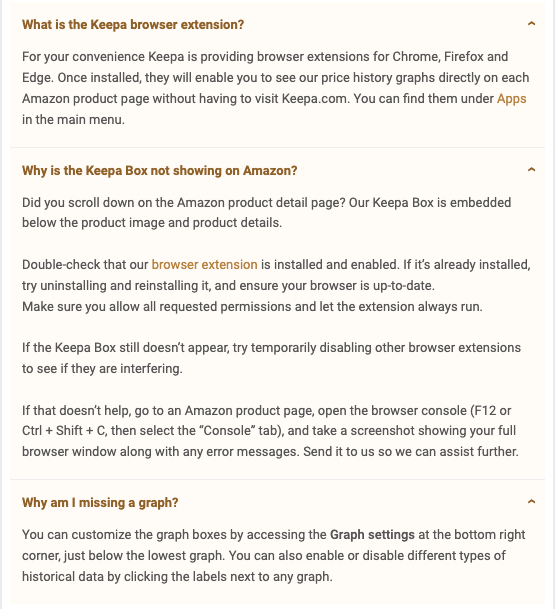
Keepa’s FAQ has an entry titled “Why is the Keepa Box not showing on Amazon?” These are its steps, in its order:
- Scroll down the product page. The box is below the product image and details, not at the top.
- Check that the extension is installed and enabled.
- Uninstall and reinstall it, and update your browser.
- Allow all requested permissions and let the extension always run.
- Temporarily disable other extensions to see whether one interferes.
- If none of that works, open the browser console on an Amazon product page (F12, then the Console tab), take a screenshot of the full window with any error messages, and send it to Keepa.
Other causes that Keepa itself documents:
- A privacy or blocking add-on. In a developer reply on its Firefox listing, Keepa says the most common issue is “other add-ons like privacy badger or similar blocking the insertion of our Keepa box on Amazon”. That reply is about six years old, and the FAQ’s step 5 still points the same way.
- An old Firefox. The add-on needs Firefox 140 or later, 142 on Android.
- The box loads but a line is missing. The FAQ entry “Why am I missing a graph?” says to open the Graph settings and to click the labels next to a graph to switch data types on or off. Keepa’s 9 November post adds that series you switch off now fold away under “N more” in the legend. Sales-rank and Buy Box data need Keepa Pro.
- Pro data missing after you subscribe. The FAQ says this “usually happens if you have multiple accounts”; log in to the account named in your payment receipt.
- A changed box. Keepa rebuilt the box on 9 November 2026 and updated the Chrome extension the same day, with an Edge update two days later. Reinstalling, the FAQ’s step 3, forces the current version.
Keepa’s FAQ has no entry for a box stuck on an “Anti-bot check” screen, which one reviewer on the Edge listing reported in March 2026. For that, or anything else the steps don’t fix, Keepa’s Support page gives an email address, info@keepa.com, and a contact form. Older Keepa news posts mention a user forum, but the site links to none today.
How to recognize the official Keepa extension
Searching a store for “keepa” returns other publishers’ tools next to Keepa’s own. On 11 November 2026:
- Chrome Web Store: results included International Keepa Charts (from selleramp.com), KeepaVault (keepavault.com), ProfitNavi for Keepa and an FBA calculator called ASINPeek. These are other publishers’ products that use Keepa’s data or name; none is published by Keepa GmbH.
- Firefox Add-ons: the first result was an add-on called Amazon Price Tracker, from a publisher named CDO, with 191 users. Keepa’s own add-on, with 271,655 users, was second.
- Edge Add-ons: Keepa’s listing came first of 21 results; the others we saw were unrelated, such as KeePass password helpers and keep-awake utilities.
The official ones are easy to confirm:
| Store | Name and publisher | Address ends in |
|---|---|---|
| Chrome Web Store | Keepa - Amazon Price Tracker, Keepa GmbH | neebplgakaahbhdphmkckjjcegoiijjo |
| Edge Add-ons | Keepa - Amazon Price Tracker, Keepa | ejefaeioamebhekmfaclajddbpnnobje |
| Firefox Add-ons | Keepa.com - Amazon Price Tracker, Keepa.com | /addon/keepa/ |
| App Store, Google Play | Keepa · Price Tracker, Keepa GmbH and Keepa.com | id1518541385, com.keepa.mobile |
If in doubt, start from the Apps page on keepa.com and follow its links.
Keepa next to the seller-suite extensions
Keepa’s store listings describe a price tracker: charts, alerts and price comparison. The research suites’ extensions are built around sales and revenue estimates, and each supports fewer browsers than Keepa (checked 11 November 2026):
- The Helium 10 Chrome extension is supported in Chrome only. Helium 10’s help center says it is “not compatible with other browsers such as Safari, Edge, or Firefox”, so there is no Helium 10 Firefox add-on.
- The Jungle Scout extension comes in Chrome and Firefox versions.
- The SmartScout Chrome extension is on the Chrome Web Store only; we found no SmartScout add-on in Firefox’s or Edge’s store.
The two kinds do different jobs: the suite for demand estimates, Keepa for price and rank history. Our Helium 10 vs Keepa and Jungle Scout vs Keepa comparisons cover how the two fit together.
Bottom line
On Chrome, Edge or Firefox, install Keepa from the link on keepa.com’s Apps page and scroll down any Amazon product page to find the chart. On Opera, use the Chrome listing. On Safari there is nothing to install, so use a second browser on a Mac and the Keepa app on an iPhone or iPad. If the chart is missing, work through Keepa’s six steps before anything else, and pay for Keepa Pro only when you need sales-rank or Buy Box data.
Frequently Asked Questions
Is the Keepa extension free?
Yes. The extension is free to install, and Keepa says price-history charts, Deals and price alerts all work without an account. Sales-rank graphs, Buy Box statistics and stock data are Keepa Pro benefits, and Keepa Pro costs €29 a month or €290 a year (checked 11 November 2026).
Is there a Keepa extension for Safari?
No. Keepa's Apps page lists extensions for Chrome, Edge, Firefox and Opera only, and on 11 November 2026 a search of Apple's catalogue of Mac software for keepa returned nothing published by Keepa. On a Mac, use Keepa in Chrome or Firefox; on iPhone and iPad, use the Keepa app.
Does Keepa work on iPhone, iPad or Android?
Yes, through Keepa's own app, called Keepa · Price Tracker, on the App Store for iPhone and iPad and on Google Play for Android. Android users can also install the Keepa add-on in Firefox for Android, which its listing says needs Firefox 142 or later.
Why is Keepa not showing on Amazon?
Keepa's FAQ says to scroll down first, because the Keepa Box sits below the product image and product details. Then check that the extension is installed and enabled, reinstall it, update your browser, allow all requested permissions, and temporarily disable other extensions. If it still fails, Keepa asks for a screenshot of the browser console.
How do I know I have the official Keepa extension?
Check the publisher. The official Chrome Web Store listing is Keepa - Amazon Price Tracker by Keepa GmbH, the Edge listing is published by Keepa, and the Firefox add-on is Keepa.com - Amazon Price Tracker by Keepa.com. The safest route is the Apps page on keepa.com, which links to all three.
Which Amazon sites does the Keepa extension work on?
Keepa's FAQ lists 11 Amazon marketplaces: the US, Germany, Great Britain, France, Italy, Spain, Canada, Japan, India, Mexico and Brazil. Keepa tracks Amazon only, so it does not add charts to eBay, Walmart or Flipkart.