Jungle Scout Chrome Extension: Is It Free, What It Shows and How to Install It
Affiliate disclosure: we may earn a commission if you buy through links on this page. How we make money How we check facts

The Jungle Scout extension is free to install but is not a free tool: it needs a Jungle Scout account, and Jungle Scout sells no free plan and no free trial (checked 11 November 2026). Every plan includes it, from Starter at $29 a month billed annually or $49 monthly (prices checked 10 October 2026). Jungle Scout publishes it for Chrome and Firefox only, with no Safari or Edge version.
Extension included in every plan · no free trial Affiliate link
Is the Jungle Scout extension free?
No. Installing it costs nothing, but Jungle Scout’s own pages tie it to a paid membership (all read 11 November 2026):
- Jungle Scout’s pricing page says in its FAQ that the web app and the extension “are included and available in your Jungle Scout account, whether you go with Starter, Growth Accelerator, or Brand Owner”. The same FAQ says: “While we do not offer a free trial, we do offer a 7-day money back guarantee” (pricing page).
- The Chrome Web Store listing describes it as “Jungle Scout’s Chrome extension included in every plan” (listing).
- The Firefox Add-ons listing carries Mozilla’s “Some features may require payment” badge, and its description says: “Use of this app requires a Jungle Scout account” (listing).
None of the 16 articles in the help center’s Browser Extension category describes a free or limited mode. Guides that promise a free tier with a set number of scans, or a 7-day free trial, don’t match anything Jungle Scout publishes today. The guarantee is a refund, and Jungle Scout’s money-back article warns that “refunds are not initiated automatically”. Our page on the Jungle Scout free trial sets out the conditions.
Jungle Scout extension price
The extension has no price of its own. Jungle Scout’s plan-change article (edited 23 October 2024) says “we no longer offer standalone Extension subscriptions” and refers to an “old” Extension Lite, which explains the searches for a Lite version. Today you get the extension by paying for a plan:
| Plan | Billed monthly | Billed annually | Extension rows in the pricing table |
|---|---|---|---|
| Starter | $49/mo | $29/mo ($348 a year) | Included, without Export Data, See Historical Trends or Manual Review Requests |
| Growth Accelerator | $79/mo | $49/mo ($588 a year) | All four ticked |
| Brand Owner | $149/mo | $129/mo ($1,548 a year) | All four ticked |
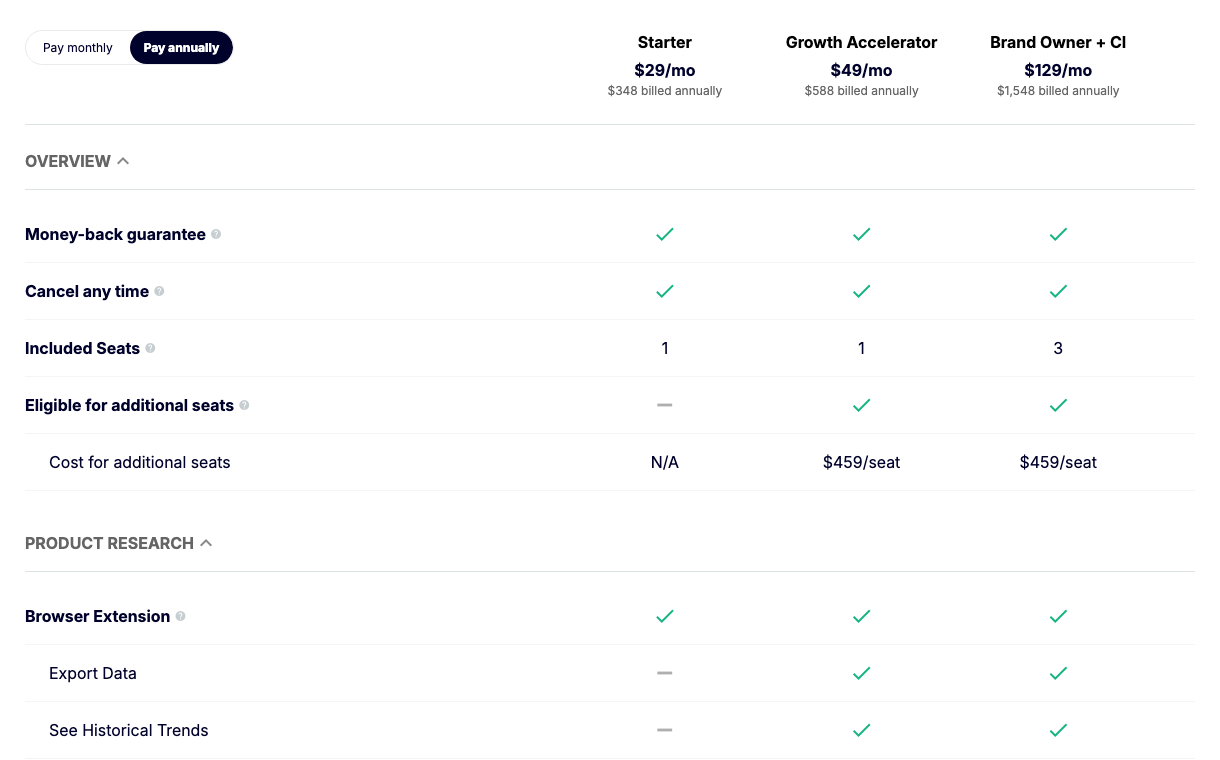
Prices are from Jungle Scout’s pricing page, checked 10 October 2026; the extension rows are from the comparison table on the same page, read 11 November 2026. The help center agrees on the graph: its Historical Trends article says it “is not included with the Starter plan, so the graph will be empty”. Its membership plans article gives Starter “unlimited searches with the Extension”, so the cheapest plan limits features, not the number of scans. Our Jungle Scout pricing guide covers the rest of each plan, and the discount page lists the offers that lower the first-year price.
Chrome Web Store and Firefox listing facts (checked 11 November 2026)
| Detail | Chrome Web Store | Firefox Add-ons |
|---|---|---|
| Name and publisher | Jungle Scout, by junglescout.com | Jungle Scout, by Jungle Scout |
| Users | 300,000 | 2,780 |
| Rating | 3.1 out of 5 from 368 ratings | 4.1 out of 5 from 59 reviews |
| Version and last update | 9.2.9, updated July 22, 2026 | 9.2.9, last updated Jul 22, 2026 |
| Size and language | 1.63MiB, English | 1.65 MB |
| Store labels | Workflow & Planning category; no “Featured” badge | “Some features may require payment”; Mozilla’s security notice |

The Chrome rating has fallen since our last check. On 10 October 2026 the same listing showed 3.8 out of 5 from 368 ratings. On 11 November 2026 it showed 3.1 from the same 368. We can’t tell from the listing why the average moved while the count didn’t, so both figures are reported as shown.
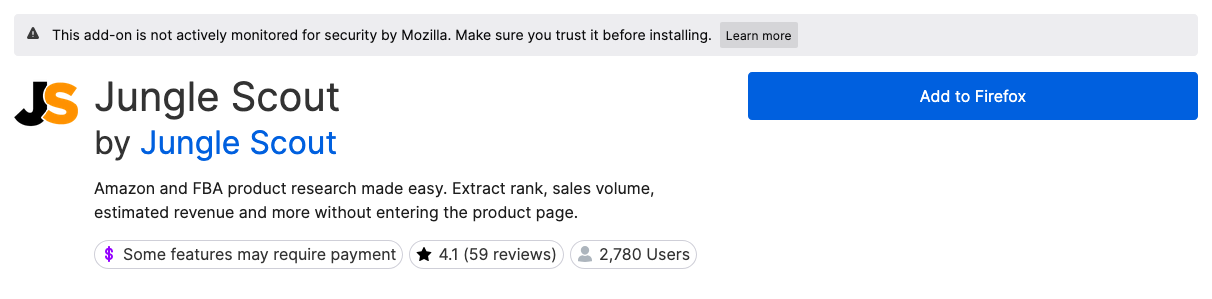
Two more details from the listings:
- User counts differ by source. The Chrome description says Jungle Scout is “trusted by over 1 million entrepreneurs and global brands”. That is Jungle Scout’s figure for the whole platform; 300,000 is the store’s count for the extension.
- Privacy. The Chrome listing says the extension handles “Web history”, “User activity” and “Website content”. Jungle Scout’s permissions article answers that “we don’t actually read (or keep a record of) your browsing history”. The Firefox description says the add-on sends “html data of the Amazon pages you choose to activate the add-on with” to Jungle Scout for processing.
What the Jungle Scout extension shows on Amazon
The Chrome listing sums it up as “rank, sales volume, estimated revenue and more without entering the product page”. Jungle Scout’s help center describes these parts:
| Part | What it shows | Notes |
|---|---|---|
| Search-results view | The products on an Amazon search page with rank, estimated sales and revenue | Load More adds further pages of results |
| Opportunity Score | A 1 to 10 score from demand (units sold), competition, number of sellers and listing quality | 6 to 10 is the best band. Search pages only |
| Embedded product cards | A data summary on each result of an Amazon search, without opening the extension | Can be switched off in Settings |
| Product-page panel | Daily sales, monthly sales, monthly revenue, net profit per sale and total fees per sale | Plus sellers, dimensions, weight and Listing Quality Score |
| Historical Trends graph | Price, rank, unit sales, rating and review count over 3 months to 2 years | Empty on Starter |
| Reviews | The last 100 reviews over time, an AI Review Analysis and a CSV download of up to 100 of the latest reviews | The download needs you logged in to an Amazon buyer account |
| FBA Profit Calculator | Fees and profit for a product | Opens from the Net Revenue value |
| Seller Central tools | A dashboard of your own sales and PPC metrics, and a Request Reviews on This Page button on Manage Orders | The dashboard needs a connected Seller Central account; review requests are not on Starter |
The listing also promises a keyword cloud, configurable filters and CSV export (not on Starter, as above).
Two limits apply to the sales figures. Jungle Scout’s estimates article (edited 13 August 2025) says a monthly estimate is “an indication of how much it has sold in the last 30 days”, not a forecast. And a 2025 help article says estimates are now shown “only at the parent ASIN level”, so there is no figure for one size or color. Our guide to the Jungle Scout Sales Estimator explains how the estimates are built and how far to trust them.
Which Amazon marketplaces it supports
Jungle Scout’s marketplace list (edited 31 October 2024) says you can run the extension on 10 Amazon stores: the US, Canada, Mexico, the UK, France, Germany, Spain, Italy, India and Japan. The Firefox listing’s description names nine of those and leaves out Japan. The extension doesn’t work on Walmart: Jungle Scout’s help center says “our system only supports Amazon marketplaces”.
How to install the Jungle Scout extension
These steps follow Jungle Scout’s install article (edited 30 January 2025):
- Log in to your Jungle Scout account.
- Choose The Extension in the left-hand navigation panel.
- Click the button for your browser. It opens the Chrome Web Store or Firefox Add-ons listing linked above; check that the publisher is junglescout.com (Chrome) or Jungle Scout (Firefox).
- Click Add to Chrome or Add to Firefox, then Add extension in the pop-up.
- Pin it. In Chrome, click the puzzle-piece icon, find Jungle Scout and click the pushpin so the JS icon stays in the toolbar.
- Set site access. Jungle Scout recommends On all sites; On specific sites also works, but you have to add each address by hand.
To check it works, search for a product on Amazon and click the JS icon.
Jungle Scout extension login
The extension has to be signed in to your Jungle Scout account: the Firefox listing says use “requires a Jungle Scout account”, and Jungle Scout’s bulk review-request guide starts by telling you to have the extension “installed and logged in”. If your password is rejected, the login troubleshooting article suggests resetting it from a different browser or a Chrome Incognito window, because a browser can keep sending an old stored password.
One address no longer helps: junglescout.com/extension/, which older guides link to, now redirects to Jungle Scout’s general Catalyst product page (checked 11 November 2026).
Which browsers it works in: Chrome, Firefox, Edge and Safari
Jungle Scout’s install article says: “Our extension is available for both Chrome and Firefox browsers.” It names no other browser.
| Browser | Status on 11 November 2026 |
|---|---|
| Google Chrome | Official listing on the Chrome Web Store |
| Firefox | Official add-on; its version history says it works with Firefox 80.0 and later |
| Microsoft Edge | No Jungle Scout listing on Edge Add-ons: the search returned 4 results, none from Jungle Scout. Microsoft says Chrome extensions “can also be used in Microsoft Edge”, but Jungle Scout doesn’t list Edge |
| Brave and Opera | Not mentioned by Jungle Scout. Opera’s add-on store returned one unrelated result |
| Safari | No Safari extension. Apple’s Safari guide points to the Mac App Store for extensions, and a search of Apple’s catalog of Mac software returned 5 results for “jungle scout”, all games |
| Phones and tablets | No. Jungle Scout’s mobile article says: “we are limited to using the JS Extension on a laptop and desktop” |
Safari users can still use the Jungle Scout web app: a troubleshooting article says “you can use other browsers like Safari, Firefox, or Explorer”. The only Jungle Scout app an App Store search returned is Jungle Scout Cobalt for iPhone, which belongs to the enterprise product and is not a browser extension.
Helium 10 is stricter: its help center says its extension “is not compatible with other browsers such as Safari, Edge, or Firefox”. If you came here from that side, see Helium 10 and Firefox and Helium 10 on Safari.
Jungle Scout extension not working: what the help center says to do
Jungle Scout’s troubleshooting articles are written for Chrome. In order:
- Turn off other extensions. The main troubleshooting article (edited 28 August 2025) says the problem “usually happens when other Chrome extensions interfere with one another”. Open
chrome://extensions, switch off everything except Jungle Scout, restart Chrome and run it again. If it works, switch the others back on one at a time. A second article names AiHello and Amazon Smile as examples. - Clear history and cache. In
chrome://settings, clear browsing data with Browsing History and Cached Images and Files ticked, then restart Chrome. - Reinstall. The install article calls this “a great way to troubleshoot the tool”, including when the JS icon has disappeared.
- No sales or revenue, but other data shows. The missing estimates article says the extension “can only estimate sales if there is a Best Sellers Rank (BSR) in a parent category for the listing”. It also says to turn off Amazon’s translator, because the extension reads each store in its own language.
- No Opportunity Score, or an empty graph. The score appears on search results pages only, and the Historical Trends graph is empty on Starter.
- Slow loading. Switch on Slow Connection Mode in the extension’s Settings tab. Jungle Scout warns that it uses cached data and removes sponsored results.
- Still broken. Jungle Scout asks you to contact support through the chat widget or by email.
If the Helium 10 extension is the one failing, see our guide to the Helium 10 Chrome extension not working.
How it compares with other Amazon seller extensions
Store numbers don’t measure data quality, but they show how widely each extension is used. Users and ratings are from each Chrome Web Store listing on 11 November 2026:
| Extension | Users | Rating | Free use |
|---|---|---|---|
| Jungle Scout | 300,000 | 3.1 (368 ratings) | None: needs a paid plan |
| Helium 10 | 1,000,000 | 4.1 (771 ratings) | 10 lifetime Xray uses on a free account |
| SmartScout | 10,000 | 4.2 (16 ratings) | 100 full-feature uses a month |
| Data Dive | 20,000 | 4.8 (25 ratings) | None: a companion to a paid subscription |
Helium 10’s free allowance is from its help center; SmartScout’s and Data Dive’s are from their listings. To see an extension’s numbers before paying anything, use the Helium 10 extension or the SmartScout extension; Jungle Scout’s doesn’t allow it. In Firefox, Jungle Scout is the only one of the four we found on Firefox Add-ons (searched 11 November 2026). Our Helium 10 vs Jungle Scout comparison sets the two suites side by side. For price and sales-rank history, see the Keepa extension.
Bottom line
- Already paying for Jungle Scout: install the extension in Chrome or Firefox. Your plan includes it, with no cap on searches.
- Hoping to use it free: you can’t. The smallest outlay is one month of Starter at $49, and a refund inside the 7-day window has to be requested.
- On Safari or Edge: use Chrome or Firefox. Jungle Scout publishes nothing else.
- Put off by the 3.1 Chrome rating: read the recent reviews on the listing, then weigh them against the rest of the tool in our Jungle Scout review.
Frequently Asked Questions
Is the Jungle Scout Chrome extension free?
It is free to install, but it needs a Jungle Scout account, and Jungle Scout has no free plan and no free trial. Every plan includes the extension, from Starter at $29 a month billed annually or $49 monthly (prices checked 10 October 2026).
How much does the Jungle Scout extension cost?
It has no price of its own, and Jungle Scout's help center says standalone extension subscriptions are no longer offered. It comes with every plan: Starter at $29 a month billed annually or $49 monthly, Growth Accelerator at $49 or $79, and Brand Owner at $129 or $149 (checked 10 October 2026).
Does Jungle Scout have a Firefox extension?
Yes. Jungle Scout publishes an official add-on on Firefox Add-ons. On 11 November 2026 it showed 2,780 users, 4.1 stars from 59 reviews and version 9.2.9, last updated 22 July 2026.
Does the Jungle Scout extension work in Safari or Edge?
Jungle Scout publishes it for Chrome and Firefox only. On 11 November 2026 there was no Jungle Scout listing on Microsoft's Edge Add-ons store and no Jungle Scout Safari extension in Apple's Mac App Store catalog.
Why is my Jungle Scout extension not working?
Jungle Scout's help center says the usual cause is another browser extension interfering. Turn off every other extension, restart the browser and run Jungle Scout again. If that fails, clear your history and cache, then reinstall the extension.
How many people use the Jungle Scout Chrome extension?
On 11 November 2026 the Chrome Web Store listing showed 300,000 users and 3.1 stars from 368 ratings, for version 9.2.9, updated 22 July 2026. On 10 October 2026 the same listing showed 3.8 stars from 368 ratings.