SmartScout Search Trends Explorer: Spot Rising Amazon Searches Before You Commit
Affiliate disclosure: we may earn a commission if you buy through links on this page. How we make money How we check facts
SmartScout’s Search Trends tool shows which Amazon search terms are rising and charts any term’s search history over 12-month, 6-month, 3-month and 30-day windows. SmartScout’s menus call it simply “Search Trends”; this page has used the name Search Trends Explorer. It starts on Essentials, at $99 a month billed yearly or $119 monthly (checked 10 October 2026).
Search Trends starts on the Essentials plan · 7-day money-back guarantee Affiliate link
For the bigger question of whether SmartScout suits you, see our SmartScout review. This page covers what Search Trends shows, how to read its numbers, and where it fits next to SmartScout’s other keyword tools.
Correction (10 October 2026): this page previously said Share of Voice sits on SmartScout’s Business plan, two tiers up. It is Enterprise-only. Essentials, where Search Trends starts, also no longer costs $97 a month.
What Search Trends shows
SmartScout describes it in three places (all checked 10 October 2026):
- Its features hub: “Historical trend lines on any search term across 12-month, 6-month, 3-month, and 30-day windows. It is how you tell a seasonal spike from a demand curve that is still bending upward, before the category prices it in.” It also lists “category-level trending term feeds”.
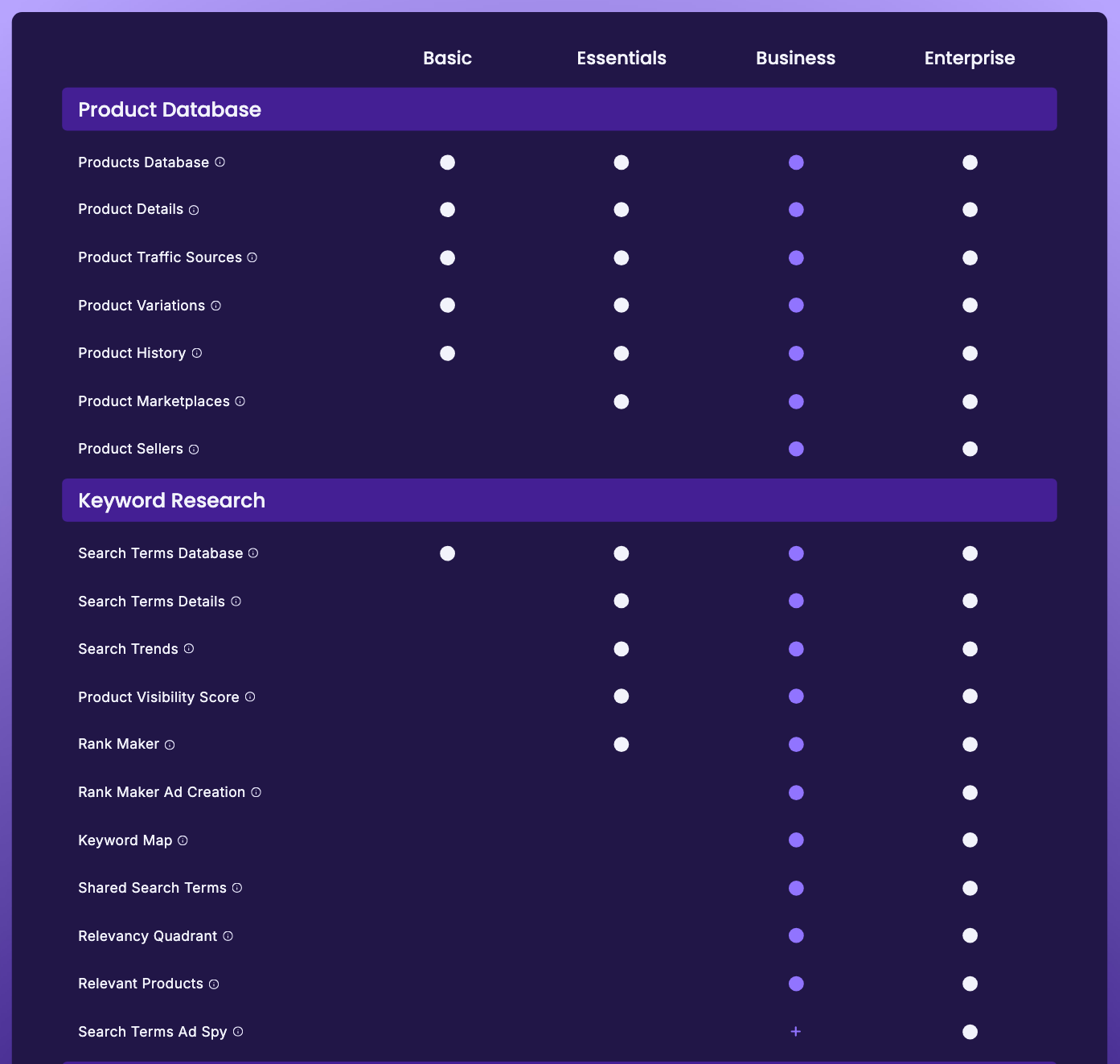
- The pricing table: a Search Trends row (“See what’s trending on Amazon, with search trend data!”) ticked from Essentials, and a second Search Trends row under “Historical Data via Scope” (“Historical search trends enable product development at a level never seen before”), also from Essentials. The Essentials plan card lists “Historical Search Trends”.
- Rank Maker: its keyword frequency cloud lets you “click through to Search Trends for deeper context”.
SmartScout’s Search Trends page also embeds a free public preview. On 10 October 2026, set to “Past 7 Days” and “All Categories”, it listed trending terms with a search count, a growth percentage and a category for each, and a second preview charted search volume and growth for individual terms by category.
Read growth percentages with care
The public preview shows why. Its top entry on 10 October 2026, “magnetic eyelashes”, showed 456.45K searches and growth of 31,466% for the selected seven days. Percentages that large usually mean the term came from a very low base or caught a short spike. Before acting on a trending term, check three things:
- The absolute volume, not just the percentage.
- The longer windows. The 12-month and 6-month views are how you separate a seasonal or one-off spike from a sustained rise, which is the use SmartScout itself pitches.
- Who already ranks. Search Terms Details shows a term’s top-ranking products, and Rank Maker shows everything those products rank for.
How it fits with SmartScout’s other keyword tools
| Question | SmartScout tool | Plan |
|---|---|---|
| Is demand for this term rising, steady or seasonal? | Search Trends | Essentials |
| What is this term’s story, and who ranks for it? | Search Terms Details (see our Search Terms Database page) | Essentials |
| Where has my product ranked over time? | Rank Maker and its Visibility Score | Essentials |
| Which brands capture the visibility on a set of terms? | Share of Voice | Enterprise |
Trend direction is a market reading. It says nothing about who captures the demand; for that you need rank data, or Share of Voice if you are on Enterprise. All three Essentials tools come in the same plan, compared on our SmartScout pricing page.
Check it against Amazon’s own data
If your brand is in Brand Registry, Amazon’s Brand Analytics has a Top Search Terms dashboard, which Amazon describes as “a broad view of customer search activity across Amazon stores”, listing the top three products, categories and brands for each keyword (Amazon, checked 10 October 2026). SmartScout’s figures are estimates; Amazon’s are first-party. Our guide to Top Search Terms for keyword research explains how to read Amazon’s version.
Where it falls short
- Essentials and up. Basic doesn’t include it.
- Estimates. SmartScout doesn’t explain how it counts searches.
- Stored history isn’t stated. The longest window SmartScout names for Search Trends is 12 months, and it doesn’t say how far back a term’s history goes. Its guide to share-of-voice tools mentions “more than 2 million Amazon keywords with a 24-month history”, and some of the public preview’s charts ran from 2024 to 2026.
What this page is based on
SmartScout’s features hub, pricing page (plan cards, comparison table and tooltips), Rank Maker page, guide to share-of-voice tools and Search Trends page with its public preview, plus Amazon’s Brand Analytics page, all checked on 10 October 2026. Descriptions of how it works come from SmartScout and its public preview. Our methods are on how we test.
Frequently Asked Questions
What is SmartScout Search Trends Explorer?
It is SmartScout's search-trend tool, which SmartScout's menus simply call Search Trends. It shows which Amazon search terms are trending and charts a term's search history over 12-month, 6-month, 3-month and 30-day windows.
Which SmartScout plan includes Search Trends?
Essentials and up. Essentials costs $99 a month billed yearly or $119 monthly (checked 10 October 2026). Basic doesn't include it.
Can I see SmartScout's trending searches for free?
Partly. SmartScout's Search Trends page embeds a public preview that lists trending search terms with search counts and growth percentages. The full tool is on the Essentials plan and up.
Is Search Trends the same as Share of Voice?
No. Search Trends measures demand for search terms. Share of Voice measures which brands capture the visibility on a set of terms, and it is only on SmartScout's Enterprise plan.