SmartScout Search Terms Database, Details and Relevancy: What Each Does and Which Plan Has It
Affiliate disclosure: we may earn a commission if you buy through links on this page. How we make money How we check facts
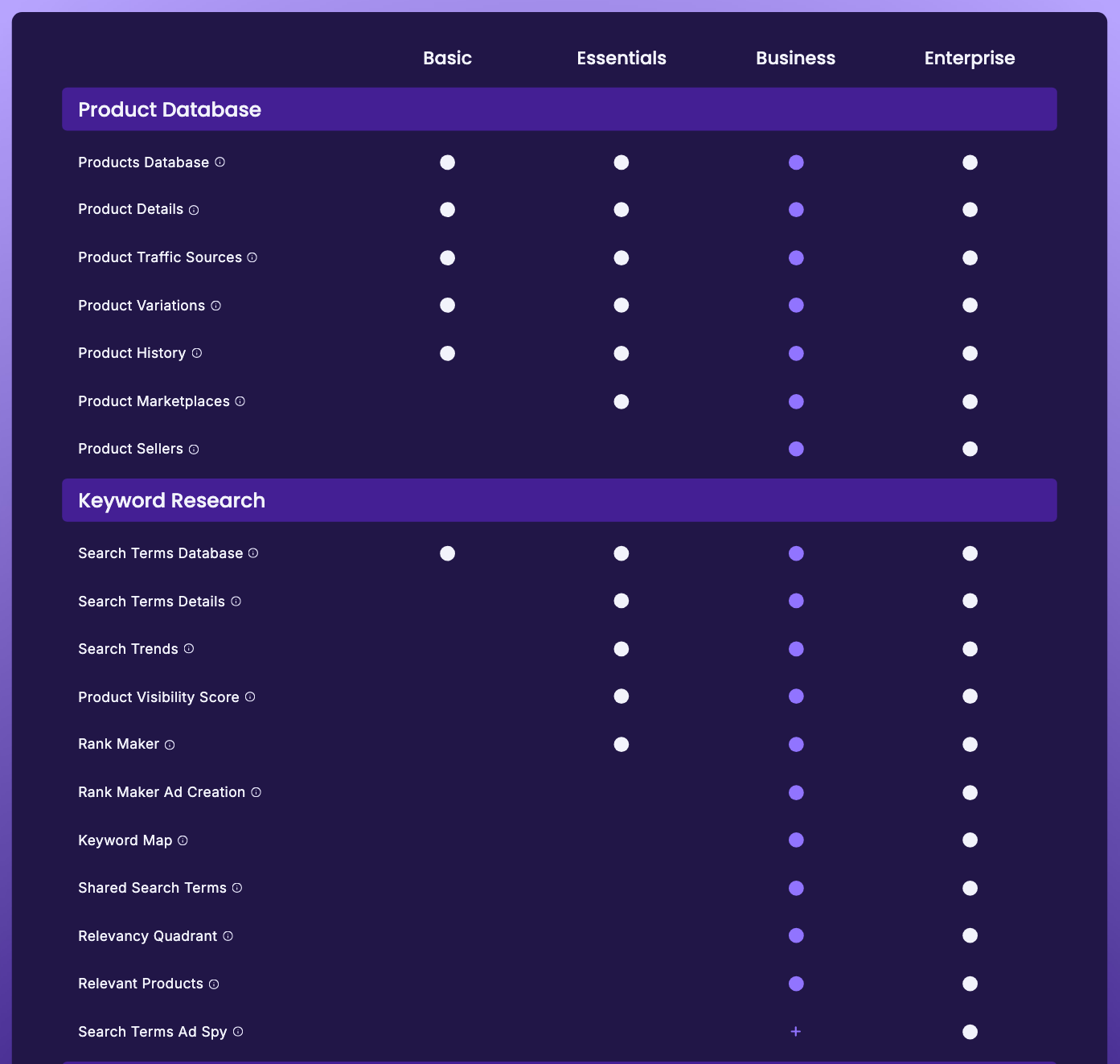
SmartScout’s Search Terms Database is on every plan: Basic costs $29 a month billed yearly or $49 monthly (checked 10 October 2026). It lists Amazon search terms you can filter by volume, CPC and sponsored products; SmartScout’s menus call it Search Terms Explorer. The per-term Search Terms Details view needs Essentials, and the Relevancy Quadrant needs Business.
Search Terms Database is on every plan · 7-day money-back guarantee Affiliate link
This page also covers Search Terms Details and Search Terms Relevancy, which we used to review separately. All three run on the same search-term data, so the useful question is which layer you need and which plan it sits on. Whether SmartScout as a whole is worth paying for is the job of our SmartScout review.
Correction (10 October 2026): this page previously said Search Terms Database starts on Essentials at $97 a month. SmartScout’s pricing table now ticks it on every plan, Basic included, and every plan price has changed since our 1 August 2026 check.
Three layers, three plans
| Layer | What SmartScout says it does | Cheapest plan |
|---|---|---|
| Search Terms Database (Search Terms Explorer) | “See every documented search term, along with filters for search volume, CPC, Shared/Sponsored products, and more.” | Basic |
| Search Terms Details | “See the story of any search term at a glance. Historical trends, top ranking products, and more.” | Essentials |
| Relevancy Quadrant | “Clearly see which product search terms hit the sweet spot between high searches, and high relevancy.” | Business |
The quotes are SmartScout’s own tooltips from the plan comparison on its pricing page, checked 10 October 2026. Basic costs $29 a month billed yearly or $49 monthly, Essentials $99 or $119, and Business $239 or $299. Enterprise is priced after a demo. Our SmartScout pricing guide covers what else each plan includes.
Search Terms Database: the term list, on every plan
This is the layer you get on Basic. SmartScout’s Basic card describes it as keyword research that lets you “find related keywords to any search via Search Terms Explorer, size demand, determine niche viability, and much more”, with “Included: 5,000 ASINs/mo”. The card doesn’t say what counts against that allowance. Essentials replaces it with “Unlimited Keyword Research & Tracking”.
Use it for the first pass: start from a seed term, pull the related terms, and sort by volume, CPC or how crowded the sponsored results are. SmartScout’s features hub adds “relevancy and intent scoring”, “estimated CPC and advertiser count” and bulk lookups to that description.
Read one claim on that hub carefully. It calls the numbers “real Amazon search volume, not a proxy”. SmartScout’s own keyword table in Rank Maker labels the same kind of figure “Est 30-Day Search Volume”, and an estimate is what it is. Our Rank Maker review shows that table from our account. The volumes are good for ranking terms against each other; don’t treat them as exact counts.
Search Terms Details: one term’s story (Essentials)
Search Terms Details is the view you open once a term from the database looks worth chasing. SmartScout’s description is “the story of any search term at a glance”: its historical trend and the products ranking for it now. It answers questions about a term you already have rather than finding new ones: whether the term is growing, steady or seasonal, and who you would be up against.
It starts on Essentials ($99 a month billed yearly, $119 monthly), the same plan that unlocks Rank Maker and Search Trends. The three work as a set: Details for one term, Search Trends for what is rising across Amazon, and Rank Maker for every term one product ranks for. Our Search Trends page covers the trend view.
Search Terms Relevancy and the Relevancy Quadrant (Business)
SmartScout’s Search Terms Relevancy page promises “high search volume keywords and high relevancy at your fingertips” and a way to “uncover the missing search terms to target for your Amazon products”. Relevance shows up in two places in SmartScout:
- Search Terms Explorer, which the features hub describes with “relevancy and intent scoring”. SmartScout’s public pages don’t say whether every plan sees those scores.
- The Relevancy Quadrant, a chart that plots one product’s search terms by search volume against relevance, so the high-volume, high-relevance corner stands out. It is a Business feature: $239 a month billed yearly or $299 monthly.
The database tells you a term is big. The quadrant tells you whether it belongs on your listing at all, which is the filter that keeps a listing from filling up with high-volume terms the product doesn’t match. On our complimentary Business account the quadrant sits as a tab in each product’s view, next to Rank Maker, Keyword Detective, Keyword Spy, Relevant Products and Ad Spy (visible in the product-view screenshot on our Rank Maker review, captured 2 August 2026). SmartScout doesn’t publish how it scores relevance, so read the quadrant as SmartScout’s judgement rather than a measurement.
How the three layers fit together
- Collect candidate terms from the Search Terms Database (Basic).
- Check the few that matter in Search Terms Details: trend direction and who ranks now (Essentials).
- Filter for relevance with the Relevancy Quadrant before the terms go into a listing or a campaign (Business).
- Track the survivors in Rank Maker, where SmartScout says tracking is unlimited (Essentials).
Steps 1, 2 and 4 all run on Essentials; only step 3 needs Business. If you want to compare several competitors’ search terms at once rather than one product’s, that is Keyword Detective, which is also a Business feature.
Where it falls short
- Estimates, not Amazon’s numbers. Search volumes and CPCs are SmartScout’s estimates. Amazon’s first-party figures come from Brand Analytics (below).
- The product-level relevance chart is Business-only. On Basic and Essentials you judge relevance yourself.
- No published methods. SmartScout doesn’t explain how it scores relevance or intent, or what “documented” means in “every documented search term”.
- Basic’s allowance is unexplained. “5,000 ASINs/mo” is the only limit shown for Basic’s keyword research, and the card doesn’t define it.
SmartScout or Amazon’s own search data?
If your brand is in Amazon Brand Registry, check Amazon’s own data first. Amazon says Brand Analytics needs a Professional selling account and Brand Representative status for a registered brand, and when it announced its Search Analytics dashboards in 2021 it said they would be provided “at no charge” to Brand Registry sellers. Its Top Search Terms dashboard lists “what keywords customers use to find products, along with the top three products, categories, and brands associated with each keyword”, and Search Query Performance shows your own brand’s impressions, clicks, cart adds and purchases per query (Amazon, checked 10 October 2026).
SmartScout adds coverage beyond your own brand and catalogue, and competitor context on every term. Our guide to Brand Analytics Search Analytics explains how the native dashboards work, and our Amazon search analytics tools roundup compares the Search Terms Database with Helium 10, Data Dive and the other paid options.
What this page is based on
SmartScout’s pricing page (plan cards, plan comparison and tooltips), its features hub and its Search Terms Relevancy page, all checked on 10 October 2026, plus our complimentary SmartScout Business account (product view captured 2 August 2026). Our methods are on how we test.
Frequently Asked Questions
Is SmartScout's Search Terms Database included on the Basic plan?
Yes. SmartScout's pricing table ticked Search Terms Database on every plan, Basic included, when we checked on 10 October 2026. Basic costs $29 a month billed yearly or $49 month to month, and its plan card lists keyword research with 5,000 ASINs a month included.
What is the difference between Search Terms Database and Search Terms Details?
The database is a list of Amazon search terms you can filter by search volume, CPC and sponsored products. Search Terms Details opens a single term and shows its history and the products ranking for it. Details starts on the Essentials plan.
What is SmartScout Search Terms Relevancy?
It is the name of a SmartScout page about finding high-volume, high-relevance search terms to target. Relevance shows up in two places: Search Terms Explorer, which SmartScout says includes relevancy and intent scoring, and the Relevancy Quadrant, a product-level chart that is only on the Business and Enterprise plans.
Are SmartScout's search volumes exact?
No. SmartScout markets them as real Amazon search volume, but its own Rank Maker table labels the column Est 30-Day Search Volume. Treat the figures as estimates, and check important terms against Amazon Brand Analytics if your brand is registered.
Which SmartScout plan do I need for keyword research?
Basic covers a first keyword list. Essentials adds Search Terms Details, Search Trends and Rank Maker with rank tracking. Business adds the Relevancy Quadrant and Keyword Detective, which compares the search terms several products share.