Data Dive Rank Radar Review: Worth It for Amazon Keyword Tracking?
Affiliate disclosure: we may earn a commission if you buy through links on this page. How we make money How we check facts
Rank Radar is Data Dive’s keyword rank tracker. It updates daily, shows organic rank next to your Amazon PPC and Search Query Performance data, and tracks each child ASIN separately. It isn’t sold on its own: every Data Dive plan includes it, with 25 keywords on Data Dive Starter ($39 a month), 1,000 on Standard and 12,000 on Enterprise (checked 10 October 2026).
Rank Radar is on every plan · no free trial · checked 10 October 2026 Affiliate link
Our verdict: Rank Radar is worth having if you already run Amazon PPC and want organic rank, ad spend and Brand Analytics data on one daily heatmap, with Blind Spend flagging search terms you pay for but don’t track. It is a weaker buy as a plain rank tracker: you can’t buy it without Data Dive, Starter’s 25 keywords cover one product’s main terms, and the SQP layer needs Brand Registry.
This review is based on Data Dive’s help center and pricing page, read on 10 October 2026. Where we describe how Rank Radar works or how accurate it is, we’re reporting Data Dive’s own documentation. For plan details, see our Data Dive pricing guide.
What Rank Radar tracks
Data Dive’s help-center article on Rank Radar (updated 17 September 2026) describes a daily heatmap with one row per tracked keyword. Through its Data Options you can show:
- Organic rank for each keyword, day by day.
- Impression Rank (IR): where your ads rank against other advertisers’ on impressions for the keyword. Per Data Dive, IR 1 means you get the most PPC impressions and IR 3 means two advertisers get more.
- PPC data: spend, clicks, sales, units sold and conversion rate for tracked keywords you advertise on, once your Amazon Ads account is connected.
- SQP data from Amazon’s Search Query Performance report, when available.
- Roots, which group keywords by their root terms.

Around the heatmap:
- Variation tracking: filter by child ASIN, and when several variations rank for the same term on the same day, each is tracked separately. Data Dive says this also works for competitor ASINs.
- Highlights and notes: tag keywords during a PPC push or a title change, with colours, notes and start and end dates, and add notes to specific days. Major holidays are marked automatically.
- Overview tab: the average organic rank across tracked keywords, the number of keywords and total search volume in the top 10 and top 50 (smoothed with a 7-day average), the biggest gainers and losers over 1, 7 or 30 days, and a BSR graph for the products in the niche.
- Search Term Impression Share totals: a row that compares PPC figures for your tracked keywords with the totals for all your search terms.
Blind Spend
Blind Spend lists search terms from your PPC reports and Dives that you spend ad money on but don’t track, with spend, sales and units sold for each. From the same screen you can start tracking a term or negate it. Per Data Dive’s Blind Spend article, a negation applies across all campaigns for that ASIN and needs an active Amazon connection and at least one active campaign; some terms, such as those with special characters, can’t be negated.
How to set up a Rank Radar
Per Data Dive’s help center:
- Click Track Keywords in Data Dive’s top menu, or open Rank Radar and choose Add a product to Rank Radar.
- Paste the ASIN or Amazon product URL.
- Pick an existing niche, or let Data Dive create a new one, choose how many products and keywords to include, and click Create Rank Radar.
- Add your own search terms at any time, or send keywords from Data Dive’s Fast Keywords tool.
- Connect your Amazon Ads account and turn on PPC and SQP data under Data Options. PPC reports take some time to sync.
Rank Radar pricing and keyword limits (checked 10 October 2026)
Rank Radar comes with every Data Dive plan. From Data Dive’s pricing page:
| Data Dive plan | Monthly | Billed yearly | Rank Radar keywords |
|---|---|---|---|
| Starter | $39 | About $32 a month | 25 |
| Standard | $149 | About $124 a month | 1,000 |
| Enterprise | $490 | About $408 a month | 12,000 |
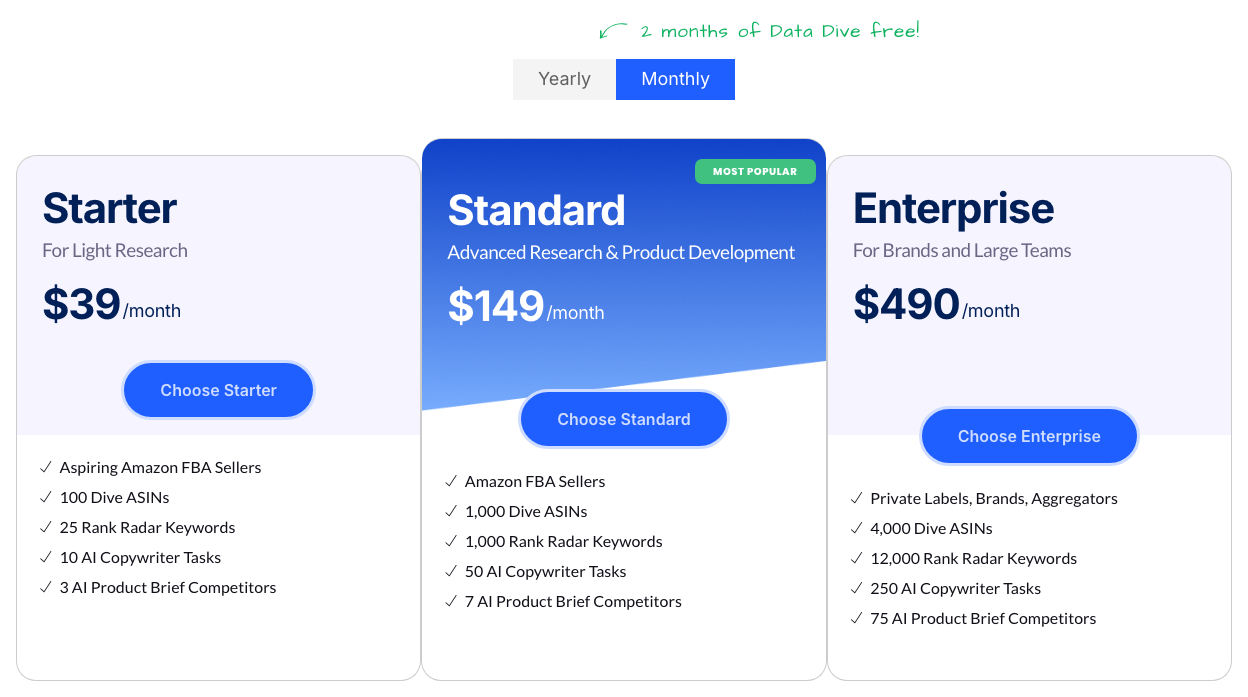
The quota counts the keywords you are tracking right now. Data Dive’s quota article says archived keywords stop counting and keep their history, and unlike Data Dive’s other quotas this one doesn’t reset monthly. You can raise it with a slider, which raises the price. In practice, 25 keywords covers one product’s main search terms, while 1,000 is 50 keywords each for 20 products.
There is no free trial, and Data Dive’s terms say payments are generally non-refundable once a billing period has begun. Our Data Dive pricing guide covers the plans, quotas and bundle in full.
What Rank Radar needs from you
- A Data Dive plan. Rank Radar isn’t sold separately.
- An Amazon Ads connection for PPC metrics, which appear only for tracked keywords with active campaigns.
- Brand Analytics access for SQP data. Amazon requires a Professional selling account and Brand Representative status for a brand enrolled in Brand Registry; our guide to Search Query Performance for keyword research explains the report itself.
Where Rank Radar falls short
- No standalone option. You pay for all of Data Dive to get it.
- Starter’s 25 keywords are enough for one product, not a catalogue.
- SQP is for brand owners and arrives weekly. Data Dive says SQP data is usually released on Wednesdays and depends on Amazon data access, and that missing days in its PPC and SQP data are normal.
- PPC data depends on your Ads connection and only covers keywords with active campaigns.
- No free trial, and payments are generally non-refundable, so there is no risk-free way to test it.
Rank Radar vs other Amazon keyword trackers
Most research suites include a rank tracker. Here is where each one starts (checked 10 October 2026):
| Tracker | Cheapest plan that includes it | Keywords on that plan | What stands out |
|---|---|---|---|
| Data Dive Rank Radar | Data Dive Starter, $39 a month | 25 | Organic rank, PPC and SQP on one daily heatmap; ranks per variation |
| Jungle Scout Rank Tracker | Growth Accelerator, $79 a month or $49 a month billed annually | 500 | Comes with Jungle Scout’s product research tools |
| Helium 10 Keyword Tracker | Platinum plus the Keyword Tracker add-on (from $19 a month), or included on Diamond | Not shown on the pricing table | Diamond also includes Helium 10 Ads (formerly Adtomic) |
| SmartScout Rank Maker | Essentials, $119 a month or $99 a month billed yearly | Unlimited, per SmartScout | Tracking now lives inside Rank Maker |
Rank Radar’s edge is the advertising layer: ad spend, Impression Rank and Blind Spend sit next to organic rank, which matters if you are trying to see whether PPC moves your organic position. If you only need daily ranks for a few keywords and already pay for a suite, its tracker may be enough. Our best Amazon keyword research tools guide covers the wider field.
Who Rank Radar is for
- Sellers running Amazon PPC who want to see, keyword by keyword, whether ad spend is lifting organic rank.
- Brand owners with Brand Analytics access, who get SQP demand data in the same view.
- Sellers with variations who need to know which child ASIN ranks for which term.
- Data Dive users already building listings from Dives, for whom Rank Radar is the next step.
Who should skip Rank Radar
- Sellers who only want a cheap daily rank check on a few keywords, and already have one in a suite.
- Sellers without PPC campaigns or Brand Registry, who lose most of what sets Rank Radar apart.
- Anyone who wants to try before paying, since Data Dive has no free trial.
Rank Radar pros and cons
Pros
- Organic rank, Impression Rank, PPC metrics and SQP data on one daily heatmap
- Blind Spend shows search terms you pay for but don't track, and can negate them
- Tracks child ASINs separately, for your products and competitors'
- Included on every Data Dive plan, from $39 a month
- Archived keywords free up quota without losing history
Cons
- Not sold separately from Data Dive
- Starter tracks only 25 keywords
- SQP data needs Brand Registry and arrives weekly
- PPC metrics need an Amazon Ads connection and active campaigns
- No free trial, and payments are generally non-refundable
Is Data Dive Rank Radar worth it?
Sources
All checked on 10 October 2026:
- Data Dive help center: Rank Radar (updated 17 September 2026), PPC and SQP data in Rank Radar, Blind Spend and usage quotas
- Data Dive pricing page and terms of service
- Amazon’s Brand Analytics eligibility
- Other trackers’ plans: Jungle Scout Catalyst plans, Helium 10 pricing and SmartScout pricing
Frequently Asked Questions
What is Data Dive Rank Radar?
Rank Radar is Data Dive's keyword rank tracker. It updates daily and shows a product's organic rank for each tracked keyword next to its Amazon PPC metrics and, where available, Search Query Performance data.
How much does Rank Radar cost?
Rank Radar isn't sold separately; it comes with every Data Dive plan. At the default quotas Starter ($39 a month) tracks 25 keywords, Standard ($149) 1,000 and Enterprise ($490) 12,000 (checked 10 October 2026).
Does Rank Radar show PPC data?
Yes, once you connect your Amazon Ads account. Data Dive says PPC metrics such as spend, clicks, sales, units sold and conversion rate appear only for tracked keywords you are actively advertising on.
Do I need Brand Analytics to use Rank Radar?
Only for the Search Query Performance data. Data Dive says SQP availability depends on Amazon data access, and Amazon gives Brand Analytics only to brand representatives of brands enrolled in Brand Registry.
Can Rank Radar track competitors' keyword rankings?
Yes. You can create a Rank Radar from any ASIN or Amazon product URL, and Data Dive says its per-variation tracking also works for competitor ASINs.
How often does Rank Radar update?
Daily, according to Data Dive's help center. Its overview figures use a 7-day average to smooth out daily swings, and Search Query Performance data usually arrives weekly, on Wednesdays.