Jungle Scout Keyword Scout Review: Worth It for Keyword Research?
Affiliate disclosure: we may earn a commission if you buy through links on this page. How we make money How we check facts
Keyword Scout is worth it if you are on Jungle Scout’s Growth Accelerator or Brand Owner plan. That is where you get 250 or uncapped searches a month, sponsored and PPC keyword data, and one or two years of keyword history (checked 10 October 2026). Its multi-ASIN search, comparing up to 10 competitor ASINs at once, is the standout. On Starter it is a 50-searches-a-month sampler.
Keyword Scout is in every Catalyst plan · search limits vary by plan Affiliate link
How this review was put together. It is based on Jungle Scout’s help-center documentation for Keyword Scout and the comparison table on its pricing page, both read on 10 October 2026. The accuracy claims below are attributed to Jungle Scout, and the rating is an editorial judgement (see how we test). Keyword Scout is one tool in Jungle Scout’s suite; our Jungle Scout review covers the rest.
Keyword Scout quick facts
| Question | Short answer |
|---|---|
| What it is | Jungle Scout’s keyword research tool, inside the Catalyst web app |
| Search types | Keyword, reverse ASIN (one product) and multi-ASIN (up to 10 products) |
| Main data | 30-day exact and broad search volume, estimated PPC bids, organic and sponsored ranks, Amazon badges, historical search volume |
| Searches a month | 50 on Starter, 250 on Growth Accelerator, no cap shown on Brand Owner |
| Keyword history | 1 month, 1 year or 2 years, by plan |
| Marketplaces | The US, Canada, Mexico, the UK, Germany, France, Italy, Spain, Japan and India |
| Best for | Sellers already paying for Growth Accelerator or Brand Owner |
| Skip it if | You would only be on Starter, or your research starts from sellers and brands |
What Keyword Scout does
Jungle Scout’s help center (updated May 2025) describes Keyword Scout as a keyword research tool that “provides direct insights on which keywords your competitors are ranking for”. It runs three kinds of search:
- Keyword search. Enter a word or phrase and get related keywords with their data. Jungle Scout says this broad-matches on keywords that share ASINs with your seed term, so it returns more results than a reverse search.
- Reverse ASIN search. Enter one ASIN and see the keywords it ranks for, with its organic, sponsored and overall rank on each.
- Multi-ASIN search. Enter up to 10 ASINs, separated by commas, to see the keywords the group ranks for, how many of those ASINs sit in the top 100 organic and sponsored results for each term, their average ranks, and where the ASIN you highlight stands against the rest.
What each search type returns, per Jungle Scout’s column guide:
| Data point | Keyword search | Reverse ASIN | Multi-ASIN |
|---|---|---|---|
| Search volume, exact and broad match (last 30 days) | Yes | Yes | Yes |
| Estimated PPC bid, exact and broad match | Yes | Yes | Yes |
| Organic and sponsored product counts | Yes | Yes | Yes |
| Ease to Rank, word count, main product category | Yes | Yes | Yes |
| The ASIN’s organic, sponsored and overall rank | No | Yes | Yes |
| The Amazon badge shown on the listing for that keyword | No | Yes | Yes |
| Your own ad campaigns that use the keyword (needs a connected Seller Central account) | No | Yes | Yes |
| How many of the entered ASINs rank for the keyword, and their average ranks | No | No | Yes |
| Option to exclude variations | No | Yes | Yes |
Click any keyword and Keyword Scout charts its historical search volume, with monthly and quarterly trends; how far back that goes depends on your plan. You can also add keywords to Keyword Lists, save searches, and download results as a CSV file on plans that include export.
Two details in that documentation are worth knowing before you trust a number. Ease to Rank is a title count: Jungle Scout takes a snapshot of 50 to 100 products for the keyword and checks how often the keyword appears in their titles, rating it easier the less often it does. And reverse ASIN results are partial by design: Keyword Scout only returns keywords for which the product ranks in the top 100 results, so an ASIN can rank for keywords you won’t see, and smaller marketplaces return fewer results than the US.
Keyword Scout limits on each Jungle Scout plan
Keyword Scout is in every Catalyst plan, but most of what makes it useful starts on Growth Accelerator:
| Plan (billed annually) | Searches a month | Keyword history | Sponsored/PPC data, search trends and export |
|---|---|---|---|
| Starter ($29/mo) | 50 | 1 month | No |
| Growth Accelerator ($49/mo) | 250 | 1 year | Yes |
| Brand Owner ($129/mo) | No cap shown | 2 years | Yes |
On monthly billing the same three plans cost $49, $79 and $149 (Jungle Scout’s pricing page, checked 10 October 2026). The Keyword Scout rows near the bottom of this screenshot of Jungle Scout’s comparison table are the source for the table above:
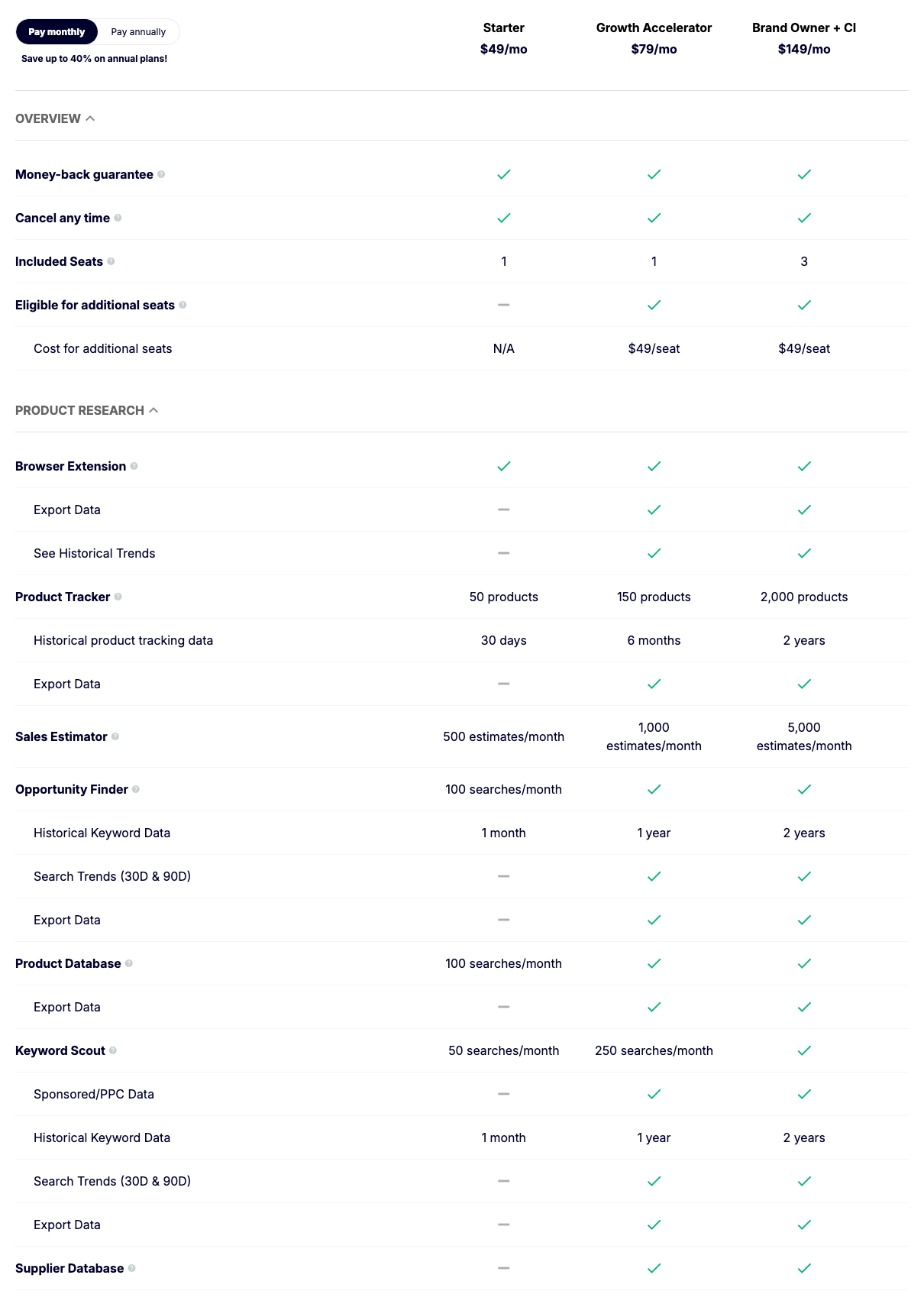
Starter is the trap. Fifty searches a month is enough to look at a few competitors, but Starter’s Keyword Scout has no sponsored/PPC data, no 30- and 90-day search trends and no export, and one month of history can’t show seasonality. If keyword research is the reason you are buying Jungle Scout, Growth Accelerator is the realistic starting point; full plan details are on our Jungle Scout pricing page.
How Jungle Scout says it gets keyword data
Jungle Scout says it uses “a proprietary algorithm combined with historical and live data straight from Amazon”, which it claims makes Keyword Scout “the industry’s most up-to-date and accurate keyword research tool” (The Science Behind Keyword Scout). The same article criticizes tools that estimate Amazon search volume from Google or Bing data, or that mostly return Amazon’s autocomplete suggestions.
Those are Jungle Scout’s claims. If you have a Professional selling account and are the Brand Representative for a brand enrolled in Amazon Brand Registry, Amazon’s Brand Analytics includes a Search Query Performance dashboard that shows query volume for the searches that led customers to your products, which lets you check your most important terms against Amazon’s own data. Our guide to Search Query Performance for keyword research explains how.
Keyword Scout vs Helium 10 Cerebro, SmartScout and MerchantWords
| If your job is | Start with | Why |
|---|---|---|
| Keyword research inside a Jungle Scout plan you already pay for | Keyword Scout | It’s included; Growth Accelerator gives you 250 searches a month |
| Reverse ASIN research on a Helium 10 plan | Helium 10 Cerebro | Helium 10’s reverse ASIN tool; Helium 10 Platinum costs $99 a month billed yearly |
| Keyword research that starts from brands and sellers | SmartScout Search Terms Database | SmartScout’s keyword database, included on every SmartScout plan |
| Amazon keyword data without a full seller suite | MerchantWords | A standalone keyword research subscription |
| Comparing reverse ASIN tools across vendors | Best Amazon reverse ASIN tools | Our roundup, free options first |
For a wider shortlist, including keyword clustering tools, see our best Amazon keyword research tools.
Should you pay for Keyword Scout?
Pay for it if:
- you are buying Growth Accelerator or Brand Owner anyway, so Keyword Scout comes with the plan;
- your keyword work centers on a handful of direct competitors, which is what multi-ASIN search is built for;
- you want organic ranks, sponsored ranks and PPC bid estimates in the same table.
Skip it or compare first if:
- you would only be on Starter;
- you sell in a marketplace Keyword Scout doesn’t support, such as the Netherlands or Australia;
- your research starts from sellers and brands rather than products, which is where SmartScout is organized;
- you need two years of keyword history but don’t want to pay for Brand Owner.
Pros and limits
Pros
- Multi-ASIN search compares up to 10 competitor ASINs in one table
- Organic, sponsored and overall ranks sit next to 30-day search volume and PPC bid estimates
- Historical search volume with monthly and quarterly trends, up to two years on Brand Owner
- Included in every Jungle Scout plan, with CSV export from Growth Accelerator up
Cons
- Starter caps it at 50 searches a month with one month of history and no PPC data or export
- Reverse ASIN results only include keywords where the product ranks in the top 100
- Ease to Rank is based on how often a keyword appears in 50 to 100 product titles
- Supports 10 Amazon marketplaces; others, such as the Netherlands and Australia, are not on the list
Final verdict
Keyword Scout is a good reason to choose Jungle Scout if you are buying Growth Accelerator or Brand Owner. It is not a reason to buy Starter.
Frequently Asked Questions
What is Jungle Scout Keyword Scout?
Keyword Scout is the keyword research tool in Jungle Scout's Catalyst web app. It runs keyword searches, reverse ASIN searches on one product and multi-ASIN searches on up to 10, showing 30-day search volumes, estimated PPC bids and organic and sponsored ranks.
How many Keyword Scout searches do you get?
Jungle Scout's pricing table, checked 10 October 2026, gives Starter 50 Keyword Scout searches a month and Growth Accelerator 250, and shows no cap on Brand Owner. Historical keyword data is 1 month, 1 year and 2 years on those plans.
Can Keyword Scout do a reverse ASIN search?
Yes. You can enter one ASIN, or up to 10 for a multi-ASIN search, and see the keywords they rank for. Jungle Scout's help center notes that a reverse ASIN search only returns keywords for which the product ranks in the top 100 results.
Is Keyword Scout better than Helium 10 Cerebro?
Both do reverse ASIN keyword research, so the better choice is usually the suite you already pay for. Keyword Scout comes with every Jungle Scout plan, from $29 a month billed annually, while Cerebro is part of Helium 10, whose cheapest plan, Platinum, costs $99 a month billed yearly (both checked 10 October 2026).
When should you skip Keyword Scout?
Skip it if you would only be on Starter, where it is capped at 50 searches a month with one month of history and no PPC data, if you sell in a marketplace it doesn't support, or if your research starts from sellers and brands rather than products. A dedicated keyword tool or SmartScout's Search Terms Database may fit those jobs better.