Helium 10 Chrome Extension Not Working: 9 Checks, the Status Page and What Isn't a Fault
Start with three checks: use Google Chrome, update the extension at chrome://extensions, and look at Helium 10’s status page. The Chrome Web Store listed version 8.44.3, updated 9 November 2026, when we checked on 11 November 2026. If it still fails, check whether you have hit a limit, not a fault: free accounts get 10 lifetime Xray uses, and several features work only on paid plans or in certain marketplaces.
The technical fixes below (steps 3, 4, 6 and 9) follow Helium 10’s troubleshooting article (last edited 9 April 2026) in the order it gives them. The account, plan and marketplace checks come from its other help articles, each linked and dated by its last edit. All were read on 11 November 2026. For what the extension does and how to install it, see our Helium 10 Chrome extension guide.
Helium 10 Chrome extension not working: 9 checks in order
The first two checks take seconds. Helium 10’s article explains why faults happen at all: the tools “communicate with Google’s and Amazon’s software to pull data”, so an update on either side “can impact the ability of the extension to work properly”.
- Use Google Chrome. The article says: “The Helium 10 Chrome Extension is supported only on the Google Chrome browser. It is not compatible with other browsers such as Safari, Edge, or Firefox.” Our pages on Firefox and Safari cover what still works there.
- Check whether Helium 10 itself is down. Open status.helium10.com; the section below explains what it does and doesn’t monitor.
- Update the extension. Type
chrome://extensionsin the address bar, switch on Developer mode at the top right, click Update at the top left, then switch Developer mode off. Helium 10 says this “manually updates all of your extensions to the latest version”. - Update Chrome. Helium 10 calls this a fix for “very rare occasions”. Google’s instructions: click More, then Help, then About Google Chrome, and select Relaunch; if there is no Relaunch option, you’re on the latest version.
- Sign in, to the right account. The extension prompts you to log in or sign up if you aren’t logged in. If you are a sub-user, click your username at the bottom right of the extension panel and select the main account.
- Clear cookies, or allow them. Helium 10 names “interference from another website’s cookies” as a third possible cause. Clearing cookies logs you out of other sites. Also check
chrome://settings/content/cookies: “Allow sites to save and read cookie data (recommended)” should be on. - Set site access to “On all sites”. In Chrome’s extensions menu, click the three dots next to Helium 10, choose This can read and change site data, then On all sites. The install guide (10 October 2025) says this is what lets the extension work on Alibaba.com, Walmart.com and Shopify.com.
- Rule out other extensions. The article says extensions “can conflict with each other” but gives no steps. Google’s extension help shows how to turn an extension off: switch the others off, test Helium 10, then switch them back on one at a time.
- Send support a diagnostics report. The last section lists what Helium 10 asks for.
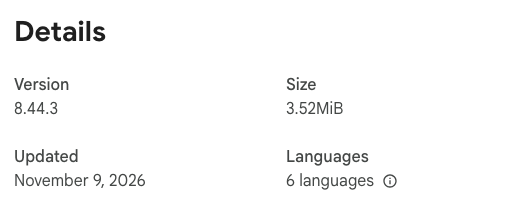
The Chrome Web Store listing showed version 8.44.3 that day, two days after its last update, with 1,000,000 users and 4.1 stars from 771 ratings. On 10 October 2026 the same panel showed 8.43.5, updated September 28, 2026. The diagnostics report in step 9 states the version you have installed.
Reinstalling is not on Helium 10’s list. If you try it, the only download route its install guide gives is helium10.com/extension, which leads to that Chrome Web Store listing.
Is Helium 10 down? How to check the official status page
Helium 10 runs a status page at status.helium10.com. It sits on Helium 10’s own domain and describes itself as “the official status page of Helium10”. We found no link to it on Helium 10’s homepage, pricing page or Chrome extension page, or in any of the 383 articles in its help center’s public list, and the page tells search engines not to index it (its response carries an X-Robots-Tag: noindex header). That would explain why a search for “is Helium 10 down” leads to third-party trackers instead. Bookmark the address.
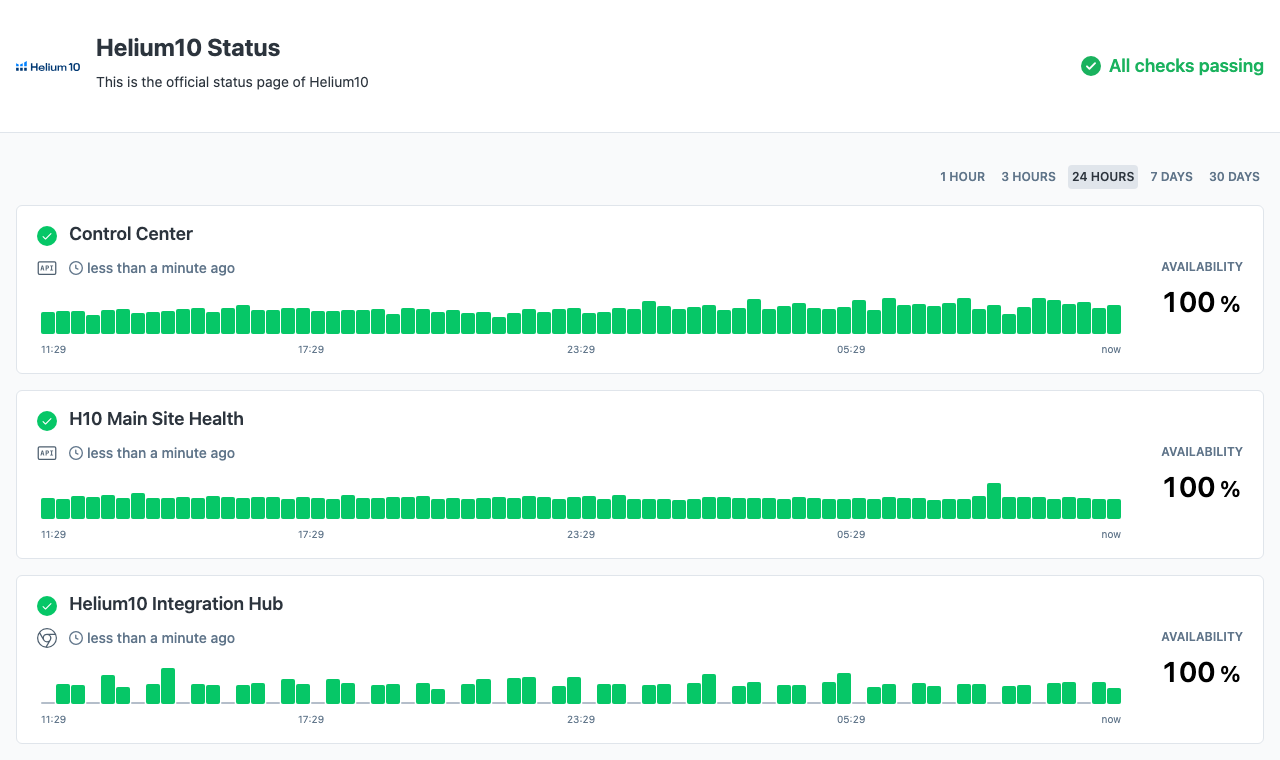
What it showed on 11 November 2026:
| Detail | What the status page showed |
|---|---|
| Overall | “All checks passing” |
| Checks listed | 12: Control Center, H10 Main Site Health, Helium10 Integration Hub, Helium10 Members Site, Helium10 Offer Claims, Helium10 Tools, members.helium10.com, MT360, Profits, Research Tools, Research Tools Api Status, Systems |
| 24-hour view | 100% availability on all 12 |
| 30-day view | 99.972% for Control Center, 99.931% for H10 Main Site Health, 100% for the other ten |
| Incidents | “No incidents reported” for each day from 5 to 11 November 2026 |
No check is named for the Chrome extension or Xray. A red check on Research Tools or the Members Site would point to Helium 10’s side. A green page narrows the fault to your browser, your account or one of the limits below, but it can’t prove the extension is healthy. Helium 10’s article says only that when “a widespread event affects all customers’ extensions, our developers work to enact a fix immediately”.
Helium 10 Xray not working: limits that look like faults
Helium 10’s install guide calls Xray “one of our most popular tools for product research”, and its help center documents several ways Xray stops or shows blanks by design:
| What you see | What Helium 10’s help center says |
|---|---|
| Xray stops opening on a free account | “Free users can access 10 lifetime uses for both Standard and Influencer Xray views” (Xray for Influencers article, 16 January 2026) |
| Xray does nothing on a page | It works on Amazon search results, product and best-sellers pages, and on Walmart.com (install guide) |
| Other tools are grayed out | On a search results page only Xray and ASIN Grabber run; the rest “only work on product pages” (install guide) |
| N/A in the sales columns | The category isn’t supported, the product has no main-category BSR, or the ASIN doesn’t meet Helium 10’s criteria (N/A article, 20 July 2021) |
| No Influencer view or variation sales | The Influencer view is “offered only in the US marketplace”; variation sales need Platinum or above (Xray for Influencers article) |
| Nothing at all on some Amazon sites | Helium 10’s market table (10 December 2025) lists the Chrome Extension for 14 marketplaces and not for Brazil, Sweden, Poland, Turkey, Egypt, Singapore or China |
The 14 supported marketplaces are the US, Canada, Mexico, the UK, Germany, France, Italy, Spain, the Netherlands, the UAE, Saudi Arabia, Australia, Japan and India; our Helium 10 marketplaces guide goes country by country. No fix above restores used-up free runs. Full Xray access starts with Platinum, at $99 a month billed yearly or $129 monthly (checked 10 October 2026). Our page on what Helium 10’s free account includes lists the other free limits.
Review Insights not working: the old notice is gone
Search results for this problem still list a Helium 10 help article titled “Review Insights Temporarily Unavailable in the Chrome Extension”. On 11 November 2026 its address returned Helium 10’s “The page you were looking for doesn’t exist” error, the help center’s article list no longer included it, and the Internet Archive held no copy. Treat anything quoting it as out of date.
The current article, Review Insights: Analyze Customer Feedback with Amazon Data (3 April 2026), describes a live feature built on Amazon’s Customer Feedback API and opened with Analyze Reviews on a product page. It gives four reasons the feature can look broken:
- Free account. “Review Insights is available to Helium 10 paid subscribers. Free users must upgrade to use this feature.”
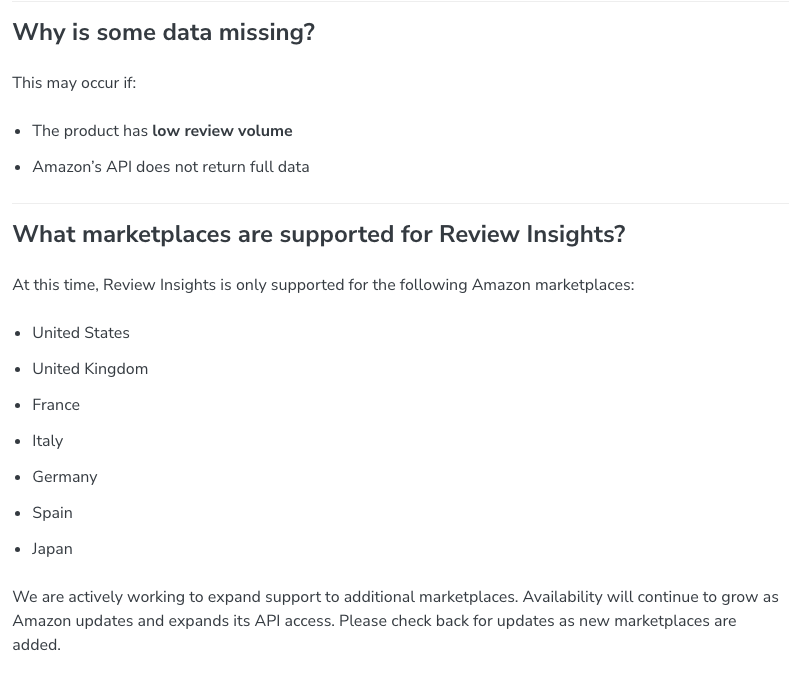
- Unsupported marketplace. It is “only supported” on seven Amazon marketplaces: the US, UK, France, Italy, Germany, Spain and Japan. Canada, Mexico, Australia and India have the extension but are not on that list.
- No variation selected. It “analyzes data at the child ASIN level, so you must select a specific variation”.
- Missing data. This can happen when a product “has low review volume” or “Amazon’s API does not return full data”.
If you are looking for Review Downloader, the help center has no how-to article for it: the name appears only in its glossary (15 October 2025), and the Chrome Web Store listing’s feature list doesn’t name it.
Other features that are limited, moved or retired
| What you see | What Helium 10’s help center says |
|---|---|
| The camera icon is missing from Amazon’s search bar | Open the extension’s settings, switch Page Widgets on and save. Image OCR is US-only, and free users get “10 free launches” (Image OCR article, 11 March 2025) |
| eBay Price Checker asks you to upgrade | Free users get “10 free launches before an upgrade is required” (eBay Price Checker article, 11 March 2025) |
| TikTok Shop data is blurred or slow | Platinum gets “Limited access, 10 uses/lifetime”, plans below it a preview only, and it covers TikTok Shop U.S. only; for slow loads Helium 10 suggests waiting and refreshing (TikTok article, 9 April 2026) |
| Keyword Tracker Snap View is locked | Free and legacy Starter accounts get a “Locked preview” (Snap View article, 20 August 2026) |
| A sub-user sees fewer features than the account owner | You may be “logged in to the wrong user profile in the Chrome Extension”; switch accounts, and ask the owner to check your permissions (sub-user article, 9 April 2026) |
| You keep getting signed out | “Each Helium 10 account is limited to two concurrent logins”, and a third login disconnects another device (devices article, 6 September 2022). It doesn’t say whether the extension counts as a login |
| Seller Assistant doesn’t request reviews | That separate extension “has been discontinued” and gets no updates or bug fixes (Helium 10’s notice, 11 June 2026) |
Helium 10 recommends Follow-Up in place of Seller Assistant; our Seller Assistant page covers the switch. For Walmart research, step 7 above is the first thing to check, and our Helium 10 for Walmart guide lists which tools work there.
Helium 10 not loading in the browser
If the web app at members.helium10.com is the problem, not the extension, start with the status page, which monitors the Members Site, Profits and Research Tools. We found no browser requirement for the web app in the 383 help-center articles (searched 11 November 2026). The nearest thing to a web-app checklist sits in Helium 10’s account-connection article (28 May 2026), written for errors when linking an Amazon Ads account: try another browser, update the browser, use an incognito window, turn off extensions, clear cache and cookies, and allow cookies for helium10.com.
How to contact Helium 10 support, and what to send
Helium 10’s support article (6 April 2023) gives two channels: email to support@helium10.com, and the chat icon at the bottom right of the Helium 10 website, which it says is available 24 hours a day, seven days a week. It says there is no phone support.
For an extension fault, the troubleshooting article asks for a diagnostics report:
- Open a page in Chrome and click the Helium 10 icon.
- Click the gear wheel at the bottom right of the Helium 10 menu to open the extension’s options.
- Click Run Diagnostics at the bottom right.
- Open the downloaded .txt report and attach it to your message. It records your operating system, Chrome version and Helium 10 extension version.
In the message, Helium 10 asks you to:
- describe the issue;
- say how often it happens;
- say what action comes before it;
- list the Amazon pages or products where it happens;
- list every third-party extension installed in Chrome.
Screenshots help. For errors in the web app, Helium 10’s error-documentation article (18 November 2025) asks for more: open an incognito window, open Chrome’s Developer Tools on the Console tab, and screenshot each step that leads to the error.
Bottom line
- The extension stopped today and worked yesterday: update it, check the status page, then work down the list to cookies and other extensions.
- It never worked: confirm you are in Chrome, signed in, on one of the 14 supported Amazon marketplaces, and that the feature is included in your plan.
- Xray stopped on a free account: the 10 lifetime uses are gone, and only a paid plan brings it back. Our Helium 10 pricing guide has the plan prices.
- You bought a plan for a feature your marketplace doesn’t get: a first payment is refundable within 7 days; our guide to canceling Helium 10 explains how to ask.
- Nothing here fixes it: send support the diagnostics report with the details above.
Our Helium 10 review covers the rest of the suite.
Frequently Asked Questions
Why is my Helium 10 Chrome extension not working?
Helium 10's troubleshooting article says Chrome or Amazon updates can cause temporary glitches and that other extensions can conflict with it. Its fixes, in order, are to update your extensions, update Chrome, clear cookies and check Chrome's cookie settings, then send support a diagnostics report. The extension is supported only in Google Chrome.
Is Helium 10 down right now?
Check status.helium10.com, which describes itself as the official status page of Helium10. On 11 November 2026 it showed All checks passing across 12 monitored services and no incidents for the previous seven days. None of its checks is named for the Chrome extension, so a green page does not rule out an extension fault.
Why is Helium 10 Xray not working?
On a free account Xray stops after 10 lifetime uses, according to Helium 10's help center; full access needs Platinum or higher. Xray runs only in Google Chrome, on Amazon search, product and best-sellers pages and on Walmart.com, and Helium 10 lists no Chrome extension support for Amazon Brazil, Sweden, Poland, Turkey, Egypt, Singapore or China.
Why is Review Insights not working in the Helium 10 extension?
Helium 10's Review Insights article, last edited 3 April 2026, limits the feature to paid subscribers and to seven Amazon marketplaces: the US, UK, France, Italy, Germany, Spain and Japan. It analyzes one child ASIN at a time and can show gaps when a product has few reviews. An older notice titled Review Insights Temporarily Unavailable no longer exists on the help center (checked 11 November 2026).
What is the latest version of the Helium 10 Chrome extension?
The Chrome Web Store listing showed version 8.44.3, updated November 9, 2026, when we checked on 11 November 2026. The extension's Run Diagnostics report lists the version you have installed; to force an update, open chrome://extensions, switch on Developer mode and click Update.
How do I contact Helium 10 support about the extension?
Email support@helium10.com or use the chat icon at the bottom right of the Helium 10 website; Helium 10's help center says it has no phone support. Attach the diagnostics report from the extension's settings and say what happened, how often, on which Amazon pages, and which other extensions you have installed.