SmartScout Relevant Products: Find the Products Competing Closest With Yours
Affiliate disclosure: we may earn a commission if you buy through links on this page. How we make money How we check facts
SmartScout’s Relevant Products lists the products that compete most closely with a given ASIN; SmartScout’s pricing table describes it as a way to “understand which products compete the closest with a given product”. It is a Business-plan feature, at $239 a month billed yearly or $299 monthly (checked 10 October 2026). Use it to build a competitor set before keyword or ad work; it won’t find you new products.
Relevant Products is on the Business plan · 7-day money-back guarantee Affiliate link
Whether SmartScout as a whole is worth paying for is the job of our SmartScout review. This page covers one Business-plan view and how to get value from it.
Correction (10 October 2026): this page previously gave Business as $187 a month. SmartScout raised its prices after our 1 August 2026 check; Business is now $239 a month billed yearly or $299 monthly.
What SmartScout says Relevant Products does
SmartScout describes it in two places (both checked 10 October 2026):
- The pricing table’s tooltip: “Understand which products compete the closest with a given product.”
- The Rank Maker page, which lists it among the tools to pair with Rank Maker: “Discover products associated with your keywords”.
Read together, the two descriptions suggest closeness is judged at least partly by shared search terms: products that rank on the same keywords as yours. SmartScout doesn’t publish how it ranks closeness, so treat that as our reading rather than its documentation.
On our complimentary Business account, Relevant Products is a tab in each product’s view, next to Rank Maker, Keyword Detective, the Relevancy Quadrant, Keyword Spy and Ad Spy. The screenshot on our Rank Maker review, captured 2 August 2026, shows that tab bar. Rank Maker’s Product Snapshot in the same screenshot shows a “Similar Products” count (236 for that listing); SmartScout doesn’t say whether that count and the Relevant Products list use the same method.
How to use it
This workflow is our suggestion, built from what SmartScout documents rather than from a SmartScout tutorial.
- Start from your own ASIN or a competitor’s, and open the Relevant Products tab.
- Turn the list into a competitor set. Add the closest products to a custom segment. SmartScout says segments can combine brands, ASINs, subcategories and keywords, and Business includes 10 of them.
- Take the set to Keyword Detective, which compares a set of products’ search terms and shows which ones they share and which you lack.
- Use the list for ad targeting. It is a starting point for product-targeting campaigns. Traffic Graph is the better source when you want pages that send shoppers between listings.
Which plan includes it
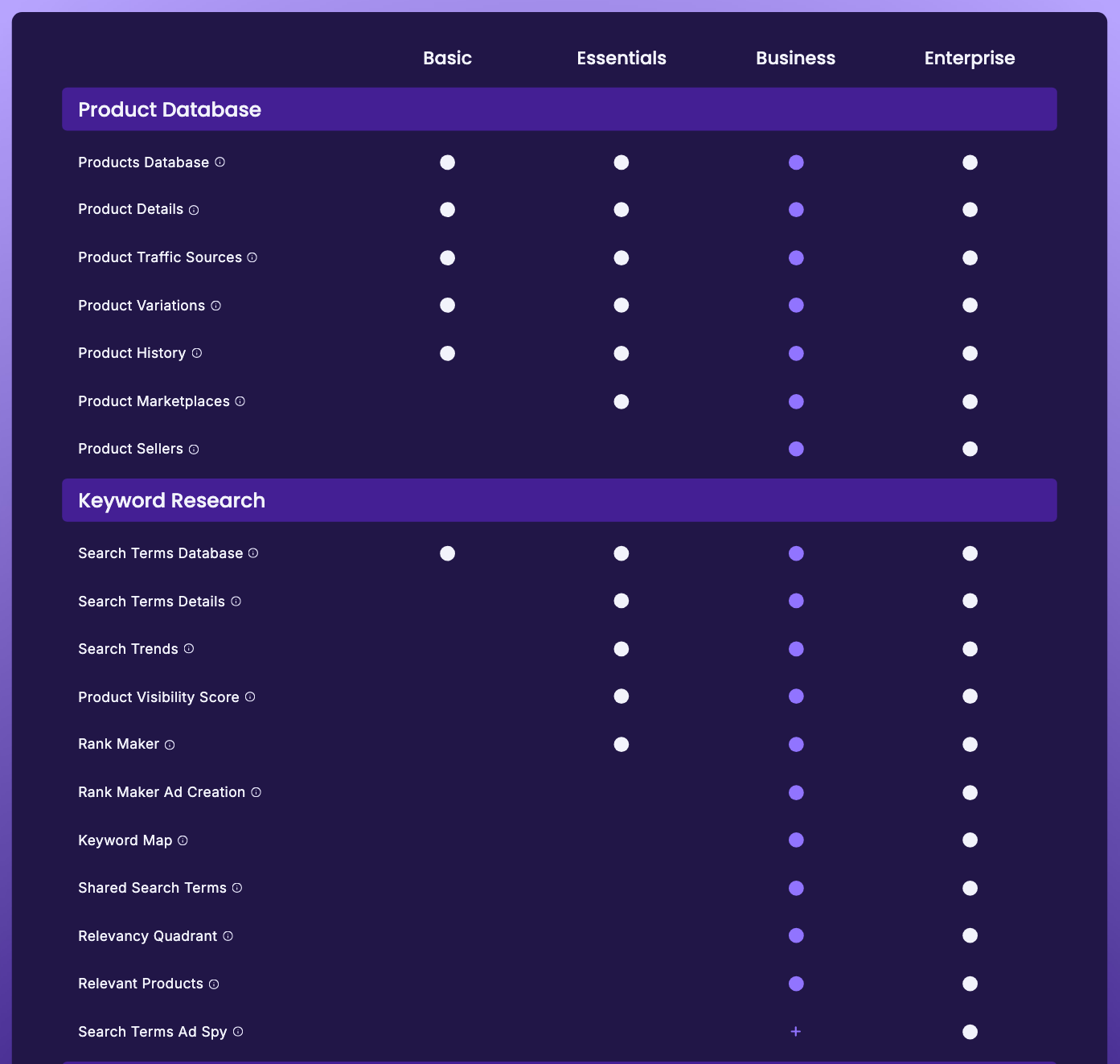
Relevant Products is on Business and Enterprise only (SmartScout’s pricing table, checked 10 October 2026). Business costs $239 a month billed yearly or $299 monthly and also brings Traffic Graph, Brand Reports, Keyword Detective, the Relevancy Quadrant and Excel exports. Essentials ($99 billed yearly, $119 monthly) doesn’t include it. Our SmartScout pricing page compares the plans in full.
Relevant Products vs Traffic Graph vs Keyword Detective
| Question | Tool | Plan |
|---|---|---|
| Which products compete most closely with this ASIN? | Relevant Products | Business |
| Where do shoppers go next from this product page? | Traffic Graph | Business |
| Which search terms do these products share, and which do I lack? | Keyword Detective | Business |
| How does this brand compare with its closest rival? | Brand Reports | Business |
All four come with Business, so you pick by question, not by budget.
Where it falls short
- It starts from a product you already have. Relevant Products maps a known market. For new product ideas, start with SmartScout’s Products and Subcategories databases or one of the best Amazon product research tools.
- No published method. SmartScout doesn’t explain how it ranks closeness.
- Business-only. On Essentials, the nearest substitute is running Rank Maker on each rival you already know.
What this page is based on
SmartScout’s pricing page (comparison table and tooltips), its Rank Maker page and its features hub, all checked on 10 October 2026, plus the product-view screenshot from our complimentary Business account (2 August 2026). Descriptions of how it works are SmartScout’s own. Our methods are on how we test.
Frequently Asked Questions
What is SmartScout Relevant Products?
A SmartScout view that lists the products competing most closely with a given ASIN. SmartScout's pricing table describes it as a way to understand which products compete the closest with a given product, and its Rank Maker page as a way to discover products associated with your keywords.
Which SmartScout plan includes Relevant Products?
Business and Enterprise only (checked 10 October 2026). Business costs $239 a month billed yearly or $299 monthly; Basic and Essentials don't include it.
Is Relevant Products the same as Traffic Graph?
No. Relevant Products lists the products competing most closely with one ASIN. Traffic Graph maps Amazon's frequently bought together and also-viewed links, which shows where shoppers move between listings. Both are on the Business plan.
Is Relevant Products good for finding products to sell?
Not on its own. It starts from an ASIN you already have, so it maps a known market rather than finding a new one. For discovery, SmartScout's Products and Subcategories databases or a dedicated product research tool are a better start.