SmartScout Ad Spy: Strong PPC Research, No Self-Serve Access
Affiliate disclosure: we may earn a commission if you buy through links on this page. How we make money How we check facts

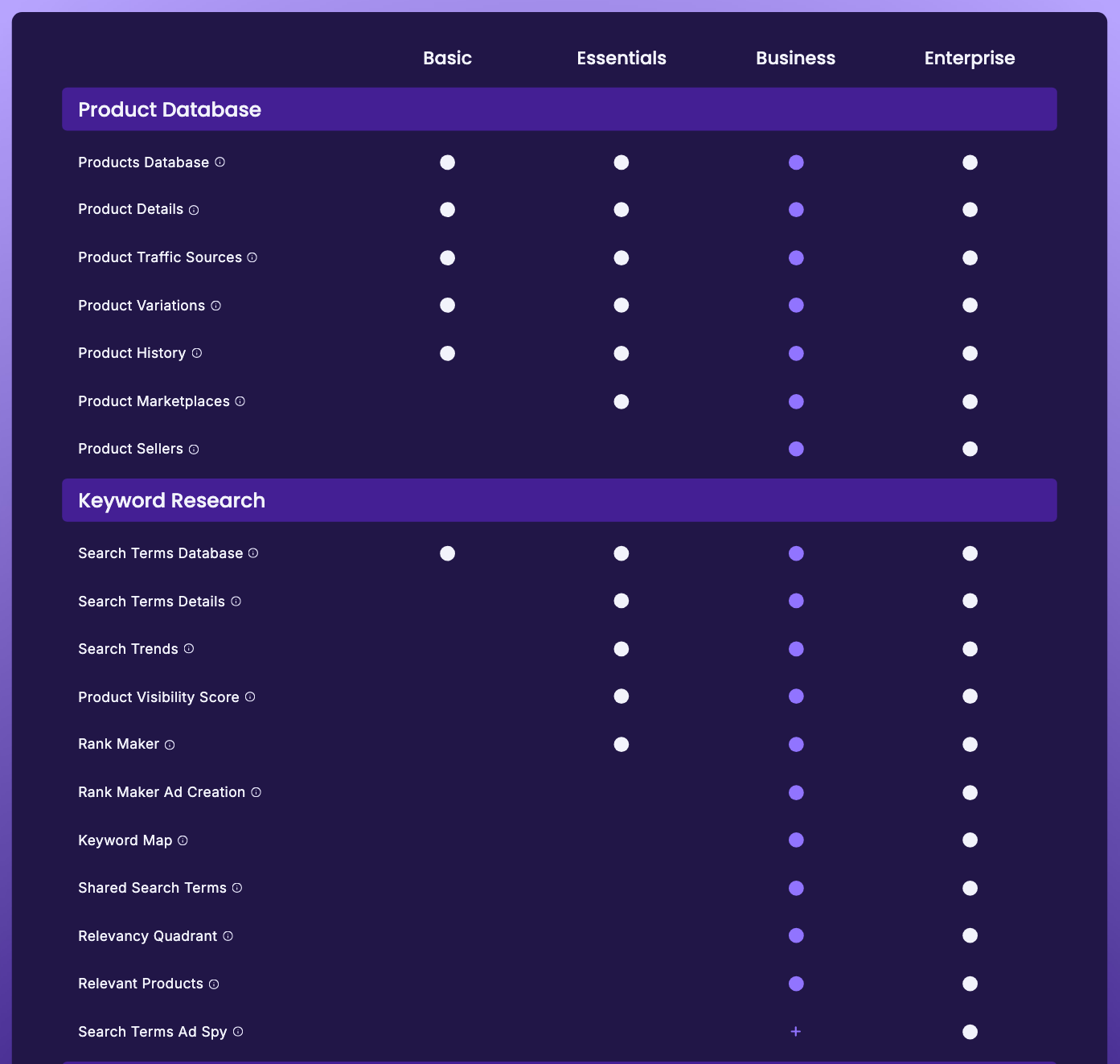
SmartScout Ad Spy is a useful Amazon PPC competitor-research tool with one catch that shapes everything else: you can’t buy it at a listed price. SmartScout’s pricing table, checked 10 October 2026, includes it on Enterprise and offers it to Business customers as an add-on through sales. Basic and Essentials don’t get it, and no plan shows a price for it.
Ad Spy: Enterprise, or a Business add-on through sales Affiliate link
Correction (10 October 2026): we previously described Ad Spy as Enterprise-only and said it shows no dollar ad-spend figures. SmartScout’s pricing table now also offers it as a Business add-on, and SmartScout’s own help page says Ad Spy shows estimated spend at brand and keyword level. We also previously cited a “Competitor Ad Spend” line on the Enterprise plan card; that line no longer appears.
| Question | Short answer |
|---|---|
| What it does | Reverse-engineers a competitor brand’s paid search terms and sponsored win rates from observed ad placements |
| Which plans | Enterprise, or a sales add-on on Business; no published price |
| Ad spend or CPC? | Estimated spend, by SmartScout’s description; no SmartScout page we found says it shows CPC |
| Ad formats | Sponsored Products, Sponsored Brands, Sponsored Video |
| Export | Excel |
| Best for | Agencies, aggregators and brands already talking to SmartScout’s sales team |
| Wrong for | Most self-serve sellers; see the best Amazon PPC tools instead |
What SmartScout Ad Spy does
Every Amazon seller running ads is bidding partly blind. You know your own search-term report. You don’t know which terms your competitor is buying, how hard, or whether the term you just lost is one they defend or one they stumbled into.
Ad Spy is SmartScout’s attempt to close that gap. In its words: “With AdSpy, you’ll be able to see the metrics behind all of your competitors’ paid search terms and discover the best keywords to target within your own Amazon PPC advertising campaign.” The tool is organised brand-first, like the rest of the platform: SmartScout says “we’ve structured AdSpy so you can first see data from a brand perspective”, and you then drill into individual terms and products.
That brand-first orientation is the real design decision. Most keyword tools start with a term and tell you about demand. Ad Spy starts with a competitor and tells you about behaviour.
What Ad Spy looks like without the add-on
Ad Spy isn’t hidden behind a locked door. On our complimentary SmartScout Business account it appeared as a tab inside a product view and returned results: against ASIN B0CJ1B6D6S (Scrub Daddy) it reported 269 paid search terms. The first five were readable: scrub daddy mop, kitchen sponges for washing dishes, happy sponge, oxo brite, sold and shipped by amazon. The other 264 were blurred.
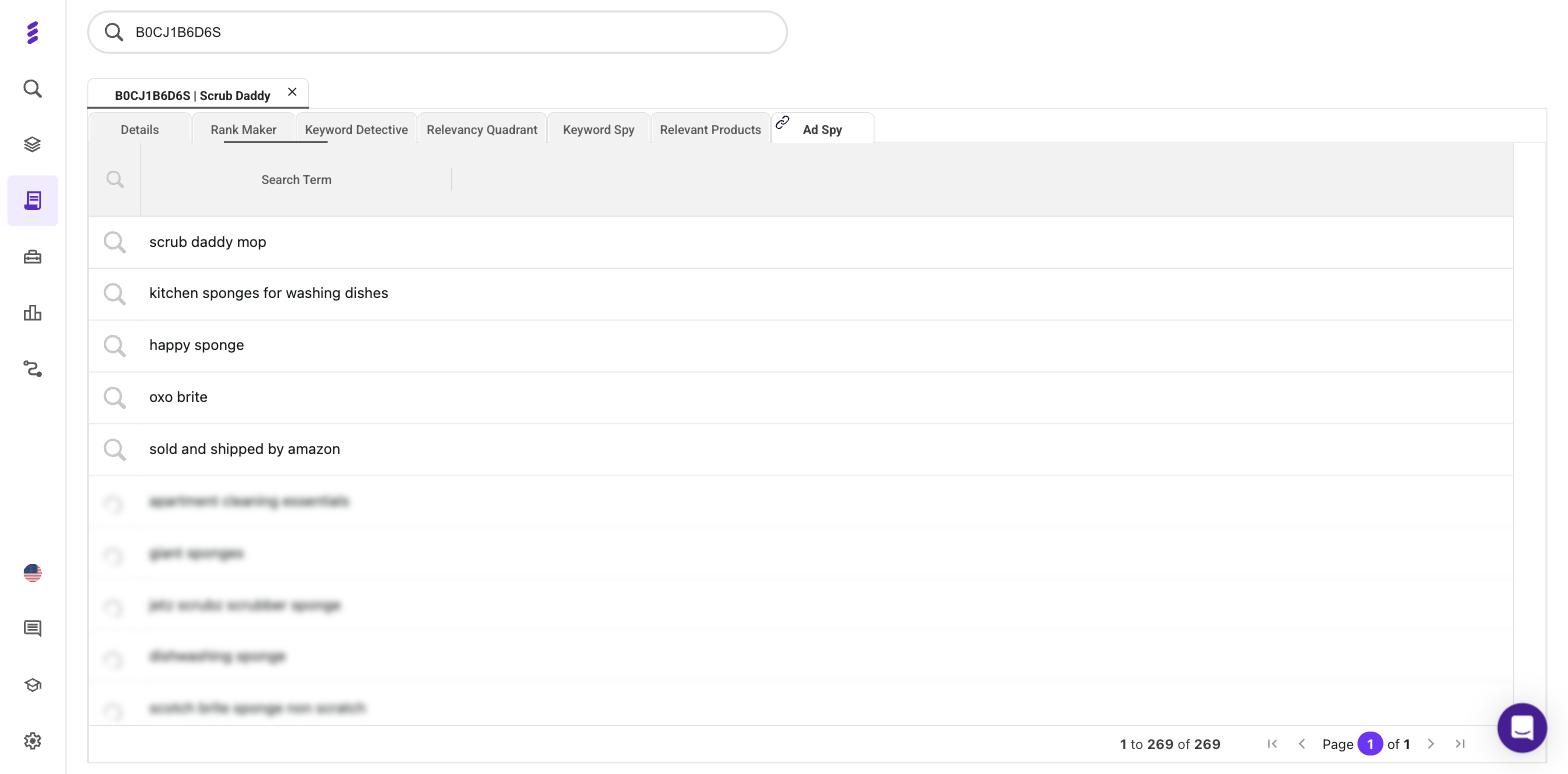
That is a deliberate upsell design, and more useful than a hard lock: you learn how much paid-keyword data exists for a competitor before deciding whether a sales call is worth it. When we captured it, on 2 August 2026, SmartScout’s pricing table listed Ad Spy as Enterprise-only; the app blurred the remaining rows without naming a plan. The pricing table has since added the Business add-on. So the answer to “is Ad Spy included in my plan?” on Business is partly: you get the count and a five-row taste, and the full tool costs extra.
A note on access and naming
SmartScout’s AdSpy FAQ says the tool “is included in SmartScout plans, with access levels depending on your subscription tier.” That reads more generously than the pricing table, which is the only place on SmartScout’s site that gives a per-plan answer.
SmartScout also calls the tool three different things, which helps if you are searching for it:
- “Amazon PPC Competitor Research AdSpy” on its product page
- “Ad Spy” in the site navigation
- “Search Terms Ad Spy” in the pricing comparison table
“SmartScout AdSpy” and “SmartScout Ad Spy” are the same product.
The six brand-level fields, and what each is for
The AdSpy product page lists six brand-level fields. Here is SmartScout’s one-line description of each, and the decision it supports.
| Field | SmartScout’s description | The decision it supports |
|---|---|---|
| Estimated Searches | “See approximately how many hits each search term is getting.” | Whether a term is worth contesting at all. A win rate on a term nobody searches is a vanity number |
| Sponsored Products | “Get the complete list of paid search terms on any brand or product.” | The breadth of a campaign: a focused defence of a few terms, or a wide net? |
| Sponsored Brand Win Rate | “Discover which search terms are putting a brand at the top of the page.” | Whether the incumbent pays for top-of-page brand placements, which are expensive to displace |
| Sponsored Video Win Rate | “Identify which brands have the most-watched videos and copy them.” | Where video inventory is under-contested; the field most likely to show a gap |
| Top Spot Win Rate | “See the brands and products dominating the top-left sponsored position.” | Commitment. A high top-spot rate on a high-volume term means someone is bidding to hold it |
| Top Group Win Rate | “Determine how often a brand or product is getting ads in the top sponsored row.” | Consistency of presence rather than dominance, useful for spotting always-on campaigns |
Two caveats about that table.
First, those one-liners are all SmartScout publishes. There are no formal definitions, so the right-hand column is our reading of how each field can be used, not SmartScout’s documentation.
Second, and more important: a win rate is a percentage without a published denominator. SmartScout doesn’t say how many observations sit behind a rate, over what window, or how often results are sampled. That isn’t a reason to distrust the data, but it dictates how to use it. Win rates are dependable for ranking competitors against one another on the same term. They are weak as absolute figures, and “our rival wins 63% of top spots” shouldn’t go into a board deck as if it were measured.
Formats and export
Ad Spy covers Sponsored Products, Sponsored Brands and Sponsored Video. Splitting win rates by format is the most useful thing in the tool, because ad formats are bought separately and a brand’s coverage is rarely even across all three.
Export is to Excel; SmartScout’s wording is “Export your filtered data directly into an Excel spreadsheet with just a couple of clicks.” The export isn’t a convenience feature. It is where the analysis starts, because the numbers only become decisions once you join them to your own reports.
Estimated, not measured
SmartScout’s own answer to “how accurate is Amazon PPC competitor data in AdSpy?” is:
“AdSpy uses large-scale Amazon SERP data to estimate paid keyword activity and win rates. While Amazon does not publish exact ad spend, AdSpy provides reliable directional insights based on real ad visibility.”
Its help page on AdSpy estimates adds what is in and out. SmartScout checks “the top Sponsored Products, Sponsored Brands and Sponsored Video placements”, and “we don’t include ads on page 2, Sponsored Display, product page targeting, and the DSP.” (SmartScout’s Helium 10 comparison page says Ad Spy tracks Sponsored Display; the help page says it doesn’t. We’d go with the help page.)
Three things follow, and all three matter.
The input is search results, not ad accounts. Nobody hands SmartScout a competitor’s campaign data. The method is repeated observation of what appears in sponsored slots, aggregated upward. That is a legitimate technique, roughly how competitive ad intelligence works outside a walled garden, but every figure is inferred from visibility.
“Directional” is SmartScout’s word, not a critic’s. It is telling you the data supports comparative judgements, not precise ones. Use it to decide which terms a rival defends hardest. Don’t use it to decide that a rival’s win rate moved from 41% to 44% last month.
Sampling has blind spots that don’t announce themselves. Ads vary by time of day, placement, shopper and device, and a crawl catches a slice. Thin sponsored inventory, dayparted campaigns and short promotions are where an observational estimate is least reliable, and nothing flags which rows those are.
None of this makes Ad Spy bad. It makes it evidence, worth having when the alternative is guessing, and to be weighed against your own account data, which is measured.
What Ad Spy says about ad spend, and what it doesn’t
We previously told readers that Ad Spy contains no dollar ad-spend figures. SmartScout’s own pages say otherwise:
- Its help page on estimates talks about a brand “with $10k in estimated spend and another brand at $50k in estimated spend”, and says “AdSpy lets you look at the keyword level. If we show a brand spending $1k on a keyword, you can expect to spend that much to compete with them.”
- Its homepage describes Ad Spy as showing “which sponsored ads competitors run, on which keywords, and how their spend is trending.”
- Its Helium 10 comparison page says Ad Spy shows competitors’ “estimated ad spend.”
None of the six fields on the AdSpy product page is a spend column, and the preview on our Business account showed only search terms, not spend figures. Treat them as SmartScout describes them: modelled from observed placements, directional, and blind to Sponsored Display, page-two ads, product-page targeting and the DSP.
CPC is a different matter. We found no SmartScout page that says Ad Spy reports a cost per click. CPC data sits elsewhere in SmartScout, on plans with a listed price. The pricing table’s tooltip for the Search Terms Database, which every plan includes, lists filters for “search volume, CPC, Shared/Sponsored products, and more”. And Rank Maker, from Essentials, lists “PPC bid estimates” and an “Estimated PPC Bid for budget planning” on its product page.
What you would do with win-rate data
Here is a workflow that uses Ad Spy for what it can support rather than what you wish it did.
1. Start with the brand, not the keyword. Pull the Ad Spy table for a competitor you already know matters. The brand-first structure makes this the natural entry point.
2. Filter on Estimated Searches first. Win rates on low-demand terms are noise. Cut the table to terms with real volume behind them before you look at any percentage.
3. Read Top Spot Win Rate as a commitment signal. High demand plus a high top-spot rate means a term someone is paying to hold, and entering that auction means bidding against a demonstrated willingness to defend it. That isn’t a reason to avoid it. It is a reason to go in with a budget and an expectation, rather than a default bid and hope.
4. Hunt for format gaps. Compare Sponsored Video Win Rate against Sponsored Brands and Sponsored Products coverage on the same term. A brand winning Sponsored Products consistently but showing little video presence is leaving inventory uncontested. Video takes more work to produce, which is why fewer sellers run it and why the gap persists.
5. Check who is bidding on your brand name. SmartScout says AdSpy “identifies when other brands bid on your branded keywords.” Defending branded terms is a different budget conversation from acquisition, and one of the few Ad Spy findings you can act on the same day.
6. Export, then join. Ad Spy’s spend figures are estimates, so the export is only half the picture. Put it in Excel next to your own search-term report and you can set competitor visibility beside your real ACOS on the same term. That join, observed rival behaviour against your measured cost, is the analysis worth paying for.
7. Feed the winners back into organic. SmartScout makes a fair point that paid terms often reveal high-converting language worth using in listings and backend keywords. If you also run Keyword Detective or the Search Terms Database, the paid list is a good filter for which organic terms deserve effort. Our SmartScout competitor keyword guide maps which SmartScout tool, and which plan, answers each competitor-keyword question.
Who it is for, and who should not buy it
Ad Spy makes sense if you are an agency managing several brands’ Amazon advertising, an aggregator assessing an acquisition target’s paid moat, or a brand with enough ad spend that a point of ACOS is worth a research contract. In each case you are probably already talking to SmartScout’s sales team, about Enterprise’s historical data or the API and Data Lake add-ons, and Ad Spy can join that conversation.
Most sellers shouldn’t buy SmartScout for Ad Spy, and we’d rather say so. The sales-led access is the whole argument: no published price, no self-serve checkout, no coupon known to cover it, and no way to test it for a month to see whether it changes a decision. You’ll be in a sales process before you find out what it costs. For a seller spending $5,000 a month on ads, that is a poor trade against software you can buy this afternoon.
It isn’t the only SmartScout tool like this. Share of Voice reads like a mid-tier competitive metric and is Enterprise-only. If competitive visibility is your reason for looking at SmartScout, check the tier before you get attached: our SmartScout pricing guide has the full breakdown, and the SmartScout review covers where the platform earns its money.
Pros
- Answers a question few tools can: which terms a rival actually defends
- Win rates split by ad format, which exposes uncontested video inventory
- Brand-first structure matches how competitive research starts
- Flags competitors bidding on your branded terms
- Excel export makes joining it to your own account data straightforward
Cons
- No published price: Enterprise, or a Business add-on through sales
- Spend figures are modelled estimates that skip Sponsored Display, page-two ads and the DSP
- Win rates come with no published denominator or sampling window
- Dayparted and short burst campaigns are blind spots for search-result sampling
- SmartScout's own pages disagree on access and on which ad formats it covers
If you can’t get Ad Spy
Be clear about what you are replacing. Ad Spy is an outside-in observation tool. Most affordable PPC software is an inside-out management tool, working from your own connected account. They aren’t substitutes, and any page telling you otherwise is selling something. With that said, here is what to do instead.
Buy PPC management, not PPC espionage. For nearly every seller, the money is in running your own campaigns better rather than modelling someone else’s. Our roundup of the best Amazon PPC tools compares the field by seller size and ad complexity. Helium 10 Ads is the practical default if you already run Helium 10, though it needs Diamond rather than Platinum, and on Diamond Helium 10 charges a 2% management fee on all ad spend in profiles set to Managed, with no minimum (Helium 10 help center, updated 20 August 2026).
Stay inside SmartScout, on a self-serve plan. Rank Maker, from Essentials ($99 a month billed yearly or $119 monthly), lists every term a listing ranks for organically and through paid ads, with a PPC bid estimate among more than 20 data points per keyword. Even Basic’s Search Terms Database has CPC filters, according to SmartScout’s pricing table. Neither gives win rates, but both come at a listed price.
Use Amazon’s own data harder. Your search-term report tells you which terms convert, and at what cost, with no estimation involved, and most accounts haven’t exhausted it. That is an unsatisfying answer for anyone shopping for an Amazon competitor ad spy tool, but it is usually the right one.
What to read next
- SmartScout review: whether the platform is worth it at all
- SmartScout pricing: every plan, and which tools each one unlocks
- SmartScout coupon code: the 25% codes, and which plans they are known to cover
- Best Amazon PPC tools: the practical alternative for most sellers
- SmartScout Keyword Detective review and the Search Terms Database review for the keyword side of the stack
Frequently Asked Questions
Which SmartScout plan includes Ad Spy?
Enterprise, or Business with a paid add-on. SmartScout's pricing table, checked 10 October 2026, ticks Search Terms Ad Spy for Enterprise and marks it as an add-on on Business, with the note 'If interested, please talk to sales.' It isn't available on Basic or Essentials, and no price is published.
Does SmartScout Ad Spy show competitors' ad spend or CPC?
SmartScout says it shows estimated ad spend: its help page on AdSpy estimates describes spend figures at brand and keyword level, modelled from observed placements. We found no SmartScout page that says Ad Spy reports cost per click. For CPC, look elsewhere in SmartScout: its pricing table lists CPC filters in the Search Terms Database on every plan, and Rank Maker, from Essentials, lists PPC bid estimates.
How does SmartScout Ad Spy produce its estimates?
By observing Amazon search results at scale. SmartScout says it checks the top Sponsored Products, Sponsored Brands and Sponsored Video placements and leaves out ads on page two, Sponsored Display, product-page targeting and the DSP, so its figures are directional rather than measured.
What does a win rate mean in Ad Spy?
It is the share of observed sponsored placements a brand won, split by ad format and position. SmartScout doesn't publish how many observations sit behind a rate or over what window, so win rates are good for ranking competitors against each other and weak as absolute figures.
Is SmartScout Ad Spy better than Helium 10's PPC tools?
They do opposite jobs. Helium 10 Ads, formerly Adtomic, manages your own campaigns with your account's real bids and spend, and it needs Helium 10 Diamond plus a 2% fee on managed ad spend. Ad Spy observes competitors from the outside.
Can I export SmartScout Ad Spy data?
Yes. SmartScout says you can export filtered Ad Spy data directly into an Excel spreadsheet. The export is where most of the analysis happens, because the figures become useful once you join them to your own search-term reports.