Helium 10 Dashboard: What the Insights Dashboard Shows and What Each Plan Gets
Affiliate disclosure: we may earn a commission if you buy through links on this page. How we make money How we check facts
The Helium 10 dashboard, which Helium 10 calls the Insights Dashboard, is the home screen that fills with your own Amazon sales, advertising and product data once a seller account is connected. Both paid plans include it. The “Insights and recommendations” feed is Diamond-only, and My Products tracks 20 ASINs on Platinum against 1,000 on Diamond (pricing page, checked 10 October 2026).
Dashboard on both plans · insights feed on Diamond Affiliate link
Until an account is connected, the dashboard has nothing to show: it reports on your business, not on the market. Research happens in other tools, which our Helium 10 features guide maps out.
What the dashboard shows
Helium 10’s getting-started guide (last edited 8 August 2025) splits the dashboard into three parts.
| Section | What it shows | What it needs |
|---|---|---|
| Insights (“Grow Your Business”) | Suggested actions for your listings, each with an impact level and a link to the tool that acts on it | Diamond or Enterprise |
| Graphs | Revenue (with metrics you choose), top five products by revenue, units or refunds, and advertising: gross revenue, PPC spend, ACoS and TACoS | A connected account; the advertising graph also needs Helium 10 Ads |
| My Products | A table of your ASINs with metrics, insights, alerts, average keyword rank, inventory and net profit | ASINs selected for tracking; cost of goods for net profit |
A few details from Helium 10’s dashboard FAQ (January 2026):
- Insights are Helium 10’s own suggestions. Its product page gives examples such as Product Trending Down, New Keyword Suggestion, Listing Suppressed and Organic Rank Dropped, plus alerts on competitors’ prices, keywords and listing changes. Helium 10’s Insights article confirms the feed is “only included in the Diamond and Enterprise tiers”.
- Page views and conversion rate in My Products are “provided by Amazon”, the FAQ says.
- Net profit stays blank until cost of goods is set up in Profits.
- You can export My Products to Excel, keep three custom dashboards, and open any product in Listing Analyzer from the table.
How to set it up
- Connect your Amazon seller account from the Connections page in your profile menu, using the main Seller Central login. Helium 10 says the dashboard can take 24 to 48 hours to load fully.
- Pick the marketplace in the drop-down at the top right.
- Choose your ASINs. Use Adjust Selected ASINs to switch products into My Products, and repeat for each marketplace. Your ASIN limit appears at the top of the dashboard.
- Add cost of goods in Profits so the net profit column works.
- Connect advertising if you want the Advertising graph: Helium 10’s FAQ says you need a connected PPC account and a Helium 10 Ads (formerly Adtomic) subscription, which comes with Diamond. Our Helium 10 Ads guide covers its 2% managed-spend fee.
Platinum vs Diamond on the dashboard
| Dashboard feature | Platinum | Diamond |
|---|---|---|
| Business performance dashboards | Included | Included |
| Insights and recommendations | Not included | Included |
| My products (tracked ASINs, lifetime) | 20 | 1,000 |
| Advertising graph | No Helium 10 Ads on Platinum | Included with Helium 10 Ads |
Source: Helium 10’s pricing page, 10 October 2026. Helium 10’s older My Products article (January 2026) still gives 20, 200 and 5,000 ASINs for Platinum, Diamond and Enterprise, so its own documents disagree on Diamond. The figure at the top of your dashboard is the one that applies, and Helium 10 sells extra ASINs in packs of 100.
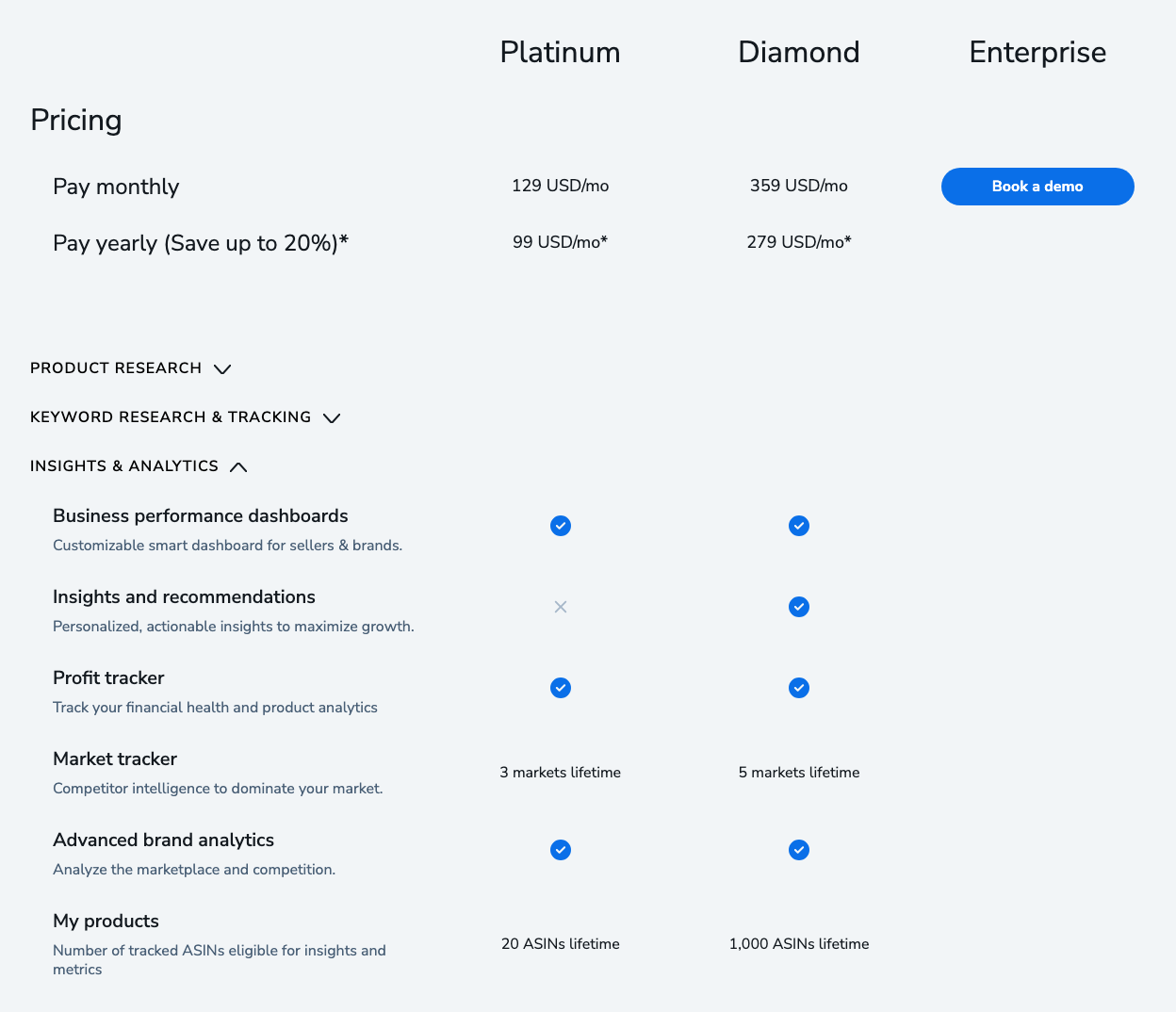
Helium 10 Platinum costs $99 a month billed yearly, or $129 billed monthly; Diamond costs $279 a month billed yearly, or $359 billed monthly (checked 10 October 2026). The Helium 10 pricing guide covers the other differences.
What the dashboard doesn’t do
- It is Amazon-only. Helium 10’s FAQ says Walmart products don’t appear on the dashboard. Walmart sellers see their numbers in Profits; our Helium 10 for Walmart guide lists what works there.
- It doesn’t research markets. For tracking competitors across a whole niche, use Market Tracker.
- It can’t fix bad inputs. Net profit depends on the costs you enter, and most competitor figures elsewhere in Helium 10 are estimates. Our guide to how Helium 10 gets its data explains which numbers come from Amazon.
Correction (10 October 2026): an earlier version of this page described goal-setting, Latest Orders and keyword-research widgets and a Trendster integration. Helium 10’s current dashboard guide describes three sections, Insights, Graphs and My Products, and Trendster was retired on 30 September 2025.
The mobile app
Helium 10 also has a mobile app for iOS and Android that covers business performance, advertising campaigns, product alerts and account settings (feature guide, last edited 5 March 2026). Helium 10’s mobile app FAQ says it supports Amazon, Walmart and TikTok seller accounts on Platinum and Diamond. On 10 October 2026 the iPhone app’s App Store listing showed 1.9 out of 5 from 9 ratings.
For the bigger buying decision, our Helium 10 review weighs the whole suite.
Frequently Asked Questions
What is the Helium 10 Insights Dashboard?
It is the home screen of a Helium 10 account. Once your Amazon seller account is connected, it shows suggested actions, revenue, top-product and advertising graphs, and a My Products table with metrics and alerts for each ASIN.
Is the Insights Dashboard included in Helium 10 Platinum?
The dashboard is, but not all of it. Helium 10's pricing table includes business performance dashboards on Platinum and Diamond, while the Insights and recommendations feed is Diamond-only, and My Products tracks 20 ASINs on Platinum against 1,000 on Diamond.
Why is my Helium 10 dashboard empty?
Data only appears after you connect your seller account, and Helium 10 says the dashboard can take 24 to 48 hours to load fully. The Advertising graph also needs a connected PPC account and Helium 10 Ads, and net profit needs your cost of goods entered in Profits.
Does the Insights Dashboard show Walmart products?
No. Helium 10's dashboard FAQ says it only includes Amazon products from your connected Amazon seller account. Walmart sales are reported in Profits instead.