Jungle Scout Opportunity Finder: Niche Score, Search Limits and How to Use It
Affiliate disclosure: we may earn a commission if you buy through links on this page. How we make money How we check facts

Opportunity Finder is Jungle Scout’s niche search: it filters Amazon keywords, not products, and grades each niche with a Niche Score from 1 to 10. Jungle Scout’s help center says the score is based on demand, competition and listing quality (checked 11 November 2026). The tool was called Niche Hunter until late 2019. Starter allows 100 searches a month; the two higher plans show no cap.
Opportunity Finder is in every plan · 100 searches a month on Starter Affiliate link
Our sources are Jungle Scout’s product pages, help center, changelog and pricing table, read on 11 November 2026, with each help article’s last-edited date. Older Jungle Scout blog posts are quoted from Internet Archive copies, dated where they are cited.
What is Jungle Scout Opportunity Finder?
Opportunity Finder sits under Product Research in the Catalyst web app, next to the Product Database. Its help-center article (last edited 14 April 2025) says it “helps you determine whether to pursue a specific niche based on the top 1 million user searches on Amazon monthly”. You set filters, and it returns keywords that match, each treated as a niche.
Jungle Scout’s Opportunity Finder page puts it this way: “Turn a keyword into a market segment”. For each niche the page promises history for average units sold, average price and search volume, seasonality tags such as “trending”, and “the top 25 products in each opportunity niche”, which you can add to the Product Tracker.
Opportunity Finder vs Product Database
Both tools are in every plan, with the same Starter limit, but they search different things.
| Detail | Opportunity Finder | Product Database |
|---|---|---|
| What you search | Keywords, each treated as a niche | Individual products |
| Pool | “the top 1 million user searches on Amazon monthly” | “475 million products”, says the product page |
| Main filters | Units sold, price, search volume and trend, Niche Score, competition, seasonality | Price, net revenue, BSR, units sold, revenue, reviews, rating, weight, sellers, listing quality |
| Score | Niche Score, 1 to 10, per niche | Listing Quality Score, per product |
| Results | A list of niches with their top products | Up to 10,000 products, 25, 50 or 100 to a page |
The Product Database rows come from its help article (last edited 1 July 2025), which also lists two filters the Opportunity Finder article doesn’t: product size tier and seller type (FBA, FBM or Amazon).
Jungle Scout gives two sizes for the Product Database. The product page says “a searchable catalog of 475 million products pulled directly from Amazon”. The same page’s search-engine description says “Access 70+ million Amazon products instantly”, and Jungle Scout’s guide How to Use Jungle Scout (dated 30 November 2023; Internet Archive copy of 22 April 2026) says “over 70 million”. Whichever is current, one search displays at most 10,000 products.
Is Opportunity Finder the same as Niche Hunter?
Yes. Niche Hunter is the tool’s former name, and Jungle Scout’s own blog says so. A post dated 17 April 2016, in the Internet Archive’s copy of 6 December 2021, carries this note: “Opportunity Finder was formerly called Niche Hunter, but we kept this image to show the many cool results! Opportunity Finder has advanced functionality and is even faster and easier to use than Niche Hunter!”
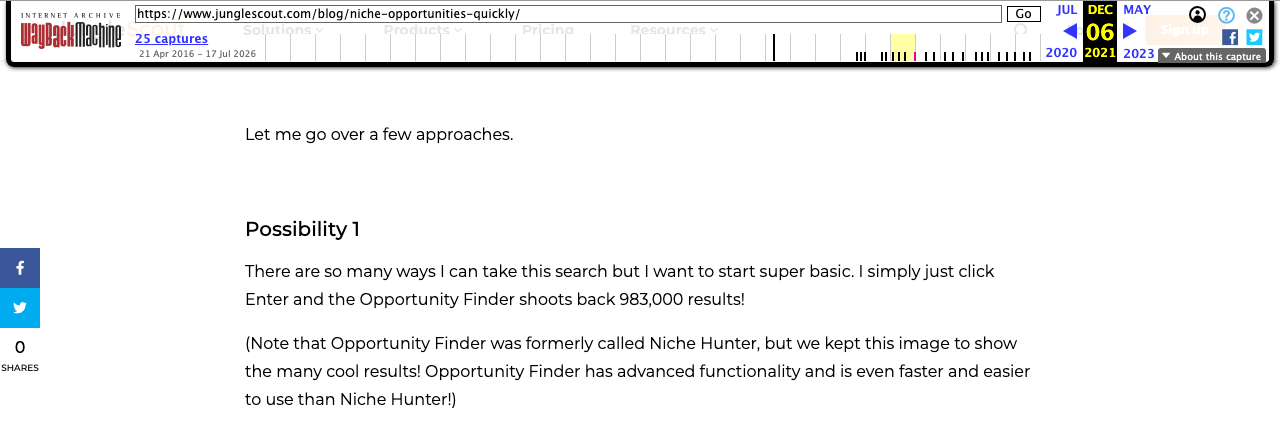
The rename dates from late 2019. The Internet Archive’s copy of the same post from 19 October 2019 still says Niche Hunter throughout, the help-center article for Opportunity Finder was created on 21 October 2019, and the post’s own metadata shows an edit on 7 November 2019.
The old name explains a common mix-up. In the 2019 copy, Niche Hunter’s filters were “Demand, Price, Competition, Listing Quality Score, and Opportunity Score”. In Opportunity Finder the score is called the Niche Score, and “Opportunity Score” now belongs to the browser extension.
Opportunity Score vs Niche Score: how Jungle Scout defines each
Jungle Scout’s article Opportunity Score vs. Niche Score (last edited 5 November 2024) covers both: “Both the Niche Score & Opportunity Score are proprietary algorithms that grade product opportunities based on a product’s demand (according to units sold), competition, and quality of the listings (determined by a number of factors like title, keywords, number of photos, quality of bullet points and description). However, these scores are measured differently.”
| Detail | Niche Score | Opportunity Score |
|---|---|---|
| Where you see it | Opportunity Finder, in the web app | The browser extension, on Amazon search results |
| Scale | 1 to 10; “10 is the highest opportunity and 1 is the lowest” | 1 to 10, same direction |
| Products it is based on | “the top products that make up that Niche”, which “could be up to 10 products or only 3-4” | “all the products in the search results” you have loaded |
| Published bands | None | 1 to 3, 4 to 5 and 6 to 10 |
The bands come from the extension’s score article (last edited 20 March 2025):
- 1 to 3: “You have little opportunity to enter markets with this low score. Low scores indicate not enough demand, too high competition, or both.”
- 4 to 5: “These may be good products, but they need more research.”
- 6 to 10: “These are the best opportunities, and you’ll want to start investigating these products more.”
Three cautions follow from Jungle Scout’s own wording:
- The bands are published for the extension’s score only. A guide that applies the 6-to-10 band to the Niche Score is borrowing it. For the Niche Score, Jungle Scout says only which end is better.
- Neither score is a measured success rate. Both are Jungle Scout’s own algorithms. The product page says the Niche Score will “predict a keyword’s success on Amazon”, but none of the Jungle Scout pages we read publishes the weights, or any record of how scored niches went on to perform.
- The two can differ for the same keyword. They use different sets of products, and the extension article adds that its score “can also change from day to day”.
Opportunity Finder filters
The help-center article defines each filter:
| Filter | Jungle Scout’s definition |
|---|---|
| Average Monthly Units Sold | “the average monthly units sold for listings in this niche” |
| Average Monthly Price | “the average sales price for listings in this niche” |
| Monthly Search Volume | “the number of times this keyword has been searched in the last 30 days” |
| 30/90 Search Volume Trend | “the search volume over the last 30/90 days compared to the prior time period” |
| Niche Score | 1 to 10, from “the demand, competition, and quality of the listings in this niche” |
| Competition | “based on keywords and the number of reviews. Aim for competition in the low to medium range” |
| Seasonality | “how different the demand for a product is and if that spike in demand is cyclical” |
You can also include or exclude keywords (separated by commas) and tick Exclude Top Brands. Categories are Amazon’s parent categories only. Jungle Scout’s own comparison with Amazon’s Product Opportunity Explorer (dated 11 June 2024; Internet Archive copy of 5 June 2026) admits “you can’t search by subcategory in Jungle Scout” and suggests the Include Keywords filter instead.
How to use Opportunity Finder: a first search
These steps follow the Opportunity Finder article, the preset filters article (last edited 1 July 2025) and the validation advice in the score article.
- Open it. In the left-hand menu, click Product Research, then Opportunity Finder.
- Select your marketplace from the drop-down.
- Choose one or more categories.
- Start from a preset if you are new. Load Saved Searches, at the top right, opens Jungle Scout’s preset filters.
- Set the filters. The article gives one target: competition “in the low to medium range”.
- Add keywords to include or exclude, and tick Exclude Top Brands if you want.
- Click Search, then open a niche to see its history and top products.
- Save what works. Save Filter Set stores your criteria, and a November 2023 entry in Jungle Scout’s changelog says you can add an opportunity to the Product Tracker from the results.
- Validate before you believe the score. Jungle Scout recommends “digging deeper”: find related keywords in Keyword Scout, run the extension on Amazon for those keywords to read the Opportunity Score, and track the products “at least for a few weeks”.
How to use Jungle Scout for product research: where each tool fits
Jungle Scout’s How to Use Jungle Scout guide, linked above, names three tools for finding a product: Product Database, Opportunity Finder and the extension. It then says to add candidates to the Product Tracker “to track sales and performance over time”.
- Trending products. In Opportunity Finder, use the 30/90 Search Volume Trend filter and the seasonality tags. Category Trends lists the top 100 products of an Amazon Best Sellers category with up to 90 days of rank history, for the US only (help center, last edited 26 November 2024).
- Best Seller Rank (BSR). The Product Database filters by BSR, and the Sales Estimator turns a rank and category into a monthly sales estimate. Jungle Scout’s free web estimator returned a 404 page on 11 November 2026, as that guide explains.
- After you pick a product, the Supplier Database is the next step, on the Growth Accelerator plan or higher.
Search limits on each plan
| Feature | Starter | Growth Accelerator | Brand Owner + CI |
|---|---|---|---|
| Opportunity Finder searches | 100 a month | No cap shown | No cap shown |
| Historical keyword data | 1 month | 1 year | 2 years |
| Search Trends (30D & 90D) | No | Yes | Yes |
| Export data | No | Yes | Yes |
| Product Database searches | 100 a month | No cap shown | No cap shown |
| Price, billed annually | $29/mo | $49/mo | $129/mo |
The limits are from the comparison table on Jungle Scout’s pricing page, read on 11 November 2026; prices were checked on 10 October 2026, and monthly billing costs $49, $79 and $149.
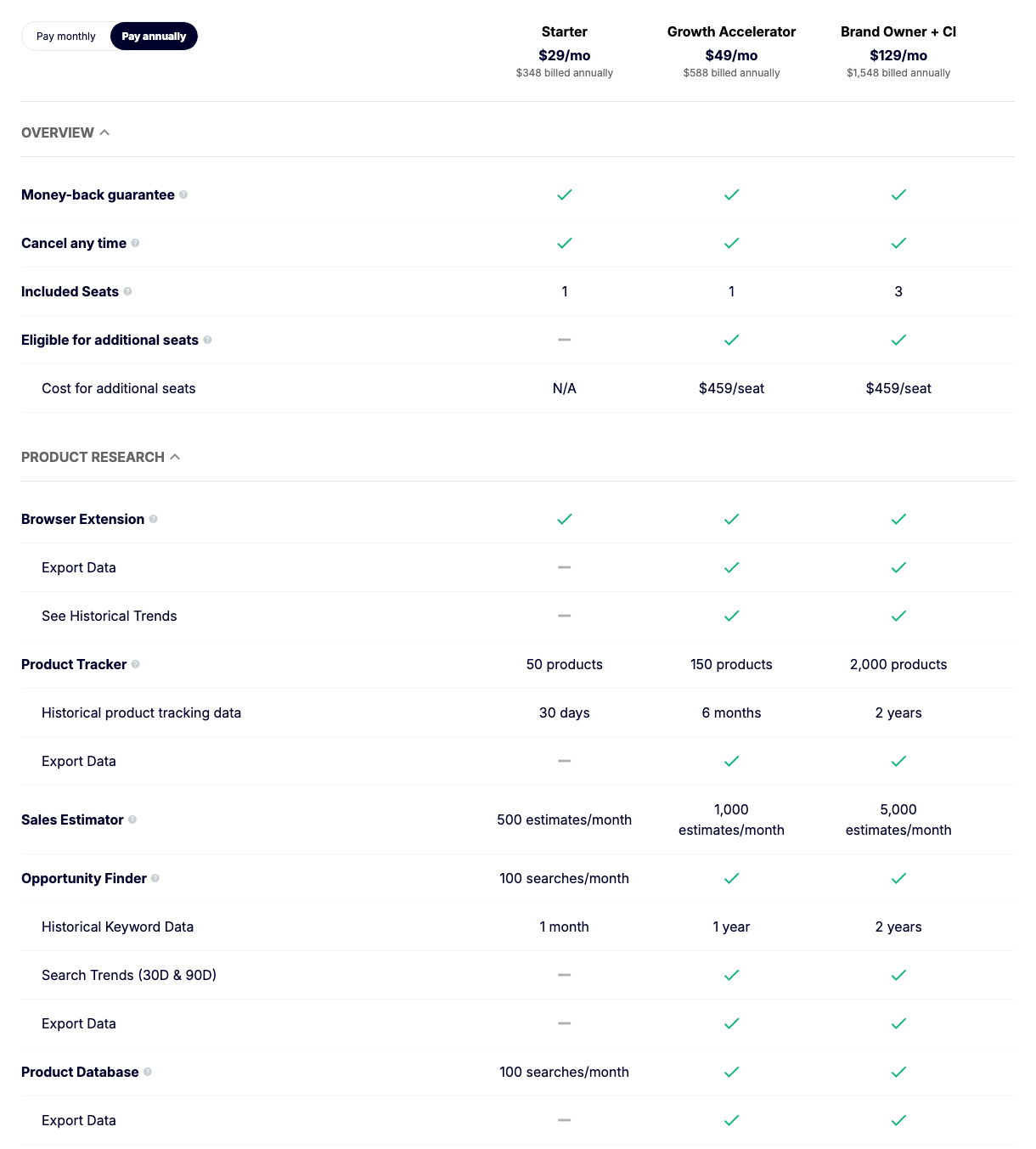
Three details:
- Starter loses more than searches. The Search Trends (30D & 90D) row is dashed for Starter, so expect the 30-day and 90-day trend data to be missing on that plan.
- “No cap shown” is the table’s tick. The help center’s membership plans article (last edited 13 August 2025) words it as “An unlimited number of searches” for both tools on Growth Accelerator.
- A “search” isn’t defined. Neither page says whether changing a filter and searching again uses another one.
The extension’s Opportunity Score is not metered: the same article gives Starter “unlimited searches with the Extension”. Our Jungle Scout pricing guide has every plan limit.
Which marketplaces Opportunity Finder supports
The feature table in Jungle Scout’s marketplace list (last edited 31 October 2024) ticks Opportunity Finder and the Product Database for 10 Amazon stores: the US, Canada, Mexico, the UK, France, Germany, Italy, Spain, India and Japan. It crosses them for the Netherlands, Turkey, Saudi Arabia, the UAE, Australia, Singapore and Brazil. One footnote applies: “The Seasonality graph is not yet available for either the Mexican or Indian Marketplaces.” Our guide to Jungle Scout’s marketplaces covers the other tools.
What the Niche Score cannot tell you
- How the whole niche looks. The score rests on at most 10 products, sometimes 3 or 4, even though the niche view lists 25.
- Anything about small keywords. Jungle Scout describes the pool as the top 1 million monthly searches, so a keyword below that may not be in the tool.
- What Amazon’s own data shows. Jungle Scout’s comparison with Product Opportunity Explorer concedes that Opportunity Finder has no ASIN search, no return insights, no click data and no customer review insights.
- Whether the sales figures are right. Units sold are Jungle Scout’s estimates, not Amazon’s numbers.
- Whether you can make and land the product at a profit. That needs supplier quotes and fee calculations.
Opportunity Finder vs Helium 10 Black Box
Helium 10 splits the same job across two tabs of Black Box:
| Detail | Jungle Scout Opportunity Finder | Helium 10 Black Box |
|---|---|---|
| Keyword-first search | The whole tool | Keywords tab: search phrases filtered by search volume, revenue, price and reviews |
| One niche in depth | A niche’s top products | Niche tab: products that “either rank for or are indexed for” a phrase you type |
| Niche grade | Niche Score, 1 to 10 | None described in either tab’s help article |
| Allowance | 100 searches a month on Starter | 250 uses a day on Platinum and Diamond; 5 lifetime uses on a free account |
| Entry price | $29/mo billed annually, $49 monthly | $99/mo billed yearly, $129 monthly |
Helium 10’s figures are from its plan guide (dated 13 May 2026), Keywords tab tutorial (20 July 2021) and Niche tab article (30 May 2024); prices for both tools were checked on 10 October 2026. Black Box allows far more searching and Jungle Scout costs far less to start. Our Helium 10 vs Jungle Scout comparison weighs the two suites.
Bottom line
- New to product research: use Opportunity Finder to build a list of niches, and treat a high Niche Score as a reason to look closer, not as a verdict.
- On Starter: 100 searches a month is enough to learn the tool, but without Search Trends or export it is a sampler. Growth Accelerator removes both limits.
- Checking one keyword you already have: run the extension on Amazon’s results page and read the Opportunity Score there.
- Comparing tools: our Jungle Scout review covers the suite, and the product research tools roundup sets it against Helium 10 and the free options, including Amazon’s own.
Frequently Asked Questions
What is Jungle Scout Opportunity Finder?
It is the niche search tool in Jungle Scout's web app. It filters Amazon keywords by units sold, price, search volume, competition and seasonality, and grades each niche with a Niche Score from 1 to 10.
What is a good Opportunity Score on Jungle Scout?
Jungle Scout's help center calls 6 to 10 the best opportunities, 4 to 5 products that need more research and 1 to 3 markets with little opportunity. Those bands are published for the Opportunity Score in the browser extension; for the Niche Score in Opportunity Finder it says only that 10 is the highest opportunity and 1 the lowest.
Is Niche Hunter the same as Opportunity Finder?
Yes. A Jungle Scout blog post, in the Internet Archive's copy of 6 December 2021, says Opportunity Finder was formerly called Niche Hunter. The help-center article for Opportunity Finder was created on 21 October 2019.
How many Opportunity Finder searches do you get?
Jungle Scout's pricing table gives the Starter plan 100 Opportunity Finder searches a month and 100 Product Database searches a month, and shows no cap on Growth Accelerator or Brand Owner (read 11 November 2026). Starter also has no Search Trends data and no export in Opportunity Finder.
What is the difference between Opportunity Finder and Product Database?
Opportunity Finder searches keywords and treats each one as a niche, with a Niche Score and the niche's top products. Product Database searches individual products by price, rank, sales, reviews and other filters.
Which marketplaces does Opportunity Finder support?
Jungle Scout's help center lists it for 10 Amazon marketplaces: the US, Canada, Mexico, the UK, France, Germany, Italy, Spain, India and Japan. The Seasonality graph is not available for Mexico or India.