Jungle Scout Supplier Database: What It Searches, Which Plans Include It and What It Can't Tell You
Affiliate disclosure: we may earn a commission if you buy through links on this page. How we make money How we check facts
Jungle Scout’s Supplier Database is a search engine for US customs import records, not a directory of wholesalers. Its help center says it holds goods imported to the US only, going back to 2014 and updated monthly (checked 11 November 2026). You search by product, company, supplier or ASIN. It starts at Growth Accelerator ($49 a month billed annually, $79 monthly; prices checked 10 October 2026), not Starter.
Supplier Database: Growth Accelerator and Brand Owner · not in Starter Affiliate link
Our sources are Jungle Scout’s product page, help center and pricing table, read on 11 November 2026, with each help article’s last-edited date. Three Jungle Scout blog guides are quoted from Internet Archive copies, dated where they are cited.
What is the Jungle Scout Supplier Database?
The Supplier Database is the sourcing tool in Jungle Scout’s Catalyst web app. Jungle Scout’s feature overview (last edited 22 October 2024) describes the data in one sentence: “We have indexed all the US customs import records and made them easily searchable inside the Supplier Database.”
A second article, Which marketplaces and countries does the Supplier Database support? (last edited 13 January 2025), sets the limits: “The Supplier Database only has data for goods imported to the US, but it can be used to find a supplier to import to any country. The data in the database includes all products imported to the US and is not limited to only products sold on Amazon. The data in the Supplier Database goes back to 2014 and is updated monthly.”
What that means for coverage:
- It records shipments, not factories that signed up. A supplier appears because a shipment to a US importer was recorded. The same article calls the tool “import-driven rather than export-driven”.
- A supplier with no shipment into the US has no record to find. That includes a factory that has only sold to buyers in Europe.
- Jungle Scout doesn’t say which kinds of shipment are covered. The only document its help center names is the bill of lading, and no article says whether air freight is included.
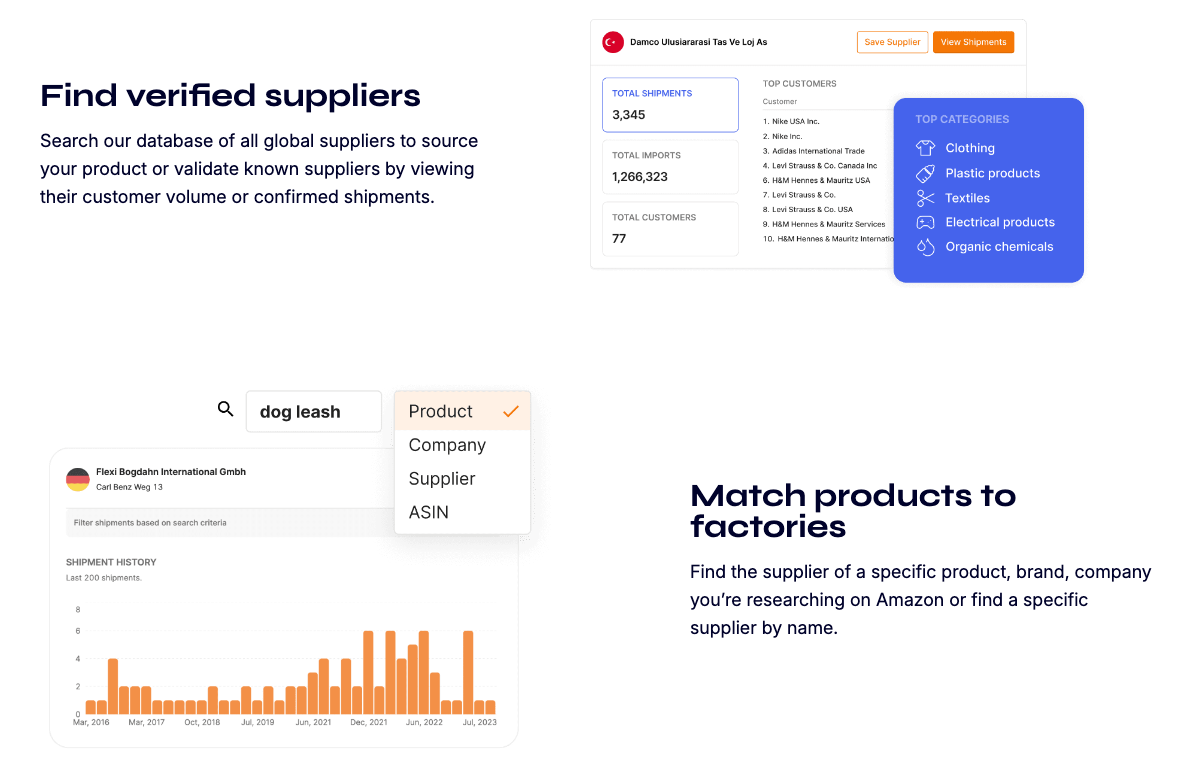
The product page promises more than the help center does. Jungle Scout’s Supplier Database page says “Search our database of all global suppliers” under the heading “Find verified suppliers”. Next to the help center, “global” describes where suppliers are based, not where they ship. “Verified” refers to recorded shipments: the same sentence says you “validate known suppliers by viewing their customer volume or confirmed shipments”. The page also promises to “identify the exact supplier of any product on Amazon in seconds”; the help center limits ASIN search to ASINs from Amazon.com.
What you can search by, and what a result shows
The feature overview lists four search types, chosen from a drop-down next to the search box:
| Search by | What you enter | What the help center says |
|---|---|---|
| Product | A type of product, such as “marshmallow sticks” | Matched against “keywords listed in a product’s Shipment description on the Bill of Lading” |
| Company | An importer’s full legal name, for example a competitor’s | Shows the suppliers that company buys from. A storefront name is often not the legal name |
| Supplier | A supplier’s name | One supplier can appear several times, because its name was spelled differently on different shipments |
| ASIN | An Amazon product ID | “This type of search only supports ASINs from Amazon.com” |
Each result is a supplier record: name, address, Total Shipments, Total Imports, Total Customers, Top Customers (the 10 that ordered most) and Top Categories. View Shipments opens a graph of shipments by month and a table with each shipment’s date, customer, description, HS code, weight in kilograms and quantity. The overview says it covers “the last 200 shipments (going back to 2014)”.
The help center’s screenshots of the tool show five filters: Country of Origin, Product Category, Customer Name, Supplier Name and HS Code. The HS code is the customs classification that sets the duty rate, and Jungle Scout’s HS Codes article advises finding it early “to work the duty rate into your costs”.
How to find a supplier with Jungle Scout, step by step
These steps follow the feature overview, the Supplier Shipping History article (last edited 25 November 2024) and the contact information article (last edited 22 October 2024).
- Open the Supplier Database from the Suppliers section of the web app’s left-hand menu.
- Choose a search type from the drop-down: Product, Company, Supplier or ASIN.
- Enter your term and click Search. For an ASIN search, copy the ASIN from the Product Information section of the listing on Amazon.com.
- Filter by Country of Origin. Jungle Scout suggests keeping countries closer to where the goods need to go, or excluding countries with higher duty rates.
- Click View Shipments on a supplier. After a product search you see only shipments whose description matches your term. Switch that filter off to see the last 200 shipments.
- Read the history. Jungle Scout’s advice: a long, consistent record suggests an established exporter, the customer names show who else buys there, and frequency and volume indicate the factory’s size. A supplier that only ships large quantities may not take a small order.
- Click Search for Contact Info. It opens a Google search for the company in a new tab.
- Click Save Supplier to add the record to a Supplier Tracker group. Jungle Scout recommends one group per product.
There is a shortcut from product research: the Product Tracker’s menu for each product has a Find Supplier option, which the help center (last edited 23 July 2025) says will “Open Supplier Database to look for suppliers for this product”. Jungle Scout’s 2024 guide to the tool, linked below, also describes a “Find supplier for this product” button in the browser extension; no help-center article mentions it. If you are still choosing a product, start with our guide to Opportunity Finder and the Product Database.
Which Jungle Scout plans include the Supplier Database
| Plan | Billed monthly | Billed annually | Supplier Database and Supplier Tracker |
|---|---|---|---|
| Starter | $49/mo | $29/mo ($348 a year) | Not included |
| Growth Accelerator | $79/mo | $49/mo ($588 a year) | Included |
| Brand Owner | $149/mo | $129/mo ($1,548 a year) | Included |
Prices are from Jungle Scout’s pricing page, checked 10 October 2026. The two supplier rows are from the comparison table on the same page, read on 11 November 2026: a dash under Starter and a tick under Growth Accelerator and Brand Owner + CI, with no number.
The help center agrees. Its membership plans article (last edited 13 August 2025) lists “An unlimited number of searches with the Supplier Database, with access to the Supplier Tracker” under both higher plans. Of Starter it says members “won’t be able to export data to CSV or access Supplier Database, Supplier Tracker” and six other features.
So the only cap we found is inside a result: the last 200 shipments per supplier. A guide that lists the Supplier Database under Starter doesn’t match the pricing table.
Jungle Scout has no free trial, only a 7-day money-back guarantee for new customers on regularly priced plans. A week on Starter can’t test this tool, so buy Growth Accelerator if supplier search is why you are signing up. Our Jungle Scout pricing guide lists what else each plan includes.
What Supplier Tracker adds
Supplier Tracker stores the suppliers you save, in groups. Per its overview article (last edited 31 October 2024), each record keeps the supplier’s shipment data and adds:
- Contact details you enter yourself.
- Quotes: unit cost, quantity, unit weight, other costs, lead time, sample cost and sample shipping. The tool totals each quote, and you can mark one as a favorite (quotes article, last edited 18 July 2025).
- Samples and notes, with pictures of each sample.
- Purchase orders, generated from a form. Jungle Scout also publishes a purchase order agreement template, under the disclaimer “We are not lawyers”.
One restriction matters: “All suppliers have to be added from the Supplier Database, they cannot be manually entered at this time.” A factory you found on Alibaba or at a trade show can go into the tracker only if it has a record in the import data.
What the Supplier Database cannot tell you
Each limit below is Jungle Scout’s own statement, or follows directly from one.
- Whether a supplier ships anywhere but the US. The data is US imports only.
- Who makes a product sold only on another marketplace. ASIN search supports Amazon.com ASINs only.
- A competitor’s supplier, if you only know the brand. Company search needs “the full legal name of the company”. In Jungle Scout’s own worked example (last edited 5 March 2023), searching for the storefront name ZOOMGET LLC “didn’t yield any results”. The importer turned up only after a trademark search led to a different company name.
- How to reach the supplier. “Our import data is sourced and not self-reported by suppliers, so we only occasionally have their most up-to-date or direct contact information.”
- Whether the factory is any good. The shipping history article calls a long record “a good indicator of how legitimate they are as an exporter” and “just one more tool”. The help center describes no audit or inspection of suppliers by Jungle Scout, so order samples as you would from any new supplier.
- What the goods cost. The shipment table has no unit cost, minimum order quantity or lead time. You get those by asking for a quote.
Which marketplaces and countries it covers
The feature table in Jungle Scout’s marketplace list (last edited 31 October 2024) ticks the Supplier Database for the US only and Supplier Tracker for all 17 marketplaces. Its note says the database “can be used to find a supplier to import to any country”, on the argument that a supplier exporting to the US probably has “a global presence”. A UK or EU seller can use it that way, but is reading another country’s import records. Our guide to Jungle Scout’s marketplaces covers the rest of the suite.
Supplier Database vs Alibaba and other free ways to find a supplier
Jungle Scout’s own guide to the tool (Internet Archive copy of 5 June 2026; the guide is dated 7 May 2024) names the free routes: “You can do it the old-fashioned way by doing a Google search or by scrolling through Alibaba”. The two answer different questions.
| Question | Supplier Database | Alibaba, per Jungle Scout’s guide |
|---|---|---|
| What it shows about a supplier | Recorded US shipments, customers and product categories | The supplier’s own listing and company profile |
| Prices and minimum orders | None in the data | Listed, but pricing “may not always be accurate” until you ask for a quote |
| Contacting the supplier | A button that opens a Google search | A “Contact Supplier” button on the listing |
| Order protection | None built in; a purchase order template | “Verified Supplier” and “Trade Assurance” filters |
The Alibaba column follows Jungle Scout’s Alibaba guide (dated 3 April 2024; Internet Archive copy of 12 June 2026), which also warns: “DO NOT use Alibaba to purchase branded products.”
The two work together: shortlist factories on Alibaba, then search each name in the Supplier Database to see whether it has a US shipping record, and with whom. Jungle Scout’s stated advantage is the reverse lookup. Its guide says ASIN and company search let you “see exactly who your competitors are sourcing their products from”, which holds only within the limits above.
Jungle Scout for wholesale, and how SmartScout and Helium 10 compare
Wholesale. The Supplier Database lists exporters, so it suits private-label sourcing, not wholesale, where you buy from a brand or its distributor. Jungle Scout’s own wholesale suppliers guide (dated 2 April 2024; Internet Archive copy of 16 June 2026) doesn’t mention it. The guide lists five routes: the brand itself, wholesale directories, trade shows, distributors and Google. The only Jungle Scout tool it names is the Product Database, for finding products to resell.
| Tool | What it searches | Fits |
|---|---|---|
| Jungle Scout Supplier Database | US import records: suppliers, their customers and shipments | Private-label sourcing; checking a factory’s export record |
| SmartScout Brands Database | Brands selling on Amazon | Choosing wholesale brands to approach |
| Helium 10 Supplier Finder | Alibaba listings matched to an Amazon product | A price and minimum-order check from an Amazon page |
SmartScout is built for the wholesale side. Its pricing table starts the Brands Database on the Essentials plan, at $99 a month billed yearly or $119 monthly (checked 10 October 2026). Our SmartScout wholesale guide walks through that workflow, and the arbitrage and wholesale tools roundup covers price-list scanners.
Helium 10 has a supplier tool of a different kind. Its help center (article last edited 16 July 2021) describes a “Source on Alibaba.com” button in Xray that lists matching Alibaba products with price, minimum order quantity and lead time. On 11 November 2026 its Chrome Web Store listing still promised to “Match Amazon/Walmart products to Alibaba suppliers”. We found no customs-record database in Helium 10’s help center. Jungle Scout’s own comparison page marks Helium 10 with a cross for “Global Supplier Database”, which is fair only in that narrow sense. Our Helium 10 vs Jungle Scout comparison covers the rest.
Bottom line
- Launching a private-label product for the US: the Supplier Database is a good reason to choose Growth Accelerator over Starter. Use it to check that a factory exports what it claims, then get prices by quote.
- Selling only in the UK or EU: it works as a background check on factories that also export to the US, and nothing more.
- Buying wholesale: it is the wrong tool. Our Jungle Scout alternatives page matches that case to a better fit.
- Wanting only the supplier search: the pricing page lists no stand-alone price for it, so judge the whole plan. Our Jungle Scout review covers the suite, and the product research tools roundup compares it with its rivals.
Frequently Asked Questions
What is the Jungle Scout Supplier Database?
It is a search tool in Jungle Scout's web app that indexes US customs import records. You search by product, company, supplier name or ASIN, and each result shows a supplier's shipments, customers and product categories.
Is the Supplier Database included in the Jungle Scout Starter plan?
No. Jungle Scout's pricing table leaves it out of Starter and includes it, with Supplier Tracker, in Growth Accelerator ($49 a month billed annually or $79 monthly) and Brand Owner ($129 or $149). Prices were checked on 10 October 2026 and the table rows on 11 November 2026.
Where does Jungle Scout get its supplier data?
From US customs import records. Jungle Scout's help center says the database only has data for goods imported to the US, goes back to 2014 and is updated monthly.
Can I use Jungle Scout to find wholesale suppliers?
Not directly. The Supplier Database lists companies that shipped goods into the US, which suits private-label sourcing. Jungle Scout's own wholesale guide sends sellers to brands, distributors, wholesale directories and trade shows instead.
Does the Jungle Scout Supplier Database work outside the US?
Partly. Sellers in any country can search it, but it only contains shipments into the US, and its ASIN search only supports ASINs from Amazon.com.
Does Jungle Scout give supplier contact details?
Rarely. Its help center says it only occasionally has a supplier's up-to-date or direct contact information, so the Search for Contact Info button opens a Google search for the company.