Helium 10 Black Box: What It Does, How to Use It, Limits and Price
Affiliate disclosure: we may earn a commission if you buy through links on this page. How we make money How we check facts
Black Box is Helium 10’s product-research database: set your filters and it lists matching Amazon products with Helium 10’s estimated sales and revenue. Its help center documents seven tabs, 250 uses a day on Platinum and Diamond, and 5 lifetime uses on a free account (checked 11 November 2026). It isn’t sold on its own: Platinum costs $99 a month billed yearly (checked 10 October 2026).
Black Box: 250 uses a day on Platinum and Diamond · 5 lifetime uses on a free account Affiliate link
Everything below comes from Helium 10’s help center, product page and pricing page, read on 11 November 2026. Each help article’s date is given, because several are older than the tool and some disagree with each other.
What is Helium 10 Black Box?
Helium 10 calls Black Box its “primary product research tool” (Product Tab Overview, 31 March 2026). It runs in the Helium 10 web app: you open it from the Products menu, under Product & Keyword Research. Xray analyzes the Amazon page in front of you; Black Box starts from an empty filter form and searches Helium 10’s own product database, so it can turn up products you weren’t already looking at.
The size of that database is Helium 10’s own claim, and it varies by page: “millions of e-commerce product listings” on the product page, “hundreds of millions of products” in the Niche tab article (30 May 2024) and “over two billion products” in the introduction article (10 December 2025).
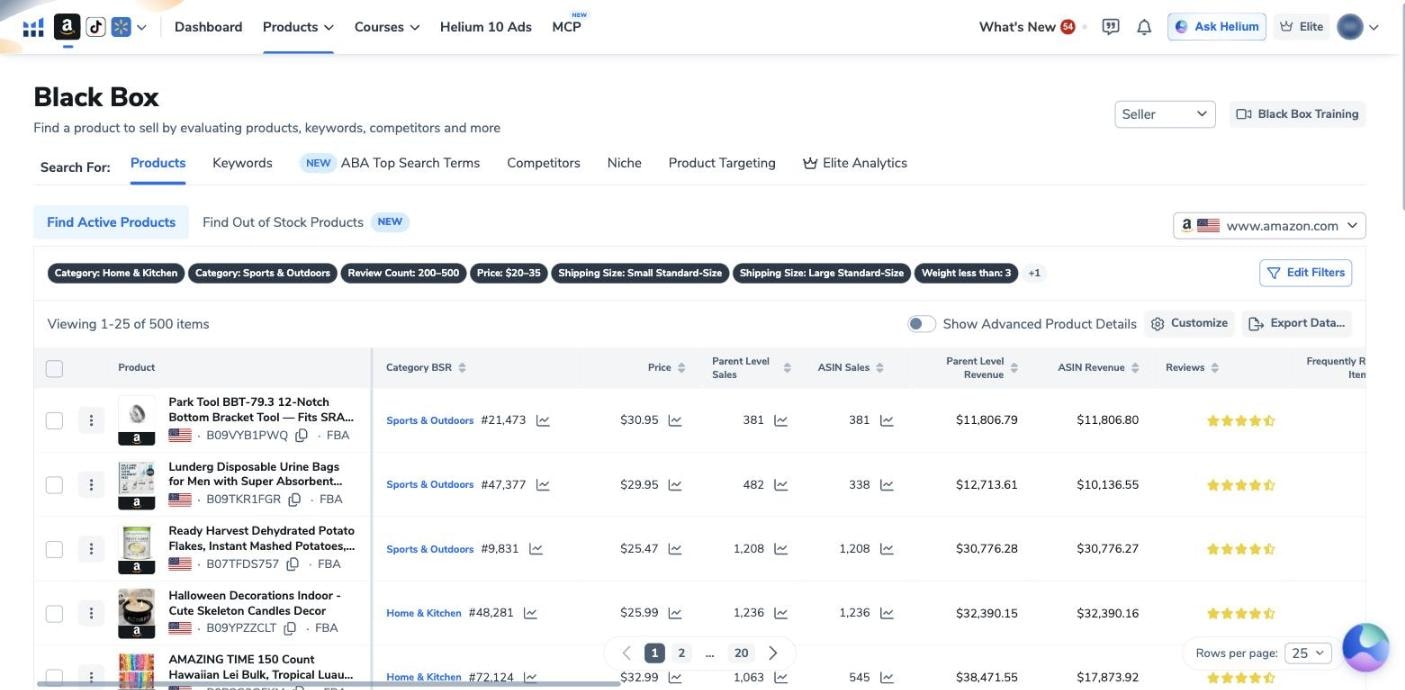
The screenshot below is from our own Helium 10 account, which is on the Diamond plan, taken on 12 October 2026. It shows the seven tabs, one search’s filters as a row of chips, and a results table headed “Viewing 1-25 of 500 items”.
The Black Box tabs and what each one answers
Helium 10’s dashboard tutorial (24 February 2026) says “Black Box features seven tabs”, and they match the tab row in the capture above. An older article, How Are the Different Tabs in Black Box Used for Product Research? (21 October 2024), still describes five, so five-tab lists elsewhere are out of date.
| Tab | What you enter | The question it answers |
|---|---|---|
| Products (the default) | Filters, or up to 500 product IDs | Which products meet my limits on price, sales, reviews and competition? |
| Keywords | Search-volume, revenue, price and review filters | Which search terms have demand that few products serve? |
| ABA Top Search Terms | An ASIN or a keyword | For which keywords is a product among the three most clicked, and with what conversion share? |
| Competitors | An ASIN or product ID | Which products rank for similar keywords? |
| Niche | A search phrase | Which products appear for that phrase, and which pass my filters? |
| Product Targeting | An ASIN | Which products does Amazon show as Frequently Bought Together, Customers Also Bought or Amazon Suggested? |
| Elite Analytics | A keyword list of up to 2,000 rows | Which keywords on my list have low title density and rising search volume? |
Four details the table leaves out:
- The Products tab has two modes, Find Active Products and Find Out of Stock Products. The second lists inactive listings with more than 30 reviews and a sales history, and “is available for Diamond plan and above users” (help center, 31 March 2026).
- ABA Top Search Terms adds Helium 10’s search-volume trends, title density and sales estimates to Amazon Brand Analytics data (help center, 10 April 2026). The article doesn’t say which plans include it.
- Elite Analytics “is only available to Elite subscribed members”, according to its article (12 December 2025). The pricing page sells no Elite plan; our Helium 10 Elite page explains what Elite is now.
- A drop-down switches between Seller and Influencer views. The Influencer view covers the US only and adds an opportunity score, video counts and commission estimates (help center, 16 January 2026).
Black Box filters and what the result columns mean
The Products tab opens on a Simple search: marketplace, one to three categories, price range, product size, competition and monthly revenue. Advanced shows the full set, which the dashboard tutorial sorts into three groups:
| Filter group | Filters |
|---|---|
| Product | Review count, review rating, Best Seller Rank, listing age, shipping size, weight, fulfillment, number of images, variation count, title keywords to include or exclude, product identifiers |
| Competitors | Number of sellers, exact brand search, exact seller search, and exclusions by brand, seller or seller country |
| Sales | Price, price change, parent-level and ASIN sales and revenue, sales change, sales year over year, best sales month, sales-to-reviews ratio |
Four presets fill in filters for you: High Growth, Low Rating, Low Image Count and Small and Light. Exact Brand Search and Exact Seller Search list the products of a brand or seller whose name you type exactly, capitals included (help center, 30 September 2024).
You can add, remove and reorder the result columns. Those in view in our capture are Category BSR, Price, Parent Level Sales, ASIN Sales, Parent Level Revenue, ASIN Revenue and Reviews. The two sales columns can differ: one product there shows 482 parent-level sales against 338 for the ASIN itself. The tutorial lists more columns you can switch on, among them brand, sellers, fulfillment method, size tier, storage fees and time on Amazon. Show Advanced Product Details adds a second line to several columns: subcategory, 90-day price and sales trends, average rating, number of active sellers, year-over-year sales and package dimensions.
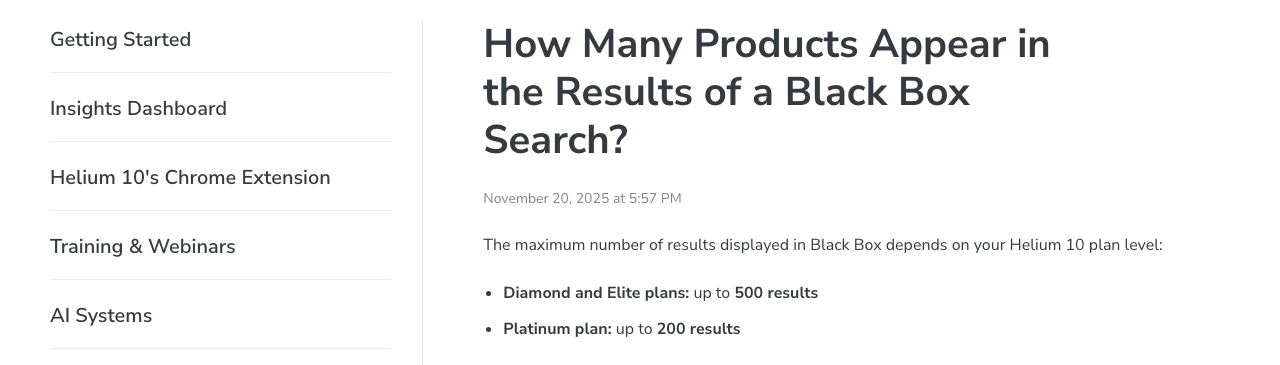
How many results you see depends on your plan. A help article dated 20 November 2025 gives Platinum up to 200 results per search and “Diamond and Elite plans” up to 500. Our Diamond capture shows 500 items, which fits; a Platinum subscriber would see at most 200 of that list.
How to use Helium 10 Black Box: a first product search
These steps follow Helium 10’s Products tab guide (29 July 2025), its ten-step walkthrough (30 September 2024) and the two articles linked above.
- Open Black Box. Hover over the Products menu and choose Black Box under Product & Keyword Research. It opens on the Products tab.
- Check the marketplace. Helium 10 advises a separate search for each country you sell in.
- Switch from Simple to Advanced for the wider range of filters, as the walkthrough recommends.
- Choose your categories. The arrow beside a category opens its subcategories.
- Set the filters. Helium 10’s example uses at most 2 sellers (to avoid listings shared by resellers), 150 to 400 unit sales a month, a price of $20 to $40, at most 150 reviews, at most 3 images and a variation count of 1.
- Click Search.
- Narrow the list. If more than 200 products come back, Helium 10 says to tighten the filters. Edit Filters reopens them in a side drawer, and Exclude Title Keywords removes products you don’t want.
- Read the rows. Turn on Show Advanced Product Details, and use the BSR, price and sales history graphs to rule out fads and seasonal spikes.
- Save your work. Bookmark promising products to My List, and click Save as Filter Preset to reuse the search.
If you already have a product list, the Product Identifiers field takes up to 500 ASINs, UPCs, GTINs, EANs or ISBNs at once. Then check each survivor on Amazon with Xray and pull its keywords with Cerebro.
How to find a niche or trending products in Black Box
The Niche tab. Type a phrase as you would on Amazon, and Black Box lists the products that “either rank for or are indexed for” it, as the Niche tab article linked above puts it. Then filter by sellers, variations, images, review count and price, and exclude products by words in their titles (help center, 11 February 2025). It filters one search result in depth; it isn’t a ready-made list of niches.
The Keywords tab. Set ranges for search volume, monthly revenue, price and reviews, plus categories, and it returns search phrases with product data for each. Its tutorial dates from 20 July 2021 and still ends with a Run Magnet button. Helium 10 has since merged Magnet into Cerebro (6 January 2026), so expect the screen to differ.
Trending products. The High Growth preset filters on fulfillment, monthly sales and Sales Change %, and the Sales filters include Sales Year over Year and Best Sales Month. Outside your account, Helium 10’s free Amazon Trending Products tool lists a category’s top sellers by estimated monthly sales and revenue, with markers for products moving up or down.
Is Helium 10 Black Box free? Limits on each plan
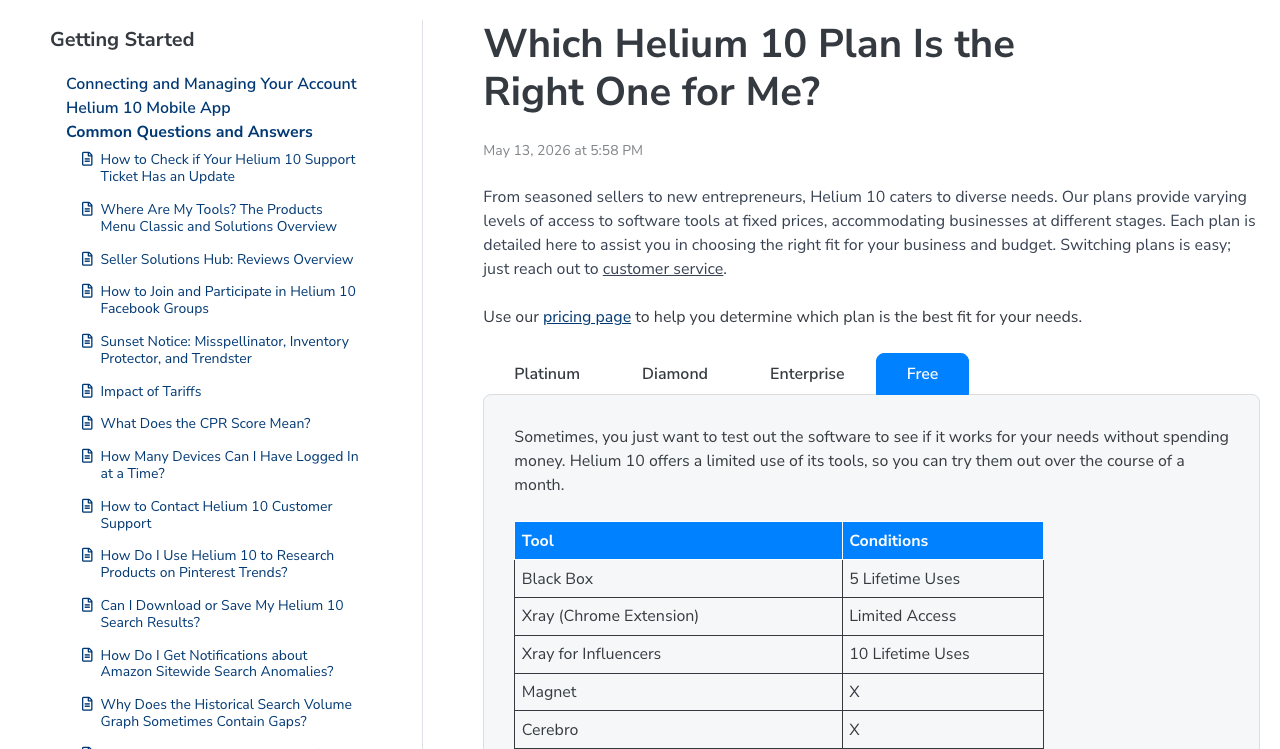
| Access | Black Box uses | Results per search |
|---|---|---|
| Free account | 5 lifetime uses | Not stated |
| Platinum | 250 a day | Up to 200 |
| Diamond | 250 a day | Up to 500; adds Out of Stock search |
| Enterprise | 500 a day | Not stated |
The use counts come from the four tabs of Helium 10’s plan guide, dated 13 May 2026; the results caps come from the 20 November 2025 article above. The pricing page gives no number: its “Amazon FBA product research” row shows no count.
What those figures mean in practice:
- “5 lifetime uses” is five in total, not five a month. The Influencer article adds: “Each search in either Seller or Influencer view counts toward your total limit if you’re on the Free plan.”
- A “use” isn’t defined. None of the 27 articles in the help center’s Black Box section says what counts as one or when the daily count resets, so set your filters before you click Search on a free account.
- The product page has a demo. Its search form, limited to a marketplace and a category, showed “You have 5 searches left” to a logged-out visitor on 11 November 2026.
- There is no free trial of Platinum or Diamond. Our page on what Helium 10 gives away free lists the other free-account limits.
Helium 10 Black Box price: can you buy it on its own?
No. Helium 10’s pricing page sells three plans, and Black Box comes with each: Platinum at $99 a month billed yearly or $129 monthly, Diamond at $279 or $359, and Enterprise from $1,499 a month, billed annually (checked 10 October 2026).
It used to be sold separately: the Internet Archive’s copy of the pricing page from 29 December 2019 lists Black Box at $37 a month a la carte, beside a free allowance of 20 uses. Our page on the a la carte plan traces when single tools stopped being sold; pages that still say Black Box can be bought standalone are out of date.
So the cheapest way past five searches is Platinum, and you pay first: Helium 10’s terms refund a first purchase in full only if you cancel within seven days. Our Helium 10 pricing guide covers what else each plan includes.
Which marketplaces Black Box supports
Helium 10’s market table (last edited 10 December 2025) lists Black Box on 15 of its 21 Amazon marketplace tabs: the US, Canada, Mexico, Brazil, the UK, Germany, France, Italy, Spain, the Netherlands, the UAE, Saudi Arabia, Australia, Japan and India. It isn’t listed for Sweden, Poland, Turkey, Egypt, Singapore or China.
Walmart is less clear. The product page heads its feature list “Amazon and Walmart Product Research Engine”, but none of the 27 articles in the help center’s Black Box section mentions Walmart. Our Helium 10 marketplaces guide sets out what each market gets.
Where Black Box’s numbers come from
Helium 10’s answer is one sentence: “Helium 10 continuously detects and processes data from a variety of sources, including Amazon itself, as well as Helium 10’s own database and proprietary models” (help center, 26 May 2022). Its general data article (30 September 2025) is plainer: outside the tools that read your own seller account, sales estimates and search volumes are Helium 10’s “best interpretation”, produced by models it doesn’t disclose.
So use the sales and revenue columns to rank a shortlist, not to size an order. Reviews that say Black Box uses “data from Amazon’s API” don’t match either article: Helium 10 reserves that description for tools that read your own account, such as Profits and Alerts. Our explainer on how Helium 10 gets its data covers the accuracy claims.
Black Box alternatives: when another tool fits better
- You are already looking at an Amazon results page. Use Xray, which reads that page in the Chrome extension.
- You want the keywords behind specific products. Black Box’s Keywords tab finds phrases; Cerebro shows what named ASINs rank for.
- Your research starts with brands or sellers. Black Box can look up a brand or seller you name, but SmartScout’s plans are built around brand-level and seller-level data.
- You want a product database for less. Jungle Scout’s Catalyst plans include a Product Database and Opportunity Finder, Keepa Pro has a Product Finder, and Amazon’s Product Opportunity Explorer sits in Seller Central under Growth. Our Helium 10 alternatives page compares them with prices, and our best Amazon product research tools roundup names one pick.
Is Helium 10 Black Box worth it?
For the rest of the suite, see our Helium 10 review and the full list of Helium 10 tools.
Frequently Asked Questions
What is Helium 10 Black Box?
Black Box is the product-research tool in Helium 10's web app. You set filters such as category, price, monthly sales, review count and number of sellers, and it lists the Amazon products that match, with Helium 10's estimates of their sales and revenue.
Is Helium 10 Black Box free?
Only for a few searches. Helium 10's help center gives a free account 5 lifetime Black Box uses, shared between the Seller and Influencer views, and paid plans 250 uses a day or more (checked 11 November 2026). There is no free trial of the paid plans.
How much does Helium 10 Black Box cost?
Black Box isn't sold on its own. It comes with every paid Helium 10 plan, starting with Platinum at $99 a month billed yearly or $129 billed monthly (checked 10 October 2026). In December 2019 Helium 10 sold it separately for $37 a month.
How many Black Box searches and results do you get?
Helium 10's plan guide, dated 13 May 2026, lists 250 uses a day on Platinum and Diamond and 500 a day on Enterprise. A separate help article says a search shows up to 200 results on Platinum and up to 500 on Diamond.
What does the Niche tab in Black Box do?
It takes a search phrase and lists the products that rank or are indexed for it in Helium 10's database. You can then filter that list by sellers, reviews, price, images and variations, and exclude products by words in their titles.
Which marketplaces does Black Box support?
Helium 10's market table lists Black Box for 15 Amazon marketplaces: the US, Canada, Mexico, Brazil, the UK, Germany, France, Italy, Spain, the Netherlands, the UAE, Saudi Arabia, Australia, Japan and India. It is not listed for Sweden, Poland, Turkey, Egypt, Singapore or China.