Helium 10 Listing Analyzer: What It Scores, Plan Limits and Gaps
Affiliate disclosure: we may earn a commission if you buy through links on this page. How we make money How we check facts
Helium 10’s Listing Analyzer audits an Amazon listing and gives it a Listing Quality Score from 1 to 10, based on how many Amazon best practices the listing follows. You can run one ASIN on its own or benchmark it against up to 10 competitor ASINs in the same marketplace. Platinum allows 50 analyses a month and Diamond 150 (Helium 10’s pricing table, checked 10 October 2026).
Listing Analyzer: 50 uses a month on Platinum, 150 on Diamond Affiliate link
Correction (10 October 2026): an earlier version of this page said Platinum had full Listing Analyzer access and listed a free plan beside the paid plans. Helium 10’s pricing table caps Platinum at 50 uses a month, and its pricing page lists no free plan.
Helium 10 Listing Analyzer features: what the report shows
Helium 10’s help center (edited 5 September 2025) splits the report into these sections, and notes that which ones you see depends on your plan:
| Section | What it shows |
|---|---|
| Summary bar | Listing Quality Score (1 to 10), current price with a price-history graph, estimated stock, review count and listing age in months |
| Sales Overview | Sales statistics for the ASIN, FBA and FBM, filterable by date, plus UOSR: units ordered per session over the previous 7 days |
| Category & Subcategory BSR | How the ASIN is selling against competitors in its categories |
| Detail Page Traffic and Conversion | Sessions, page views and conversion. Only for your own ASIN with your Seller Central account connected |
| Compare Key Metrics | Side-by-side metrics for every ASIN, plus Media Comparison to view and export competitors’ images |
| Listing Quality Score Analysis | Pass or fail on each copy, media and review check, per ASIN |
| Competitor Analysis | The selected ASIN against the group average and the top performers |
| Top Keywords Analysis | The top keywords for the ASINs and how strong an opportunity each one looks |
Every metric carries a tooltip explaining where the number comes from, according to Helium 10’s Listing Analyzer page. Sales, stock and keyword figures for competitors are Helium 10’s estimates, not Amazon data; our guide to how Helium 10 gets its data explains the difference.
What the Listing Quality Score checks
The score counts how many of Helium 10’s best-practice checks a listing passes and color-codes the result. Helium 10’s own list of checks, from its help article on single-product searches (written in 2021; the 2025 guide describes the same three areas of copy, media and reviews), includes:
- a title near 150 characters, which the article calls “standard for the majority of listings”, though some categories allow fewer;
- bullet points that aren’t written in all capitals, which the article says Amazon dislikes;
- A+ content;
- quality images on white backgrounds, at least 7 of them, ideally both product and lifestyle shots;
- one or more videos;
- the number of ratings and the average rating.
Because the checks are generic, a listing can score well and still break a rule in its category’s style guide, or score lower for reasons that don’t matter in your niche. Treat the score as a checklist result: it tells you where to look, not what to write.
How to run it
- Open Listing Analyzer from the Tools menu, under Listing Optimization.
- Choose the marketplace. Each analysis covers one market.
- Enter the main ASIN or its Amazon product URL.
- To benchmark, add up to 10 competitor ASINs, or click Get Competitors to choose from a suggested list.
- Click Run Analysis. Helium 10 says it can take up to a minute.
Analyses are saved under History, and Helium 10’s help center describes a Delete button for removing old ones. From the Top Keywords Analysis you can send the keywords to Cerebro for a deeper look, and our Index Checker guide covers checking whether your listing is indexed for them.
A Listing Analyzer report from our account
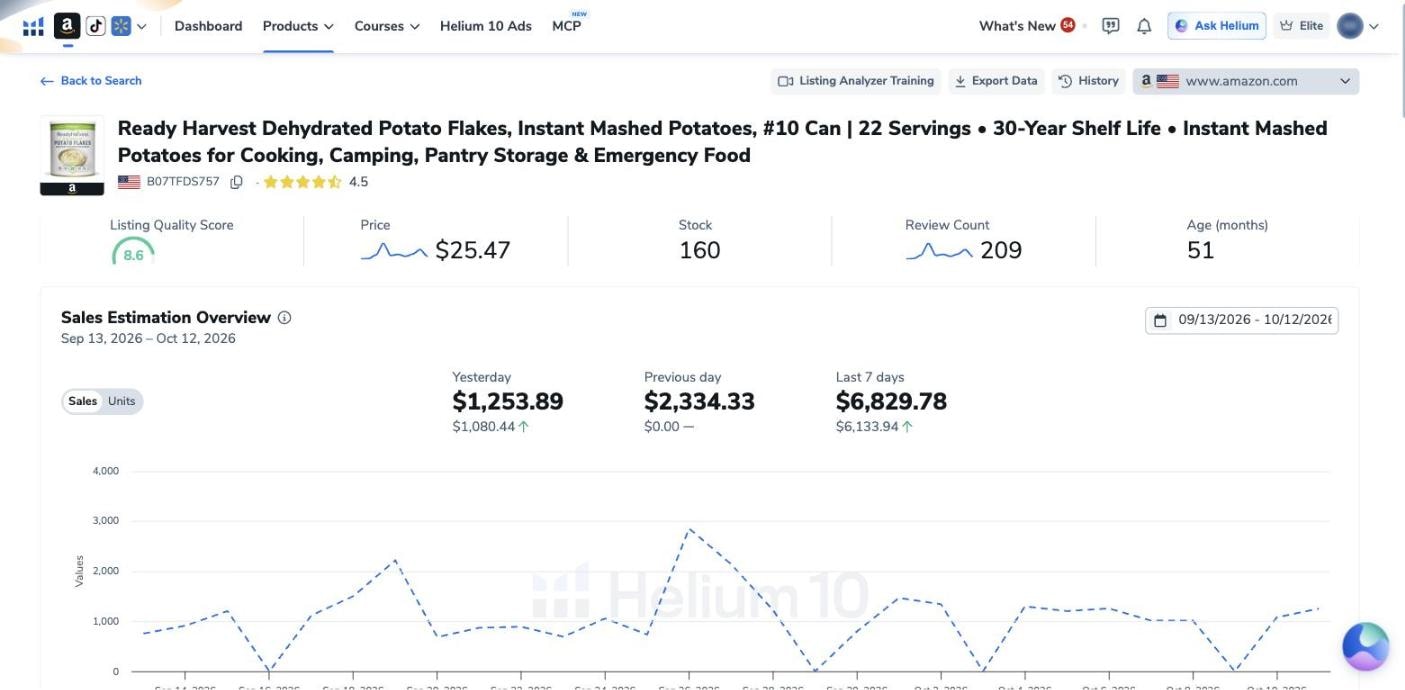
We ran Listing Analyzer in our own Helium 10 account, which is on the Diamond plan, on 12 October 2026. The main ASIN was a #10 can of Ready Harvest dehydrated potato flakes (B07TFDS757), and we picked three competitors from the Get Competitors list: Augason Farms instant mashed potatoes, Bob’s Red Mill potato flakes and Idahoan mashed potatoes. Before the run, the counter beside Run Analysis read “0 of 150 searches used this month”, Diamond’s allowance, and the report took a little over a minute to load.
The listing scored 8.6. The report’s header showed its price ($25.47), stock (160), review count (209) and age (51 months), and the Sales Estimation Overview charted Helium 10’s daily sales estimates from 13 September to 12 October 2026, about $6,830 for the last seven days.
Listing Analyzer limits on each plan
| Plan (checked 10 October 2026) | Listing Analyzer uses | Price |
|---|---|---|
| Platinum | 50 a month | $99/mo billed yearly, $129 monthly |
| Diamond | 150 a month | $279/mo billed yearly, $359 monthly |
| Enterprise | 300 a month in the plan guide | From $1,499/mo, billed annually |
Platinum and Diamond limits are from the pricing page’s comparison table; Enterprise’s is from Helium 10’s plan guide, which also gives its limited free account 2 searches a month. That account isn’t a plan on the pricing page. On 10 October 2026, the public Listing Analyzer page also offered a preview with 2 searches before asking visitors to sign up.
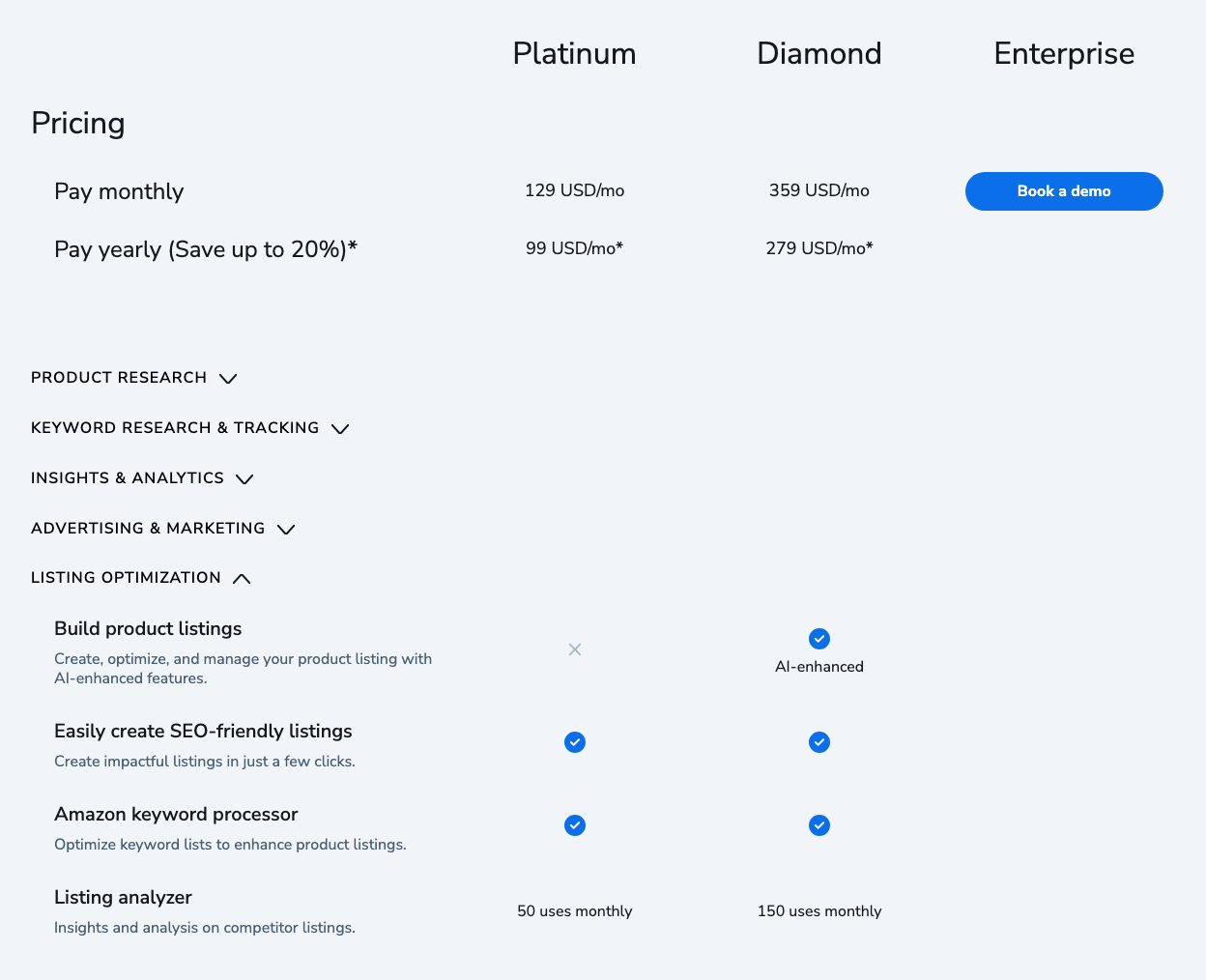
Diamond adds the AI-enhanced “Build product listings” feature, which the pricing table doesn’t give Platinum (the plan guide does give Platinum 5 lifetime AI-generated listings), and Helium 10 says Listing Builder can run the Listing Analyzer on draft versions of a listing so you can see which scores best. Our Platinum vs Diamond comparison covers the other differences, and the Helium 10 pricing guide has the full plans.
What Listing Analyzer misses
- The why behind a listing. It shows that a competitor’s title is long and which keywords it uses, not why its copy converts.
- Before-and-after tracking. The score reflects the listing at the moment you run it. To see whether an edit worked, run it again later (which uses another analysis) or watch your keyword ranks.
- Outside factors. Seasonality, competitors’ ad budgets and recent promotions all move performance, and none of them is part of the score.
- Your own data for competitors. Traffic and conversion figures appear only for your own ASIN; for rivals, the sales and stock numbers are estimates.
Listing Analyzer vs Jungle Scout and Keepa
| Tool | What it does for listings | Note |
|---|---|---|
| Helium 10 Listing Analyzer | A 1-to-10 quality score, a benchmark against up to 10 ASINs, and top keywords in one report | Uses come from your plan’s monthly allowance |
| Jungle Scout | Its help center lists a Listing Analyzer next to Listing Builder in the Catalyst plans (updated 25 June 2026) | Our Jungle Scout review covers its listing tools |
| Keepa | Price and sales-rank history; the price-history charts are free | Not a listing audit: it doesn’t score copy or images |
For how the two suites compare more broadly, see Helium 10 vs Jungle Scout and Helium 10 vs Keepa.
Is the Listing Analyzer worth using?
Listing Analyzer comes as part of a Helium 10 plan, so weigh it with the rest of the suite; our Helium 10 review does that.
For other listing tools, our best Amazon listing optimization tools guide compares the options, and the Helium 10 features guide covers Helium 10’s other listing tools, such as Listing Builder and Keyword Processor.
Frequently Asked Questions
What does Helium 10 Listing Analyzer do?
It audits an Amazon listing against Amazon best practices, gives it a Listing Quality Score from 1 to 10, and compares it with up to 10 competitor ASINs on sales, best-seller rank, price, reviews, images and top keywords.
How many Listing Analyzer uses do you get?
Helium 10's pricing table lists 50 uses a month on Platinum and 150 on Diamond, and its plan guide gives Enterprise 300 a month (checked 10 October 2026).
Can you use Helium 10 Listing Analyzer for free?
Only in a limited way. Helium 10's Listing Analyzer page offered a public preview with 2 searches before asking you to sign up when we checked it on 10 October 2026, and its help center lists 2 searches a month on the limited free account.
What does the Listing Quality Score measure?
Helium 10 says it reflects how many Amazon best practices a listing follows across its copy, media and reviews, such as title length, bullet formatting, image count and quality, video, A+ content, and the number and average of ratings.
Does Listing Analyzer show traffic and conversion data?
Only for your own products. Helium 10 says the Detail Page Traffic and Conversion section populates only when your Seller Central account is connected and you are analyzing your own ASIN.