The Best Amazon Listing Optimization Tool for 2026 (And the Free Ones Worth Using)
Affiliate disclosure: we may earn a commission if you buy through links on this page. How we make money How we check facts
If you want one Amazon listing optimization tool, buy Helium 10. It covers the whole chain in one subscription: Cerebro finds the keywords, Listing Builder and Scribbles turn them into a title and bullets, Listing Analyzer scores what you wrote, and Index Checker confirms Amazon indexed it. Platinum costs $99 a month billed yearly or $129 monthly (Helium 10’s pricing page, checked 10 October 2026).
Platinum from $99/month billed yearly · prices checked 10 October 2026 Affiliate link
Three things complicate that answer, and they are why this page is longer than one line.
First, the cheapest useful listing tools are Amazon’s own, and they are free. If you have Brand Registry and one or two listings, you may not need to spend anything. Second, listing optimization, which some vendors sell as Amazon SEO software, is five different jobs, and buying for the wrong one wastes money: the tool that writes your bullets is not the tool that tells you Amazon ignored them. Third, Amazon has published research on reading products for intent (who and what a product is for), not only matching words, and a few tools now grade listings against it.
How we picked. We compared tools on the five listing jobs below, using each vendor’s pricing table, help center and product pages, checked 10 October 2026. Vendor claims are attributed in the text; how we test explains the method.
Which listing tool to buy, by situation
| If you are… | Buy | Why |
|---|---|---|
| A seller who wants one tool and no further decisions | Helium 10 | Keyword research, writing, scoring and indexing checks in one subscription |
| Trying to spend nothing | Amazon’s own tools | Free AI listing tools; free A/B tests with Brand Registry |
| Chasing the AI-search angle | SmartScout | AI Scorecard grades listings against its reading of COSMO, on every plan |
| Writing two listings a year | Nothing | Amazon’s free tools plus an hour of care will beat a subscription you barely open |
How Amazon reads listings now: COSMO and Alexa for Shopping (formerly Rufus)
COSMO, in plain terms
In a paper presented at SIGMOD in June 2024, Amazon researchers described COSMO, a system that uses large language models to find the commonsense relationships in shopping behaviour (which queries lead to which purchases, which products are bought together) and builds them into a knowledge graph. The graph links products to the functions they serve, the audiences they suit and the events they are used for. Amazon’s example: a search for “shoes for pregnant women” should surface slip-resistant shoes (Amazon Science). Amazon’s own shopping assistant, Rufus, was renamed Alexa for Shopping on 13 May 2026.
The practical consequence is plain. A listing that reads like a keyword pile gives a system built to reason about intent less to work with than one that states who the product is for, what job it does, what its limits are and when it gets used.
Keyword research still matters: exact terms still index, still rank and still drive PPC. What has a shrinking return is cramming every variant into the backend, while copy that answers real shopper questions has a growing one.
What the tools have shipped
SmartScout’s AI Scorecard says it reverse-engineers COSMO’s evaluation logic to audit any ASIN against four vectors: functional intent, audience specification, capability constraints and contextual relevance. The output is a letter grade with an analyst verdict, a five-point radar chart and a 15-point breakdown, each point scored 1 to 10 (SmartScout, March 2026). SmartScout’s pricing table puts it on every plan: 1 audit a month on Basic, 10 on Essentials, 25 on Business and 60 on Enterprise.
Helium 10’s AI listing building is mostly a Diamond feature. Its pricing table reserves AI-enhanced “Build product listings” for Diamond, and its help center gives Platinum 5 AI-generated listings, lifetime, against 100 a month on Diamond. Diamond costs $279 a month billed yearly or $359 monthly, so on yearly billing you pay $180 a month more than Platinum, for Helium 10 Ads (formerly Adtomic), rank tracking and higher limits as well as the AI drafting.
Data Dive’s AI Copywriter writes titles, bullets and descriptions in modes Data Dive calls Classic AI, COSMO, and COSMO + RUFUS, and Data Dive says it is available on every plan.
Amazon’s own tools go furthest, and they are free. Its generative AI listing tools write titles and attributes from a short description, an image or a URL, also in bulk from a spreadsheet; Enhance My Listing suggests updates to existing listings that you can accept, edit or decline; and there are A+ content and video generators. Amazon said in May 2025 that more than 900,000 selling partners had used its generative listing tools and that sellers accepted the content with little or no editing about 90% of the time (Amazon). Those are Amazon’s own figures.
Treat AI listing scores as checklists
Nobody outside Amazon can see how its systems weigh a listing. A vendor scoring your listing against a reverse-engineered model gives you an informed opinion, not a measurement. Use any COSMO or Rufus score as a checklist pointed at the right things, good for finding what you left out and not a number to chase. The only real feedback loop is an A/B test, and Amazon gives brand owners that one free. Our guide to AI tools for Amazon sellers compares the AI features across the main suites.
Listing optimization is five jobs. Buy for the one that is stuck.
Sellers waste money here by buying a tool for a job that was never the bottleneck. This is the map:
| The job | Best paid tool | Free route |
|---|---|---|
| 1. Keyword research for the listing | Helium 10 Cerebro; SmartScout Rank Maker | Brand Analytics, with Brand Registry |
| 2. Writing title, bullets, description, backend | Helium 10 Listing Builder and Scribbles; Data Dive | Amazon’s generative AI listing tools |
| 3. Indexing checks | Helium 10 Index Checker | Searching Amazon for your ASIN plus each keyword |
| 4. A/B testing | None needed | Manage Your Experiments (Brand Registry) |
| 5. Images and A+ content | Amazon’s own A+ and video generators | The same, plus a designer |
1. Keyword research for the listing
This is upstream of listing work, and it is where most of the value is. Helium 10 Cerebro takes up to 10 competitor ASINs and returns the keywords behind them, and since Helium 10 merged Magnet into it, it also runs the seed-keyword searches Magnet used to do. SmartScout’s Rank Maker does the reverse-ASIN job with ranking history attached. If this is your real bottleneck, our best Amazon keyword research tools guide is the better page.
2. Writing the listing
Helium 10 splits this in two. Listing Builder walks you through a complete listing, imports competitor ASINs for keyword ideas and, in Helium 10’s words, is “Integrated with Chat GPT” for AI drafts; Helium 10’s help center gives Platinum 20 listings. Scribbles is the manual editor: it tracks which of your target keywords you have used as you type, with character, word and byte counts for each field and the backend search terms (Helium 10). Data Dive sits one level up: its keyword list tells you what the copy should prioritize, and its AI Copywriter drafts from it.
3. Indexing checks: confirm Amazon indexed your keywords
You can write a good listing, target the right terms and still not appear for them, because Amazon hasn’t indexed your product for a keyword. Helium 10’s Index Checker tests a list of keywords against an ASIN and reports whether, and how, each one is indexed: Traditional, Field-ASIN, Storefront, and a Cumulative column that is ticked if the ASIN is indexed in at least one way (Helium 10 help center). If your money keywords come back unindexed, fix that before polishing anything else.
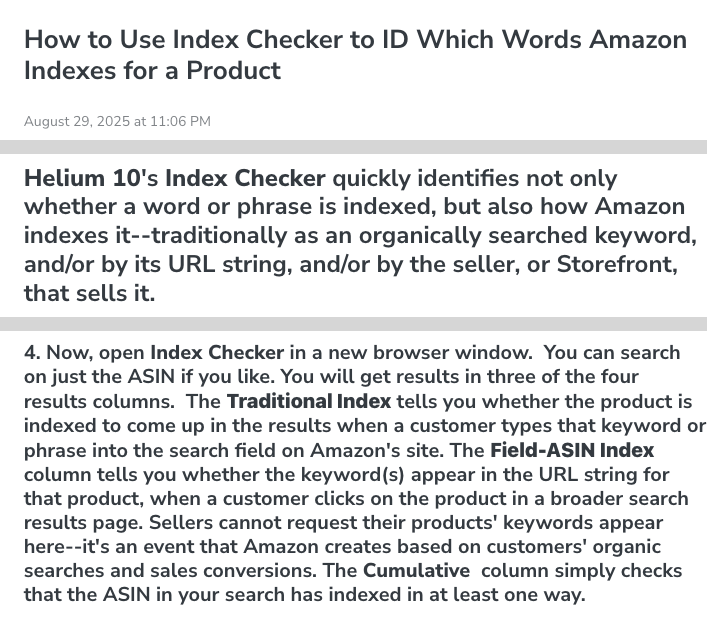
Index Checker no longer has its own product page on helium10.com, but the help center documents it, and its plan guide gives Platinum 150 uses and Diamond 300 a month. SellerSprite’s paid plans also include an index checker, while Jungle Scout’s help-center list of its Catalyst tools doesn’t mention one.
4. A/B testing
Don’t buy anything for this. Amazon’s Manage Your Experiments tests versions of your images, title, bullet points, description and A+ Content against live traffic, including several elements at once, and it is free. You need a Professional selling account and the Brand Representative role for a brand in Brand Registry (Amazon). Amazon runs each experiment until it has enough data for a statistically significant result, so low-traffic ASINs wait a long time, and no third-party tool can fix that.
5. Images and A+ content
This is mostly not a software problem. Amazon’s generative tools can draft A+ content and, for sellers using its ad tools, make videos from a product image at no extra cost; the ceiling is set by your photography and by whether your A+ modules answer shoppers’ objections. A better main image will do more than a listing tool.
Why Helium 10 is the single pick
It wins on coverage, not on any single tool: you can go from a competitor ASIN to a keyword set, a drafted listing, a score and an indexing check without leaving one subscription. Our Helium 10 review covers the rest of the suite.
The two plans differ more than the tool list suggests. These are the listing-relevant limits in Helium 10’s help-center plan guide (updated 13 May 2026), with prices from its pricing page (checked 10 October 2026):
| Listing limit | Platinum: $99/mo yearly, $129 monthly | Diamond: $279/mo yearly, $359 monthly |
|---|---|---|
| Cerebro keyword searches | 100 a month | 300 a day |
| Listing Builder | 20 listings; 5 AI listings, lifetime | 300 listings; 100 AI listings a month |
| Listing Analyzer | 50 a month | 150 a month |
| Index Checker | 150 uses | 300 uses a month |
Scribbles and the Keyword Processor are included on both. Helium 10’s pricing table also reserves AI-enhanced listing building for Diamond. Listing Analyzer checks a listing against Amazon’s best practices and, Helium 10 says, lets you import up to 10 ASINs to compare a niche.
Buy Diamond for the operating tools (Helium 10 Ads, rank tracking, higher limits), not for the listing ones. If listing work is your only reason to subscribe, Platinum is the right plan. Our Helium 10 pricing guide and Platinum vs Diamond comparison have the full detail, and the partner codes on our Helium 10 coupon page show the date each was last confirmed at checkout (2 August 2026).
Pros
- Keyword research, writing, scoring and indexing checks in one subscription
- Index Checker confirms which of your keywords Amazon has indexed
- Scribbles tracks which keywords you have used as you write, with byte counts per field
- Listing Analyzer compares up to 10 ASINs at once, by Helium 10's description
- The Chrome extension is free, so you can judge the data before subscribing
Cons
- The cheapest plan is $99/month billed yearly, since Starter was retired
- AI-written listings are mostly a Diamond feature: Platinum gets 5, lifetime
- Platinum caps Cerebro at 100 searches a month
- Index Checker and Scribbles are only sampled on the free account (6 uses a month; 30 days)
- Overkill if you have one or two listings and Brand Registry
“Free Amazon listing optimizer”: what actually exists
Many people searching this category want a free tool, so here is what is free, rather than a funnel into a paid one.
Amazon’s own tools are free, and they are the best free option
None of this is a trial. It comes with a Professional selling account, which Amazon prices at $39.99 a month plus selling fees.
- Generative AI listing tools and Enhance My Listing: they draft titles, attributes, bullets and descriptions from a short description, an image or a URL, and suggest improvements to listings you already have. You accept, edit or decline each suggestion.
- Listing Quality Dashboard: a Seller Central report that flags listings with missing or incomplete attributes, the closest thing to a free listing grader that isn’t trying to sell you something.
- Brand Analytics: free with Brand Registry, and the only first-party keyword data anyone gets. Search Query Performance follows each query from impressions to clicks, cart adds and purchases for your own catalogue, and Top Search Terms gives a search frequency rank. Our Brand Analytics guide covers the reports.
- Manage Your Experiments: free A/B tests of images, titles, bullets, descriptions and A+ Content, for brand representatives with a Professional account.
Helium 10’s free route
Helium 10’s pricing page lists no free plan, and there is no free trial of the paid plans; a limited free account exists. Its help-center plan guide gives that account Index Checker 6 times a month, Scribbles for 30 days and Listing Analyzer 2 searches a month; regular use of any of them needs Platinum or above. On the public site, the Listing Analyzer page runs a short free preview before asking you to sign up (it showed “2 searches left” when we checked on 10 October 2026), and the free keyword tool runs a limited demo of keyword search. The Helium 10 Chrome extension is free to install, but it does research rather than listing work. Our Helium 10 free tools guide sets out what the free route covers.
SmartScout has no free plan
SmartScout offers a 7-day money-back guarantee, not a free trial: you pay, and new customers can ask for a refund within 7 days. One free way into its data is the SmartScout Chrome extension, with 100 free full-feature uses a month according to its Chrome Web Store listing; SmartScout’s Brand Reports page also offers a free brand report with no credit card needed (both checked 10 October 2026). Our SmartScout free trial page explains where the “free trial” claim on other sites comes from.
What a “free listing optimizer” usually turns out to be
Search the phrase and you will mostly find three things:
- A grader as lead magnet. Paste an ASIN, get a score and a list of problems, then create an account to see the fixes. The score may be real; the product is your email address.
- A trial with a card gate. Free for a few days or weeks, then billing unless you cancel. Fine, if you know that going in.
- A free tier of a paid suite with caps tight enough that one serious listing uses them up.
Free is enough when you have Brand Registry, a small catalogue and time. Amazon’s tools draft, flag gaps and test, and they cost nothing beyond the selling plan you already pay for. Free stops being enough at three points: when you need competitor keyword data, because Amazon will never show you what other people rank for; when you need bulk indexing checks, because checking terms one at a time doesn’t scale; and when you do the same job across dozens of ASINs.
The alternatives worth knowing about
SmartScout: the second opinion, not the builder
SmartScout is a market and brand intelligence tool first, and its listing tools come on every plan with monthly limits. The AI Scorecard grades a listing against SmartScout’s reading of COSMO, and the AI Listing Architect drafts listings from keyword data: 1 ASIN a month on Basic, 10 on Essentials, 25 on Business and 60 on Enterprise, according to SmartScout’s pricing table. SmartScout Basic costs $29 a month billed yearly, or $49 month to month; Essentials is $99 billed yearly ($119 monthly) (checked 10 October 2026). Buy SmartScout for its market data and treat the listing tools as a bonus, the framing in our SmartScout review.
Jungle Scout: simpler, and starts a plan up
Jungle Scout’s Listing Builder and Listing Analyzer aren’t on Starter; they start on Growth Accelerator, $49 a month billed annually or $79 monthly (checked 10 October 2026). Its AI Assist drafts a title, bullets and description from your keyword list, and Jungle Scout’s pricing table gives it 100 uses a month on Growth Accelerator. Jungle Scout’s help-center list of Catalyst tools includes no index checker. Our Jungle Scout review has the wider picture.
Data Dive: for sellers who optimize repeatedly
Data Dive’s keyword list decides what the writing should prioritize, and its AI Copywriter drafts from it. Data Dive Starter is $39 a month, or about $32 a month billed yearly (checked 10 October 2026), with no free trial. Skip it below roughly five listings; Helium 10’s bundled tools or Amazon’s own are enough at that scale. See Data Dive pricing for the plans.
SellerSprite: the data-heavy alternative
SellerSprite pairs keyword and market data with an index checker on its paid plans and a free AI Listing Builder. SellerSprite Basic is $39 a month (shown against a $49 list price), with a free 3-day trial of the monthly plan. Our SellerSprite review covers the fit.
What to buy at each stage
- One or two listings, Brand Registry, no budget. Amazon’s free tools only: the generative listing tools for drafts, Listing Quality Dashboard for gaps, Manage Your Experiments for proof. Add nothing until one of the three free-stops-being-enough conditions above applies to you.
- Launching, and competing. Helium 10 Platinum: Cerebro for the keywords, Scribbles for placement, Index Checker before you spend on ads.
- Optimizing a catalogue. Helium 10 plus Data Dive, if the bottleneck is deciding what to prioritize across many listings rather than writing any one of them.
- Worried about AI search. Helium 10 for execution, SmartScout’s AI Scorecard for a second opinion.
- Already at scale, running ads. Helium 10 Diamond, bought for Helium 10 Ads, rank tracking and higher limits; the listing tools don’t justify the jump on their own.
If the bottleneck sits one step earlier, compare the options in our best Amazon keyword research tools guide, or step back to the parent roundup of the best Amazon seller tools.
Frequently Asked Questions
What is the best Amazon listing optimization tool?
Helium 10, for most sellers, because one subscription covers the whole chain: Cerebro for keywords, Listing Builder and Scribbles for writing, Listing Analyzer for scoring and Index Checker for confirming Amazon indexed your keywords. Platinum costs $99 a month billed yearly or $129 monthly (checked 10 October 2026). Helium 10's help center caps Platinum at 20 Listing Builder listings and 150 Index Checker uses.
Is there a free Amazon listing optimizer?
Yes, and the best ones are Amazon's own. Its generative AI tools draft titles, bullets and descriptions from a short description, an image or a URL, Enhance My Listing suggests updates to existing listings, and brand-registered sellers can A/B test content free with Manage Your Experiments. Helium 10's Listing Analyzer page also gives a short free preview.
What does a listing optimization tool actually do?
Five separate jobs, and no single tool owns all of them well: keyword research that feeds the listing, writing the title, bullets, description and backend terms, verifying that Amazon indexed those keywords, A/B testing the result, and producing images and A+ content. Work out which one is stuck before you buy anything, because the answer changes with the bottleneck.
Does Amazon's COSMO change how I should write listings?
It changes what you write, not how much. COSMO is a knowledge graph Amazon researchers presented at SIGMOD in June 2024; it links products to the functions, audiences and occasions shoppers associate with them, to improve recommendations. In practice, state who the product is for, what job it does and when it is used, in plain sentences rather than a keyword pile.
Which tool checks whether my keywords are indexed?
Helium 10's Index Checker. It shows whether a listing is indexed for each keyword and how (Traditional, Field-ASIN or Storefront), and Helium 10's help center gives the limited free account 6 uses a month, Platinum 150 and Diamond 300 a month. SellerSprite's paid plans also include an index checker.
Is Helium 10 or SmartScout better for listing optimization?
Helium 10 for writing and indexing, SmartScout for a second opinion. SmartScout's AI Scorecard grades a listing against what SmartScout calls the vectors of Amazon's COSMO model, and its AI Listing Architect drafts copy. Both are on every SmartScout plan with monthly limits, from one audit and one ASIN a month on Basic.