Helium 10 Magnet: Now Part of Cerebro, and How to Use It for Amazon Keyword Research
Affiliate disclosure: we may earn a commission if you buy through links on this page. How we make money How we check facts
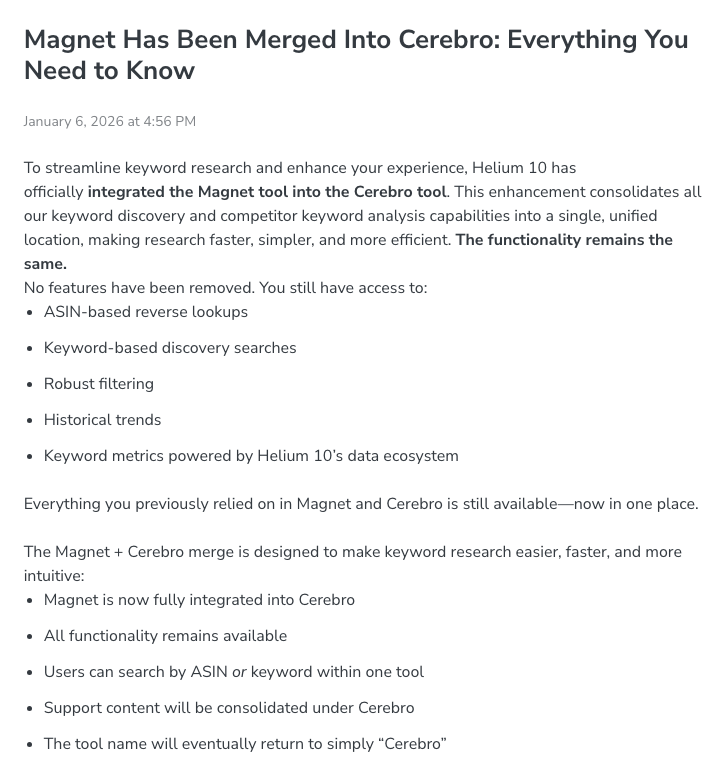
Helium 10 Magnet, the seed-keyword research tool, is now part of Cerebro. Helium 10’s help center says Magnet was merged into Cerebro with no features removed, so you can search by keyword or by ASIN in one tool, labelled “Cerebro (Plus Magnet)” while the change rolls out (help center, 6 January 2026). On Platinum, keyword and ASIN searches share 100 uses a month.
Magnet and Cerebro share 100 searches a month on Platinum Affiliate link
Correction (10 October 2026): this page previously said you could try Magnet free before paying and that Platinum included full Magnet features. Helium 10’s help center lists Magnet as unavailable on its free account, and since April 2026 Platinum allows 100 Cerebro (Plus Magnet) searches a month. We also removed accuracy statistics we couldn’t trace to a current Helium 10 source.
What changed when Magnet moved into Cerebro
Helium 10’s merger notice, Magnet Has Been Merged Into Cerebro, says keyword-based discovery, ASIN-based reverse lookups, the filters and the historical trends are all still there, and that “the tool name will eventually return to simply ‘Cerebro’”. A companion article says the change is “being rolled out in stages, so you might still be seeing Cerebro and Magnet as separate tools”.
The merger isn’t finished on Helium 10’s website either. On 10 October 2026 the Solutions menu on helium10.com still listed Magnet (“Find Keywords for Your Listings”) next to Cerebro; our Helium 10 features guide goes through that menu tool by tool. The Magnet product page still described it as an “Amazon and Walmart Keyword Planner”, although Helium 10’s help center says its Walmart search volumes are still a beta estimate.
For you, the practical change is the usage counter. Since April 2026, Platinum’s 100 monthly searches cover both kinds of search; the plan section below shows how Helium 10 counts them.
How keyword research works in Cerebro (Plus Magnet)
The Magnet side of the tool has two tabs, according to Helium 10’s help article (6 January 2026):
- Find Suggestions takes one seed keyword and returns related keywords to add to your list. Helium 10’s product page says it can “turn one keyword into hundreds of related terms that real buyers use”.
- Analyze Keywords takes a list of up to 200 keywords you already have, from Cerebro, Google Keyword Planner or another source, and returns the same metrics so you can decide which to keep.
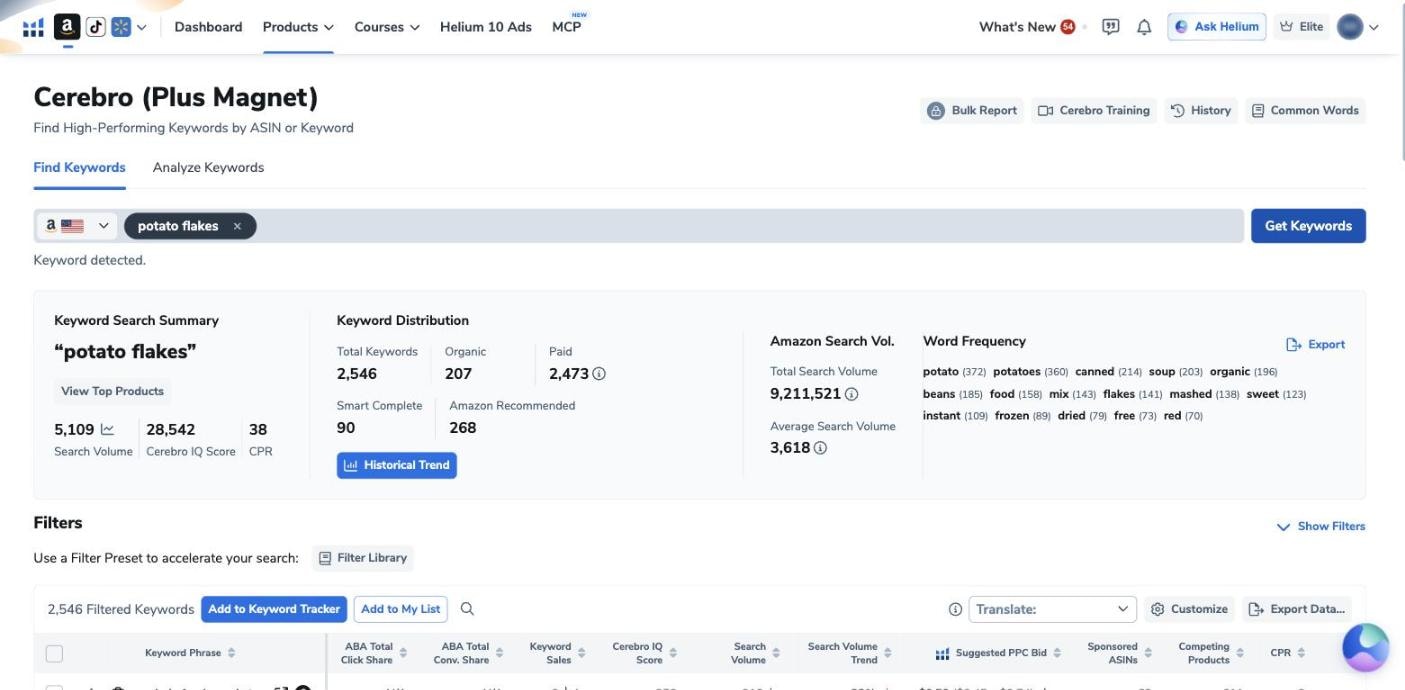
In our own Helium 10 account, which is on the Diamond plan, the first tab was called Find Keywords on 12 October 2026, and the same box takes either a seed keyword or up to 10 ASINs. We searched “potato flakes”. The summary showed 5,109 searches a month for the seed keyword itself, a Cerebro IQ Score of 28,542 and a CPR of 38, plus 2,546 related keywords with a combined search volume of 9,211,521. Helium 10 split them into 207 organic and 2,473 paid, with 90 from Smart Complete and 268 that Amazon recommends.
To run a suggestion search:
- Open Cerebro (Plus Magnet), or Magnet if your account still shows it separately, from the Products menu.
- Pick the marketplace from the flag drop-down.
- Enter a seed keyword and click Get Keywords.
- Open Show Filters and set a minimum search volume, word count, phrases to include or exclude, title density or match type, then click Apply Filters.
- Read the Keyword Search Summary: the seed keyword’s search volume, Cerebro IQ Score and CPR, a View Top Products button, the keyword distribution, the total search volume and the word frequency list.
- Delete irrelevant terms with the trash icon, add words you never want to see to Common Words, then export to CSV, to Keyword Processor or to your clipboard.
Your searches are saved under History, and Helium 10 says re-running a search from History doesn’t use one of Platinum’s monthly searches. Our keyword search history guide explains History and the search-volume graph.
Magnet metrics explained
| Metric | What Helium 10 says it means |
|---|---|
| IQ Score (Magnet IQ, now Cerebro IQ) | The ratio of estimated search volume to the number of competing products. Higher means more searches per competing product |
| Search Volume | Estimated searches for the keyword over the last 30 days; the graph icon shows its history |
| Search Volume Trend | How search volume has moved over the last 30 days |
| Competing Products | Total products returned for a search on the keyword |
| Title Density | Page-one products with the keyword in their title; lower means more room |
| Sponsored ASINs | Products recently detected running sponsored ads for the keyword |
| CPR | Helium 10’s estimate of the promotional sales a product needs to reach the top half of page one |
| Match Type | Organic (the exact words shoppers typed), Smart Complete (your keyword is an exact match for part of the phrase) or Amazon Recommended (terms Amazon recommends products for) |
Helium 10 doesn’t publish a “good” IQ Score threshold, and the score says nothing about whether a keyword fits your product. Compare scores within one niche and check relevance yourself. With Amazon Brand Analytics connected, Helium 10’s free keyword tool page says you also see click share and conversion share for each keyword. Search volume and CPR are Helium 10’s own estimates; our guide to how Helium 10 gets its data explains what is modelled.
What Magnet costs, and what you can try free
Magnet comes with Helium 10’s paid plans and draws on the same allowance as Cerebro (checked 10 October 2026). Platinum, at $99 a month billed yearly or $129 monthly, allows 100 searches a month across both. Diamond, at $279 a month billed yearly or $359 monthly, is ticked in the pricing table, and Helium 10’s plan guide lists 300 uses a day.
On the keyword side, Helium 10’s Platinum entitlement notice counts each seed-keyword search (Find Suggestions, which the notice calls Find Keywords) as 1 use, and analyzing up to 200 keywords at once as 1 use in total. ASIN searches, History and what happens at the limit are in our Cerebro guide’s plan section.
What’s free:
- Helium 10’s free Amazon keyword tool, which Helium 10 calls a “Limited Demo of Magnet”: enter a keyword or an ASIN on its free keyword tool page.
- The Chrome extension, which is free to install and shows keyword data on Amazon through Xray Keywords and Search Expander. Helium 10’s pricing FAQ says access is limited without Platinum or above; see our Chrome extension guide.
The full tool isn’t free, according to Helium 10’s plan guide, which marks both Magnet and Cerebro as unavailable on its limited free account; that account isn’t a plan on the pricing page. Helium 10’s free keyword tool page seems to contradict the guide, inviting visitors to “check out the full version” of Magnet “by signing up for free”. The searches shown on this page were run on our paid Diamond account. There’s no free trial of the paid plans. Our Helium 10 pricing guide has the full plan comparison.
Keyword search or ASIN search: which to start with
- Start with a keyword when you’re exploring a product idea or building a list from scratch.
- Start with ASINs when you know your competitors and want the terms they already rank for; our Cerebro guide covers reverse-ASIN searches.
- On Platinum, budget your searches. A keyword search costs 1 use, but a reverse search on 10 ASINs costs 10, so run broad keyword searches first and save multi-ASIN searches for close competitors.
For other keyword tools, compare Jungle Scout’s Keyword Scout and our Amazon keyword research tools roundup. Whether Helium 10 as a whole is worth paying for is the subject of our Helium 10 review.
Frequently Asked Questions
Does Helium 10 Magnet still exist?
As a feature, yes; as a separate tool, it is being folded into Cerebro. Helium 10's help center says Magnet has been merged into Cerebro, appears as Cerebro (Plus Magnet), and that the tool will eventually be called just Cerebro. helium10.com still had a separate Magnet page on 10 October 2026.
What is the Magnet IQ Score?
It is Helium 10's ratio of a keyword's estimated search volume to the number of competing products, so a higher score means more searches per competing product. In the merged tool the same metric is labelled Cerebro IQ Score.
Is Helium 10 Magnet free?
Not as a full tool, according to Helium 10's plan guide, which lists Magnet and Cerebro as unavailable on its limited free account. Helium 10's free Amazon keyword tool is a limited demo of Magnet, yet the same page invites visitors to check out the full version by signing up for free. Helium 10 calls that free version a limited demo.
How many Magnet searches do you get on Platinum?
Magnet and Cerebro share one allowance of 100 searches a month on Platinum. Finding suggestions for one keyword counts as one use, and analyzing up to 200 keywords at once also counts as one.
What is the difference between Magnet and Cerebro?
Magnet starts from a seed keyword and Cerebro starts from product ASINs. Since the merge, both searches run in the same tool, with the same filters and the same usage counter.