Best Amazon Reverse ASIN Tools in 2026 (Free Options First)
Affiliate disclosure: we may earn a commission if you buy through links on this page. How we make money How we check facts
Free reverse ASIN tools are small: about 10 searches a month. AsinSeed’s free plan allows 10 queries a month and exports the top 5 keywords, an older SellerSprite FAQ offers unpaid members 10 a month, and Amazon’s Brand Analytics is free but shows detailed query data only for your own ASINs (checked 10 October 2026). The most complete paid tool, Helium 10’s Cerebro, starts on Platinum.
Cerebro starts on Platinum · $99/mo billed yearly, 100 searches a month Affiliate link
The rest of this page covers what each free route gives you, why free reverse-ASIN data is thin no matter who gives it away, and what the paid tools return per ASIN, which is the real difference between them.
How we picked. We checked each free tool’s own pricing or help page and each paid tool’s pricing table on 10 October 2026, and we quote vendor claims as claims. The one first-hand result, for SmartScout’s Rank Maker, comes from the complimentary SmartScout Business account disclosed in how we test.
Which reverse ASIN tool to use, by need
| If you want… | Use | What it costs (10 Oct 2026) |
|---|---|---|
| A free look by ASIN | Helium 10’s free keyword tool | $0, a limited demo |
| Amazon’s own data | Brand Analytics | $0; Brand Registry; query data for your own ASINs only |
| A free tool with exports | AsinSeed | $0 for 10 queries a month, top 5 keywords |
| The most complete tool | Helium 10 Cerebro | Platinum $99/mo yearly, 100 searches a month |
| Keywords plus ranking history | SmartScout Rank Maker | Essentials $99/mo yearly, $119 monthly |
| Multi-ASIN search inside a research suite | Jungle Scout Keyword Scout | Growth Accelerator $49/mo yearly |
| Turning keywords into a listing | Data Dive | Starter about $32/mo yearly, $39 monthly |
Free reverse ASIN tools: what actually exists
Search free reverse ASIN keyword tool and every result says “free”. What you get differs a lot, and the difference matters, because a lead magnet costs you an email address and twenty minutes before you find out what it won’t show you.
| Free route | What you get | The catch |
|---|---|---|
| Helium 10 free keyword tool | A limited demo of Magnet, by seed term or ASIN | Full Cerebro needs Platinum |
| Amazon Brand Analytics | Amazon’s own query data for your ASINs | Brand Registry; can’t look up a competitor’s ASIN |
| AsinSeed | 10 queries a month, top 5 keywords exported | $19.90/mo for unlimited queries |
| SellerSprite | 10 free reverse-ASIN searches a month, per an October 2025 FAQ | The paid-plan trial lasts 3 days |
| SmartScout Chrome extension | 100 free full-feature uses a month | Not a reverse-ASIN tool |
| MerchantWords | A page titled “Free Reverse ASIN Keyword Tool” | ASIN Plus is in paid plans; no free trial |
Helium 10’s free route: a demo, not a plan
Helium 10’s pricing page lists no free plan, only Platinum, Diamond and Enterprise, and there is no free trial of the paid plans; a limited free account exists. What Helium 10 gives away for this job is its free Amazon keyword tool, which it calls a “Limited Demo of Magnet”: enter a seed term or an ASIN, choose one of 10 marketplaces, and it returns related keywords (Helium 10). The same search box appears on its Cerebro page. The free tool’s page invites you to sign up free for “the full version”, but Helium 10’s help-center plan guide lists neither Cerebro nor Magnet on the free account, so Cerebro’s full keyword lists, filters and exports mean Platinum or Diamond.
The free Helium 10 Chrome extension is a different tool: its Xray overlays sales, revenue and pricing on Amazon search pages. Helium 10’s pricing page claims 860K+ active extension users, and its Chrome Web Store listing shows 1,000,000 users (checked 10 October 2026). Our Helium 10 free tools guide sets out what the free route reaches.
Amazon Brand Analytics: free and first-party, if you can get in
Brand Analytics is the only source on this page that isn’t modelling anything: it is Amazon’s own search data, and it costs nothing. The Search Query Performance report has an ASIN view showing, for each of your ASINs, the queries that drove impressions, clicks, cart adds and purchases, with your share of each. Top Search Terms gives a search frequency rank for a term, with the three most-clicked products behind it.
Two limits disqualify many readers. Brand Analytics requires a Professional selling account and brand representative status for a brand enrolled in Amazon Brand Registry (Amazon), so wholesale and arbitrage sellers, who resell other people’s brands, can’t use it. And even brand owners only get query data for their own ASINs: you can’t point Search Query Performance at a competitor. Our Search Query Performance guide covers the workflow.
AsinSeed: free, small and clear about its limits
AsinSeed’s pricing page lists a free plan with 10 queries a month, all marketplaces, one user and export of the top 5 keywords. Unlimited queries and full exports cost $19.90 a month on its Standard plan, and its API plan $998 a month (AsinSeed pricing, checked 10 October 2026). Its homepage lists the US, Japan, the UK, Germany, France, Italy, Spain and Canada, and says it holds 6+ months of search traffic for each ASIN. AsinSeed’s pages carry SellerSprite branding.
Correction (10 October 2026): we previously wrote that AsinSeed’s free allowance included unlimited keyword exports and that its paid prices weren’t published. Its homepage still promises unlimited exports for its Chrome extension, but its pricing page limits the free plan to the top 5 keywords and lists the prices above.
Ten queries a month is enough to check a handful of competitors. It isn’t a research platform.
SellerSprite: 10 free searches, per an older FAQ
SellerSprite’s reverse-ASIN FAQ says “For unpaid members, there are only 10 free search opportunities each month” (SellerSprite, checked 10 October 2026). That FAQ is dated 14 October 2025, and the same page says Reverse ASIN data updates monthly and covers seven marketplaces, which SellerSprite’s newer help articles contradict, so treat the 10 free searches as unconfirmed. Its pricing page lists AI Listing Builder, Sales Estimator, Profitability Calculator, Google Trends and URL Builder as included free tools, and offers a free 3-day trial of the monthly plan. Index Checker is less clear-cut: the pricing page lists it as an unlimited plan feature rather than a free tool, although SellerSprite’s site menu labels it Free, and SellerSprite has moved the tool into its browser extension. See our SellerSprite review.
SmartScout’s extension is free, but not for this
SmartScout’s Chrome extension gives 100 free full-feature uses a month with no credit card, according to its Chrome Web Store listing (checked 10 October 2026). Earlier in 2026 the listing offered 1,000 free uses a month, as an Internet Archive copy from 11 February 2026 shows, and this page gave that figure until 10 October 2026. SmartScout has no free plan and no free trial, so the extension is one free way into its data; another is a free brand report from SmartScout’s Brand Reports page (checked 10 October 2026).
It isn’t a reverse-ASIN tool. It is built for qualifying products: opportunity scores, FBA profit calculators, eligibility checks through Amazon’s Selling Partner API, listing-issue flags, and price and rank history. On a search results page, it also summarizes the keyword’s search volume. Full detail is in our SmartScout Chrome extension review.

MerchantWords: a “free” page for a paid tool
MerchantWords titles its reverse-ASIN page “Free Reverse ASIN Keyword Tool for Amazon”, but the tool behind it, ASIN Plus, is part of MerchantWords’ paid plans, and MerchantWords says it offers no free trial. MerchantWords Silver starts at $35 a month (checked 10 October 2026). Our MerchantWords review covers whether the paid product is worth it.
None of this is deceptive: “free tool” is standard marketing for a gated preview. But if you are three tabs in and nothing has shown you a keyword list yet, this is why.
Why free reverse-ASIN data is limited
Amazon doesn’t publish keyword search volume to third parties outside Brand Analytics, so every volume figure in a reverse-ASIN tool is modelled. Helium 10’s help center, for one, says its search volumes and ranks are its own estimates, built from data it collects daily. Building that model and refreshing it across millions of ASINs is the expensive part, which is why free tiers have hard edges.
Free tiers cut four things, and you can use them as a test of any free tool:
- Keyword count per ASIN. An established listing can rank for thousands of terms; AsinSeed’s free plan exports five.
- History. A current snapshot is cheap to serve and months of rank history aren’t, so history sits behind a plan, sometimes a higher one than the keyword list.
- Export. A file of every keyword an ASIN ranks for is the product itself.
- Batch size. Comparing up to 10 ASINs at once is where reverse-ASIN research gets useful, and on Helium 10 Platinum each of those ASINs counts against your 100 monthly searches.
Free reverse-ASIN data is fine for checking a single competitor and not enough to build a keyword strategy. If you are validating one product idea, stay free. If you are launching, the time the free tier costs you will outweigh the subscription.
Best paid reverse ASIN tools compared
What matters is what each tool returns per ASIN, and on which plan. These are the vendors’ own figures, with gaps marked:
| Tool | Per search, and history | Plan for the feature (10 Oct 2026) |
|---|---|---|
| Helium 10 Cerebro | Up to 10 ASINs, keyword count not published; search-volume history | Platinum $99/mo yearly, 100 searches a month |
| SmartScout Rank Maker | One ASIN, 1,000+ keywords claimed; visibility history from August 2024 onward | Essentials $99/mo yearly |
| Jungle Scout Keyword Scout | Up to 10 ASINs, top-100 ranks only; 1 month to 2 years of history, by plan | Starter $29/mo yearly, 50 searches a month |
| Data Dive | A competitor set per Dive; Rank Radar tracks ranks daily | Starter about $32/mo yearly |
| SellerSprite | Keyword count and history not published | $39/mo (list $49) |
| AsinSeed | One ASIN; 6+ months of traffic data | Free; $19.90/mo for unlimited |
| Brand Analytics | Query data for your own ASINs only; weekly, monthly and quarterly views | Free |
Two things stand out. Most vendors don’t publish a keyword count per ASIN, because it depends on how established the listing is; SmartScout is the exception, and it’s worth checking its number rather than taking it. And history is often priced separately from the keyword list: Jungle Scout gives Starter one month of keyword history and Brand Owner two years, and SmartScout puts Rank Maker on Essentials but its campaign builder on Business. Budget for the plan that has the thing you came for.
Helium 10 Cerebro: the most complete
Cerebro is the tool the rest of this category gets compared to, because it does the multi-ASIN job well. Helium 10’s page says it analyzes up to 10 ASINs side by side, surfacing overlapping keywords, unique wins and gaps, with organic and sponsored rank in the same table, so it serves PPC research as well as listing work (Helium 10). Helium 10 has also merged Magnet, its seed-keyword tool, into Cerebro, according to a help-center notice last updated 6 January 2026.
The limitation is the Platinum cap. Helium 10 Platinum costs $99 a month billed yearly or $129 monthly, and Helium 10’s help center limits it to 100 Cerebro searches a month, counting each ASIN in a multi-ASIN search as one; at the limit, Cerebro freezes until the next billing cycle (Helium 10 help center). Diamond ($279 a month billed yearly) gets 300 searches a day. Helium 10 doesn’t publish how many keywords Cerebro returns per ASIN. Our Helium 10 pricing guide has every plan limit, and the Helium 10 review covers the rest of the suite.
Pros
- Up to 10 ASINs compared side by side, with overlaps and gaps
- Organic and sponsored rank in the same view, for PPC and listing work
- Seed-keyword search (the former Magnet) in the same tool
- Exports results to a file
Cons
- Platinum allows 100 searches a month, and a 10-ASIN search uses 10 of them
- No published keyword count per ASIN
- No free version beyond a limited demo
SmartScout Rank Maker: the one that publishes its numbers
Rank Maker is SmartScout’s reverse-ASIN tool, and it absorbed what SmartScout used to call Historic Keyword Ranking. SmartScout’s Rank Maker page claims 1,000+ keywords per ASIN and 20+ data points per keyword, including rank, search volume, click-through share and PPC bid estimates, with CSV and Excel export (SmartScout, checked 10 October 2026).
On our complimentary SmartScout Business account, Rank Maker returned 2,476 keywords for ASIN B0CJ1B6D6S, a Scrub Daddy sponge listing, on 2 August 2026, split 89% organic and 11% paid. For an established listing, the 1,000+ claim was conservative.
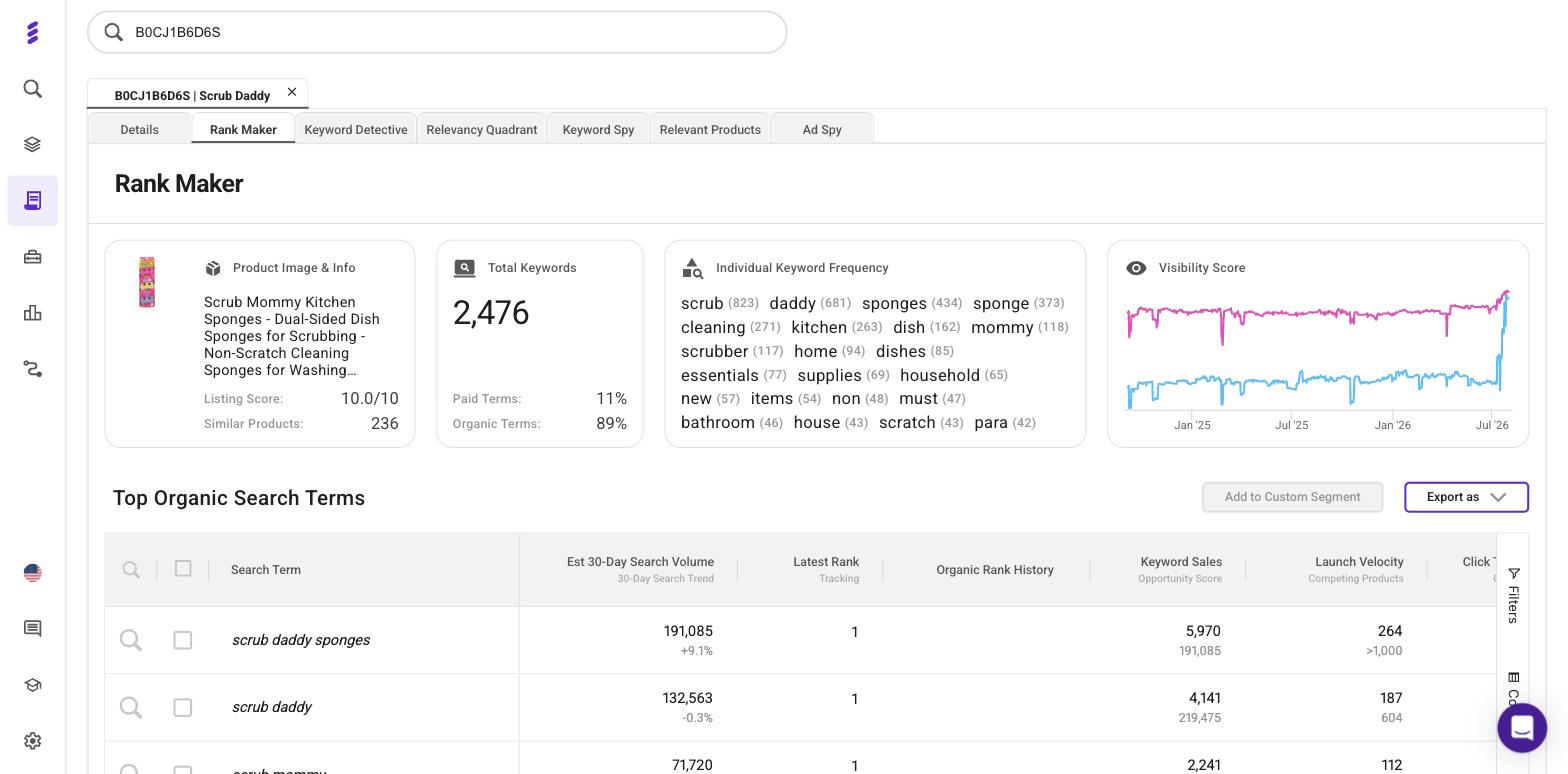
Its distinguishing feature is the Visibility Score, which SmartScout describes as a rolling chart of how visible a product has been across all its ranking keywords over the past 12 to 18 months. That view catches a listing that holds its top keywords while losing the long tail. SmartScout says its data runs from August 2024, so there is no history from before then; the chart in our 2 August 2026 capture went back to around September 2024, close to two years rather than a fixed 18-month window.
Rank Maker’s own page says it “is included in every SmartScout plan”, but SmartScout’s pricing table starts it at Essentials ($99 a month billed yearly, $119 monthly) and its ad-creation half at Business ($239 billed yearly, $299 monthly). There’s no free trial; each self-serve plan has a 7-day money-back guarantee. Our SmartScout pricing guide sets out the tiers, and the rank tracking review covers monitoring once you know which keywords matter.
Jungle Scout Keyword Scout: multi-ASIN search inside a research suite
Keyword Scout reverse-searches one ASIN or up to 10 at once and shows historical search volume with monthly and quarterly trends (Jungle Scout help center). Its reverse-ASIN results only include keywords where the product ranks in the top 100, according to a separate help-center article. History depends on the plan: one month on Starter, a year on Growth Accelerator and two years on Brand Owner, which is the plan to buy if you need to see two Q4s.
Jungle Scout Starter costs $29 a month billed annually or $49 monthly, with 50 Keyword Scout searches a month and no exports. Growth Accelerator costs $49 billed annually ($79 monthly) for 250 searches, and Brand Owner $129 billed annually ($149 monthly), with no cap shown (checked 10 October 2026). There’s no free trial; new customers on regularly priced plans get a 7-day money-back guarantee. See Jungle Scout pricing for the rest of each plan.
Correction (10 October 2026): we previously said Keyword Scout’s two-year history came with the Starter plan. Starter has one month of keyword history; two years needs Brand Owner.
Data Dive and SellerSprite: the specialist layer
Data Dive isn’t really competing on reverse-ASIN discovery; it competes on what happens next. A Dive builds a Master Keyword List from a set of competitors, with each one’s organic and sponsored rank and a relevancy score, and Rank Radar tracks the results daily. Data Dive Starter is $39 a month, or about $32 a month billed yearly; Standard is $149 or $124; Enterprise is $490 or $408 (checked 10 October 2026), with no free trial.
SellerSprite is a database-style crossover, with reverse ASIN alongside broader market and keyword data. SellerSprite Basic is $39 a month (shown against a $49 list price) or $390 a year, with a 3-day trial of the monthly plan and conflicting refund terms: its 2022 terms of service promise a 14-day money-back guarantee on a first purchase, while its 22 January 2026 refund policy refunds only unused time.
“Amazon ASIN tool” covers six different jobs
Many people searching amazon asin tool or asin tool aren’t looking for keywords at all. The phrase covers several unrelated jobs:
| What you want | What it’s called | Where to go |
|---|---|---|
| Turn a UPC, EAN or SKU into an ASIN, or bulk-convert a list | ASIN converter or lookup | Converters such as asintool.com; Amazon’s own search for one-offs |
| Pull product data (title, brand, rank) from an ASIN | ASIN lookup | Helium 10 Xray, SmartScout’s free extension |
| Find the keywords an ASIN ranks for | Reverse ASIN tool | This page |
| Work out whether an ASIN is profitable to sell | FBA calculator or sourcing tool | Best Amazon arbitrage tools |
| Check whether your listing is indexed for a term | Index checker | Helium 10 Index Checker |
| See a product’s price and rank history | History charting | Keepa (rank graphs need Keepa Pro); see Helium 10 vs Keepa |
asintool.com is an identifier converter, not a keyword tool. It converts between ASIN, SKU, UPC, EAN, ISBN and MPN, one at a time or in bulk from a spreadsheet, using data returned from Amazon; you register to use it, and it has a separate pricing page (checked 10 October 2026). If that is what you came for, no reverse-ASIN tool on this page will help.
How to choose without overbuying
| Your situation | Start with | Why |
|---|---|---|
| Checking one competitor | AsinSeed or Helium 10’s free demo | A free allowance answers a one-off question |
| You own a registered brand | Brand Analytics | Amazon’s own data; add a paid tool for competitors |
| Wholesale or arbitrage, no Brand Registry | AsinSeed, then a paid tool | Brand Analytics isn’t open to you |
| Launching a private-label product | Helium 10 Diamond or SmartScout Essentials | Multi-ASIN mining without a tight monthly cap |
| You need to see where rankings have been | SmartScout Essentials | Visibility history across every ranking keyword |
| Seasonal product, need two Q4s | Jungle Scout Brand Owner | Two years of keyword history |
| Discovery is solved; organization is the bottleneck | Data Dive | A planning layer, not a discovery tool |
Don’t buy a suite before you know whether reverse-ASIN research is a recurring job for you. Use AsinSeed’s free allowance (or SellerSprite’s, if it still applies) for a fortnight first; if ten searches a month feels like a cage, you know which limit you are paying to remove.
For keyword research beyond the ASIN, see best Amazon keyword research tools. For writing the listing afterwards, see best Amazon listing optimization tools, and for the whole stack, best Amazon seller tools.
Correction (10 October 2026): earlier versions of this page said Helium 10’s pricing-page title still read “Free, Platinum, Diamond & Custom”, and quoted an in-product figure of 1.2 million Chrome extension users. The title no longer mentions Free, and the user figures in the Helium 10 section are the ones Helium 10’s pricing page and the Chrome Web Store show now.
Frequently Asked Questions
Is there a free reverse ASIN keyword tool?
Yes, but each one is small. AsinSeed's free plan allows 10 queries a month and exports the top 5 keywords, an older SellerSprite FAQ (14 October 2025) says unpaid members get 10 reverse-ASIN searches a month, though parts of that FAQ are out of date, and Helium 10's free keyword tool runs a limited demo for an ASIN (all checked 10 October 2026). Amazon Brand Analytics is free and first-party, but it needs Brand Registry and shows detailed query data only for your own ASINs.
What is the best reverse ASIN tool overall?
Helium 10's Cerebro is the most complete: up to 10 ASINs side by side, organic and sponsored keywords, and seed-keyword search in the same tool. On Platinum it is capped at 100 searches a month, with each ASIN in a multi-ASIN search counted as one, so heavy users need Diamond or SmartScout's Rank Maker. SmartScout says Rank Maker returns 1,000+ keywords per ASIN with 18 months of visibility history.
Is Amazon Brand Analytics a reverse ASIN tool?
Partly. The ASIN view of Search Query Performance shows the queries that led shoppers to a product, from Amazon's own data. But it only covers ASINs your brand owns, so you can't point it at a competitor, and it needs a Professional selling account plus Brand Registry.
What is an Amazon ASIN tool?
It is a loose phrase for at least six jobs: converting between ASIN, UPC, EAN and SKU, looking up a product's data from its ASIN, pulling the keywords an ASIN ranks for, checking whether an ASIN is profitable to sell, checking whether a listing is indexed for a keyword, and charting a product's price and rank history. Reverse ASIN tools do only the third.
Do free reverse ASIN tools let you export the keyword list?
Rarely in full. AsinSeed's free plan exports only the top 5 keywords of a search, while its $19.90-a-month Standard plan exports everything. Among paid tools, Cerebro exports, Jungle Scout's exports start on Growth Accelerator, and SmartScout's pricing table lists Excel exports from its Business plan.
How far back does reverse ASIN keyword history go?
It depends on the tool and the plan. Jungle Scout gives 1 month of keyword history on Starter, 1 year on Growth Accelerator and 2 years on Brand Owner, SmartScout's Rank Maker shows visibility history from August 2024 onward (its page advertises 18 months; our 2 August 2026 capture went back to around September 2024), and AsinSeed says it holds 6+ months of search traffic for each ASIN.