How to Cancel a Helium 10 Subscription: Steps, Refund Window, Pause and Account Deletion
To cancel Helium 10, click your profile icon, open Plans & Billing, click Cancel under your current plan and confirm through to “I Understand” (Helium 10’s help center, checked 11 November 2026). Access continues to the end of the period you paid for. Only a first payment is refundable, within 7 days and on request, and a canceled legacy plan such as Starter cannot be restored.
Every step and rule below comes from Helium 10’s help center, its terms (effective 6 November 2026) and the FAQ on its pricing page, all read on 11 November 2026. The date beside each help article is the day Helium 10 last edited it.
How to cancel or unsubscribe from Helium 10, step by step
These steps follow Helium 10’s cancellation article, last edited 5 January 2026:
- Click your profile icon at the top right of the Helium 10 dashboard and choose Plans and Billing.
- The plans chart opens, with your current plan named at the top. Under the heading of your plan, click Cancel.
- At the confirmation prompt, choose Continue to Cancel (or Go Back).
- Answer the questions about why you are leaving.
- The next screen offers alternatives: pausing, switching plan or chatting with support. To carry on, click Continue at the bottom right.
- On the last screen, click I UNDERSTAND to finalize the cancellation.
The article closes with: “the cancellation will take effect at the end of the current billing cycle.” The terms agree that you “continue to have access to the paid Services through the end of the subscription period for which payment has already been made”.
Helium 10 describes the route in other words elsewhere:
| Source | How it describes canceling |
|---|---|
| Cancellation article (5 January 2026) | Profile icon, Plans and Billing, then the Cancel button under your plan in the plans chart |
| Account-deletion article (2 July 2025) | “Go to Billing in your account settings”, click Manage Subscription, then Cancel Subscription |
| Pricing-page FAQ | “visiting the Plans & Billing section of your account and selecting ‘Cancel’”, or writing to support@helium10.com |
| Terms, section 2(A) | “the self-serve functionality”, the customer support chat widget, or an email to support@helium10.com |
The deletion article links its “Cancel Subscription” step to the cancellation article, so the two describe one process with different labels. If the buttons on your billing page match neither description, use chat or email: the terms treat all three routes as valid.
When to cancel: renewal dates and notice
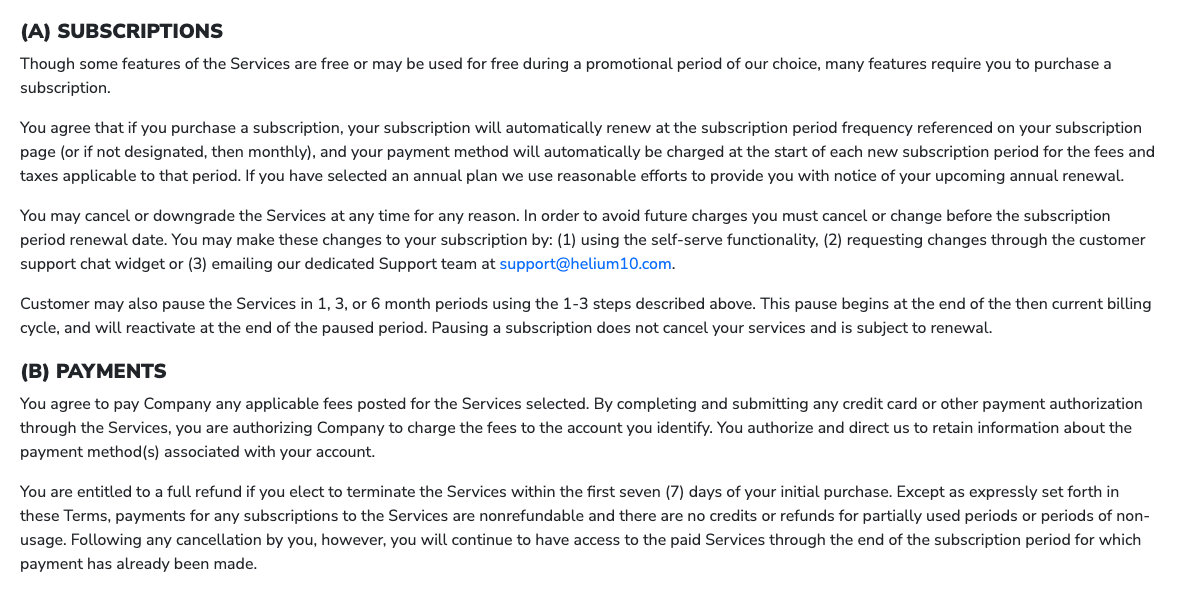
Every Helium 10 subscription renews automatically. The terms put the deadline in one sentence: “In order to avoid future charges you must cancel or change before the subscription period renewal date.” The pricing FAQ says monthly plans carry “no long-term commitments”.
Three details in the terms are easy to miss:
- Annual renewals. Helium 10 says only that it uses “reasonable efforts to provide you with notice of your upcoming annual renewal”. Set your own reminder.
- A second notice clause. Section 7 of the same terms says that if you “did not subscribe for any minimum period, then you may cancel at any time on 30 days advanced notice”, and that anyone who signed up for a designated term remains “responsible for payment for the full term”. Section 2(A) and the help center mention no 30-day notice, and the terms don’t say which rule wins, so cancel well before the renewal date, not on it.
- Enterprise contracts. The Enterprise terms, published on the same page, renew for the same term “unless either party gives ninety (90) days written notice prior to the end of the then-current Term”, sent to support@helium10.com.
Letting a card fail is not a cancellation. Helium 10’s billing article (30 March 2026) says the system “continues to attempt to process the payment until it’s successful”, and the terms hold you responsible for unpaid charges, with a late charge of up to 1.5 percent a month once a payment is more than 30 days overdue.
Helium 10 refund policy: 7 days, first payment only
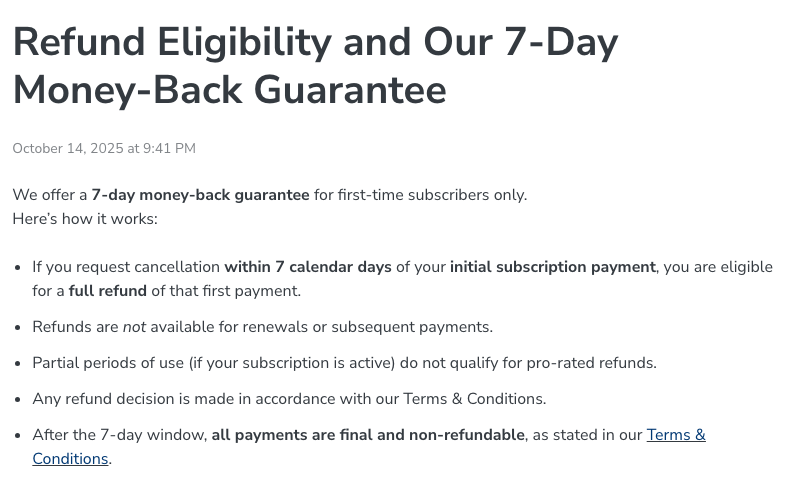
The terms were revised days before this check: the page showed an effective date of 17 August 2026 when we read it on 10 October 2026 and shows 6 November 2026 now. The refund sentence did not change. It is the only refund right in the terms: “You are entitled to a full refund if you elect to terminate the Services within the first seven (7) days of your initial purchase.” Beyond that, subscription payments “are nonrefundable and there are no credits or refunds for partially used periods or periods of non-usage”, and refunds after termination “are at the sole discretion of the Company”.
Helium 10’s refund article (14 October 2025) adds the conditions:
| Situation | Refund? |
|---|---|
| First-ever subscription payment, canceled within 7 calendar days | Yes, in full, if you ask support for it |
| Monthly or annual renewal | No |
| Canceling partway through a paid month or year | No pro-rated refund; access runs to the end of the period |
| Any payment after the 7-day window | No: “all payments are final and non-refundable” |
| Helium 10 Ads management fees | No: the fee article (20 August 2026) calls them non-refundable |
| Enterprise contracts | The Enterprise terms contain no 7-day clause |
Canceling in the app is not the refund request. The article tells you to contact support, say you are “requesting a refund under the 7-day money-back guarantee policy” and give your account details and purchase date. The billing team reviews the request and, if it approves, refunds the original payment method. The 7 days run from the first payment, not from each renewal.
On yearly billing that first payment is the whole year: 12 times $99 for Platinum ($1,188) or 12 times $279 for Diamond ($3,348), at the prices checked 10 October 2026. The guarantee covers it for seven days and nothing after that. There is no free trial of the paid plans; our page on what Helium 10 gives away free lists what you can try without paying.
Pausing instead of canceling
Helium 10 lets you put a subscription on hold for one, three or six months. Its pause article (5 January 2026) starts in the same place as a cancellation:
- Open Plans & Billing and click Cancel under your plan.
- Choose Continue to Cancel, give your reasons and click Continue.
- On the next page, open the Pause Subscription menu, pick the length and click PAUSE SUBSCRIPTION.
What the article and the terms say about a pause:
- It starts at the end of the current billing cycle, not on the day you request it.
- It ends automatically. The terms say the subscription “will reactivate at the end of the paused period” and that pausing “does not cancel your services and is subject to renewal”. Expect a charge when the pause runs out.
- Before the pause begins you can undo it with CANCEL PAUSE; once it has begun, REACTIVATE restarts the plan early.
- A paused subscription cannot be canceled in the app: “you must contact Helium 10 support via chat or email.”
The reason to pause is data. The cancellation article says that during a pause of up to six months “Helium 10 stores your historical data, including your keyword and market tracking data”.
What you lose when you cancel
The same article describes canceling as the choice to “permanently cancel and lose your data”. The account stays open after you cancel (deleting it is a separate request, below), and Helium 10’s articles treat an account without a paid plan as being on the Free plan. Other help articles say what that means tool by tool:
| What | What Helium 10 says |
|---|---|
| Keyword and market tracking | Stored during a pause; canceling means you “lose your data” (cancellation article) |
| Follow-Up | “Free plan does not include access to the Follow-Up tool”, and Follow-Up stops retrieving data from your seller account (Follow-Up FAQ, 23 October 2026) |
| Profits and Inventory Management | The same FAQ limits Profits data to “the most recent 90 days on the Free plan”; the plan guide (13 May 2026) lists both tools as “30 Days” on Free |
| Connected seller accounts | Free allows 2. Extra connections are disabled automatically, newest first, and a connection you remove by hand takes its history with it for good (connection FAQ, 28 August 2026) |
| Product Launchpad ideas | If access lapses, even briefly, ideas “may be deleted and are not recoverable” (Launchpad article, 16 January 2026) |
| Managed Refund Service | Once it is canceled you “lose access to the full tool, including the Billing page”, yet invoices for reimbursements already recovered “can still arrive afterwards” (billing-records article, 1 October 2026) |
| Freedom Ticket | Included only “as long as an active subscription is maintained” (pricing FAQ) |
Before the paid period ends, export what you rely on: tracked keyword lists, profit reports, listing drafts. If you run ads through Helium 10, the 2% management fee applies to all spend in profiles set to Managed and is non-refundable, so switch each profile to Analytics-Only or Disabled before you stop using it. Our Helium 10 Ads page explains the fee, and our Refund Genie page covers the reimbursement service.
Legacy plans such as Starter: cancellation is permanent
A legacy plan is one that Helium 10 no longer offers but keeps active for existing subscribers. Starter, which left the pricing page in January 2026, is one: the legacy articles name no plan, but Helium 10’s Keyword Tracker Snap View article (20 August 2026) labels it “Starter (Legacy)”.
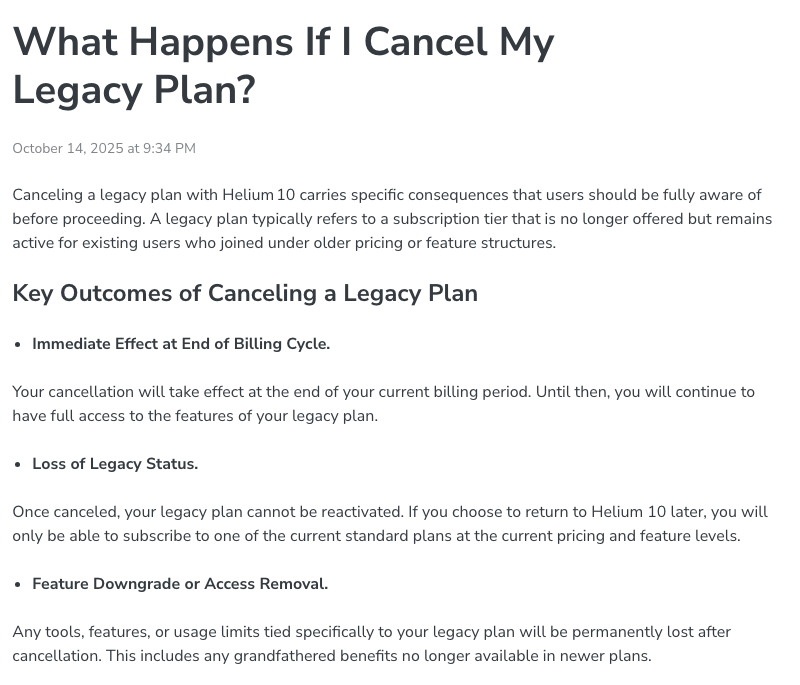
Helium 10’s legacy cancellation article (14 October 2025) says:
- “Once canceled, your legacy plan cannot be reactivated.” Returning means “one of the current standard plans at the current pricing and feature levels”.
- Access to “historical data, projects, or tracked metrics may be restricted or deleted”, and “Helium 10 does not guarantee data preservation after a subscription is fully canceled”.
Pausing is not a safe middle route. The legacy pause article warns that “pausing may result in losing your legacy plan”: if the payment at reactivation fails, “the system might cancel your Legacy plan, and you will be subject to the new plans and pricing”.
The cheapest plan on sale today is Platinum, at $99 a month billed yearly or $129 monthly (checked 10 October 2026).
Our Helium 10 Starter page sets out what a legacy subscriber gives up.
How to delete your Helium 10 account
Canceling ends the paid plan; it does not delete the account. According to the account-deletion article:
- Cancel the subscription first. An account with an active paid plan will not be deleted.
- Email support@helium10.com with the subject “Account Deletion Request”. Include your Helium 10 account email and state clearly that you want the account permanently deleted. The support chat on helium10.com works too.
- Wait for confirmation. Support may ask for verification; once that is done, the account and all saved data are deleted.
Only the support team can delete an account, the deletion is permanent, and “you won’t get a refund for unused time”. The article’s own suggestion for anyone unsure is to “downgrade to the free plan” and leave the account open.
Add-ons, downgrades and coming back later
Add-ons. Helium 10’s add-on article (14 October 2026) covers buying one: Plans & Billing, then Edit Subscription. On a monthly plan the charge is prorated; on an annual plan it “may be reflected as a lump sum, depending on your annual renewal date”. None of the 383 articles in the help center’s public list on 11 November 2026 explains how to remove an add-on, so ask support by chat or email and check your next invoice.
Downgrading. If price is the reason you are leaving, Diamond to Platinum takes the monthly bill from $359 to $129. The plan-change article (5 January 2026) says upgrades take effect immediately and a downgrade “will be reflected at the start of the next billing cycle”. Our Platinum vs Diamond comparison lists what the cheaper plan drops, and our Helium 10 pricing guide has every current price.
Coming back. Helium 10’s discount article (31 March 2026) says an account that has used a discount is ineligible for a similar one “until 6 months after the previous one ends”, so canceling and rejoining does not reset a coupon; our coupon page has the other conditions. If you are leaving for another tool, start with our Helium 10 alternatives. If that tool is Jungle Scout, read how its cancellation works before you subscribe.
Bottom line
- Inside your first 7 days: cancel, and ask support for the refund under the 7-day guarantee. It is the only refund Helium 10’s terms promise.
- On a monthly plan: cancel in Plans & Billing before the renewal date and use the days you have paid for.
- On an annual plan: there is no pro-rated refund, so cancel any time before the renewal date and keep your access until it.
- Taking a break: pause for one, three or six months to keep your tracking data, and remember that billing restarts when the pause ends.
- On Starter or another legacy plan: don’t cancel or pause unless you accept losing it for good.
- Leaving entirely: export your data, cancel, then ask support to delete the account.
Our Helium 10 review covers whether the suite is worth keeping.
Frequently Asked Questions
How do I cancel my Helium 10 subscription?
Click your profile icon, open Plans & Billing, click the Cancel button under your current plan, then confirm through the prompts and click I Understand. Helium 10's terms also let you cancel through the support chat or by emailing support@helium10.com. The cancellation takes effect at the end of the current billing cycle.
What is Helium 10's refund policy?
Helium 10's terms give a full refund only if you end the service within the first seven days of your initial purchase. Its help center says the guarantee is for first-time subscribers and the first payment only, with no refunds for renewals or partly used periods, and that you request it from support (checked 11 November 2026).
Can I pause Helium 10 instead of canceling?
Yes, for one, three or six months, through the same Cancel button in Plans & Billing. The pause starts at the end of the current billing cycle and the subscription reactivates when it ends. A subscription that is already paused can only be canceled through support chat or email.
How do I delete my Helium 10 account?
You cannot delete it yourself. Cancel any paid plan first, then email support@helium10.com with the subject Account Deletion Request or ask in the support chat. Helium 10's help center says deletion is permanent, all data is lost and unused time is not refunded.
Can I get my Helium 10 Starter plan back after canceling it?
No. Helium 10's help center says a canceled legacy plan cannot be reactivated and that a returning customer can only subscribe to a current plan at current pricing. It also warns that pausing a legacy plan can end it if the reactivation payment fails.
What happens to my data when I cancel Helium 10?
Helium 10's cancellation article describes canceling as losing your data, while a pause of up to six months stores your historical data, including keyword and market tracking. Its Follow-Up FAQ adds that the Free plan has no Follow-Up access and limits Profits data to the most recent 90 days.